Downloadable Files
You can download ColorThink for free from the end of this page.
Understand Color Like Never Before
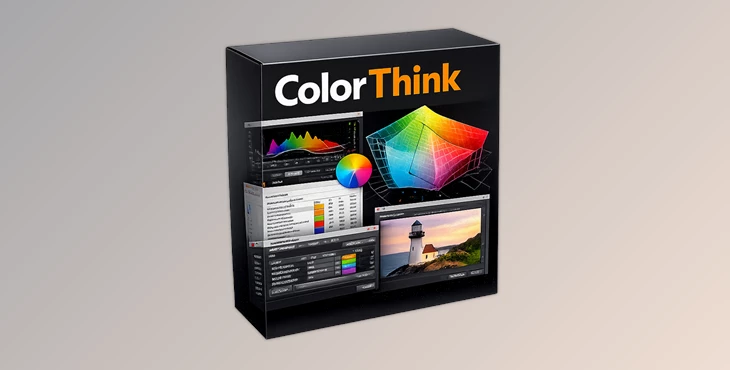
Color management is complex. That’s where ColorThink comes in. ColorThink is a professional tool for understanding color and color management.
Whether you are a photographer, a graphic designer, or a color scientist, ColorThink helps you to understand color through visualizations and analytics.
What Is Color Analysis and Why Does It Matter?
Color analysis allows you to understand how colors appear on different devices. Every device does not interpret color the same way.
For example:
- A photographer may use color analysis to compare camera profiles.
- A print technician may use it to analyze the colors that are printable on a printing press.
- A packaging designer may use color analysis to make sure their brand colors are printable on different materials.
- A color consultant may use it to understand the difference between colors to explain them to their customers.
Meet ColorThink 4
ColorThink 4 is the latest generation of the industry’s leading color graphing and analytics software. It modernizes the entire workflow while maintaining the familiar interface that color professionals have trusted for years.
The software introduces advanced measuring capabilities, new visualization methods, gamut comparison tools, profile editing options, and improved asset management, making color analysis faster and more accessible than ever before.
Features
Direct Color Measurement
One of the most significant additions in ColorThink 4 is direct instrument integration.
Compatible measuring devices are detected automatically, allowing users to capture color measurements directly inside the software. Measurements can be sent instantly to worksheets or graphed in real time, making color evaluation much faster and more interactive.
This feature is particularly useful when evaluating printed materials, packaging samples, textiles, or display calibration results.
Advanced Gamut Comparison
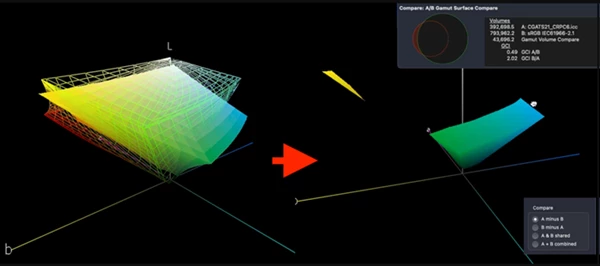
ColorThink 4 introduces a powerful gamut comparison system.
Users can compare two color gamuts and instantly visualize the differences between them. The software can show colors that exist in one profile but not in another, helping users identify potential color limitations before production begins.
For example, comparing an sRGB workspace with a printing profile clearly reveals which printable colors cannot be represented within sRGB.
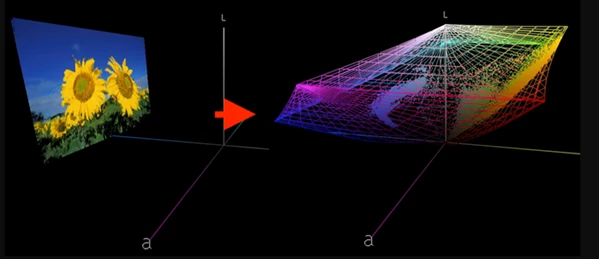
Animated Image Visualization
One of the most impressive features is the new image animation system.
Images can smoothly transition between their normal appearance and their actual color positions within a color graph. This visual approach makes complex color concepts much easier to understand and communicate.
The result is an engaging educational tool that helps users quickly grasp how image colors fit inside a color profile.
Smart Color Asset Management
Managing hundreds or thousands of ICC profiles can be challenging.
ColorThink 4 introduces a centralized Color Assets system that automatically organizes profiles and related color resources. Users can search, filter, and sort assets based on color space, gamut volume, profile type, density values, and much more.
This significantly reduces the time spent locating the right profile for a project.
White Point Editor
The White Point Editor provides advanced control over ICC profile appearance.
Users can modify white points using Lab values, XYZ coordinates, correlated color temperatures, or even measured real-world paper colors. This functionality is especially valuable when creating more accurate proofing environments and print simulations.
LCH Visualization Mode
ColorThink 4 supports graphing in the LCH color space.
Instead of displaying hue in a circular arrangement, hue values are unfolded into a straight line, making saturation and chroma relationships much easier to evaluate.
This alternative perspective can reveal patterns and color relationships that may be difficult to identify in traditional Lab graphs.
Delta-E Visualization
Color differences are often difficult to explain using numbers alone.
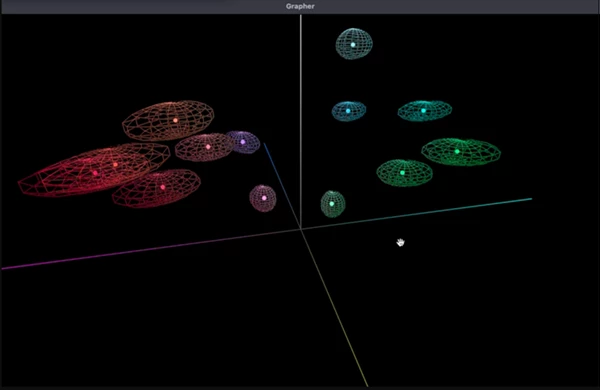
ColorThink 4 solves this by visualizing Delta-E calculations as graphical shapes surrounding colors. Users can explore the Delta E 76 and Delta E 2000 models visually and better understand how color difference calculations behave across different color spaces.
This feature is particularly useful for teaching, quality control, and professional color evaluation.
Practical Examples in Real Projects
A print production specialist can compare customer artwork against a press profile before printing, avoiding unexpected color shifts.
A photographer can measure color targets and visualize camera performance to improve color accuracy.
A display calibration expert can analyze monitor profiles and compare calibration results visually.
A packaging company can verify whether corporate brand colors remain consistent across different printing methods and substrates.
These practical workflows demonstrate how ColorThink turns complex color science into actionable information.
Professional Tips for Better Results
Build a Profile Library
ColorThink 4 allows users to build a library of ICC color profiles that can be accessed in one place. Building a color profile library will save users significant time.
Compare Before Production
Color profiles can be compared before production. This helps avoid costly revisions if colors cannot be reproduced on the print press.
Use Real Measurements
Using color-measuring devices to obtain color samples of the print products will allow users to get more accurate results.
Explore Multiple Color Spaces
The color spaces that ColorThink 4 supports include Lab, LCH, Jab, and OKLab. Each color space may reveal additional information about the colors in an object or print product.
Visualize Delta-E Differences
ColorThink 4 allows users to visualize the differences in Delta-E values between two colors. This will give a much clearer understanding of color differences when presenting them to clients.
Final Thoughts
ColorThink 4 is one of the most powerful color analysis and visualization software applications in the market today. By offering users color measurement, gamut comparison, profile editing, color graphing, and visualization capabilities, ColorThink allows users to understand colors in a way that traditional color analysis tools cannot provide.
ColorThink 4 is an application that offers solutions to a wide variety of color-related issues in various industries. From print to photography to graphic design, this software is an invaluable tool for those whose work depends on an accurate understanding of color.

Files Password : gfxplugin.com OR 123456