Downloadable Files
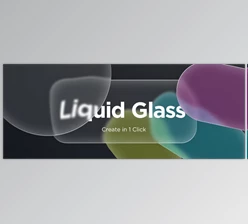
You can download MB Liquid Glass for free from the end of this page.
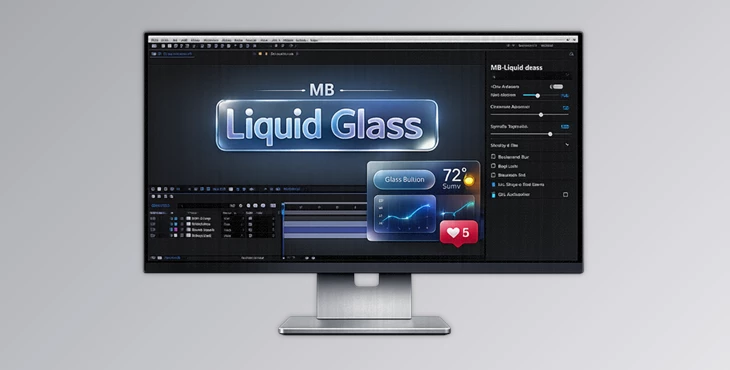
Create Stunning Liquid Glass Effects Directly in After Effects
The trend of including glass-like effects within user interfaces is increasing at a rapid rate. Whether it’s for mobile applications or desktop interfaces, many developers now include these elements within their designs to enhance the visual experience of their products.
For those looking to create such effects within After Effects, MB Liquid Glass may be of great benefit. The software allows for the creation of glass refraction effects within After Effects, all without the need for complex setups.
What Is Liquid Glass and Why Is It Useful?
Liquid Glass allows for transparent objects to be distorted in a way that simulates how glass refracts light. This effect is often used within various types of designs, including but not limited to:
- Modern user interfaces (UIs)
- User interface (UI) elements like buttons
- Product advertisements
- Motion graphics
- Logos
- Glassmorphism designs
- Social media content
Due to the visual impact that these types of designs can have, they have become a popular design trend across a variety of digital projects and presentations.
Meet MB Liquid Glass
MB Liquid Glass is a native Adobe After Effects plugin that allows for the creation of realistic glass refraction effects. The plugin includes an all-in-one solution for the creation of glass effects directly within After Effects compositions.
With MB Liquid Glass, designers and animators no longer have to perform complex and time-consuming setups in order to include glass-like effects within their designs. Instead, it can be easily applied to any elements within After Effects.
Features
Native Glass Refraction Engine
At the heart of MB Liquid Glass is its native refraction system. The plugin creates realistic light bending and distortion effects that mimic the behavior of real glass surfaces. This makes objects appear naturally integrated with the scene behind them.
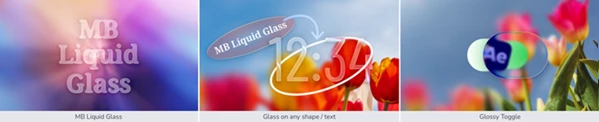
Glass on Any Shape or Text
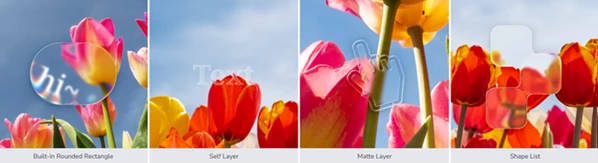
One of the biggest advantages of MB Liquid Glass is its flexibility. You can apply glass effects to:
- Text layers
- Shape layers
- Matte layers
- Custom shape lists
- Built-in rounded rectangles
This gives motion designers complete creative freedom when building interface elements and visual effects.
Multiple Glass Silhouette Types
The plugin offers four different silhouette methods for generating glass objects. These options allow users to quickly adapt the effect to different design styles and project requirements without creating complicated masks manually.
Adjustable Blur System
MB Liquid Glass includes both pre-blur and post-blur controls. This allows designers to control how the background is softened before and after refraction calculations, helping create more realistic glass materials and cinematic depth.
Advanced Glass Optics
The plugin includes several optical effects commonly found in real-world glass materials:
- Refraction
- Fresnel reflections
- Glare effects
- Spectral color separation
- Tint controls
Together, these features create highly convincing glass surfaces that respond naturally within the composition.
Realistic Highlights and Shadows
Highlights and shadows play a major role in selling the illusion of glass.
MB Liquid Glass provides dedicated controls for both, making it easy to add depth, contrast, and realism without relying on additional layers or effects.
Glossy Surface Control
The Glossy Toggle allows users to quickly switch between different surface appearances.
This makes it easy to create anything from soft frosted glass to polished glossy materials, depending on the project’s visual style.
Real-World Creative Applications
Imagine designing a futuristic mobile app presentation where buttons appear as floating glass panels.
Or creating a premium product advertisement with transparent glass cards revealing content beneath them.
You can even animate logos with elegant glass distortion, build modern dashboard interfaces, or create trendy glassmorphism-inspired social media content.
Because the plugin works directly within After Effects, these effects can be animated and customized throughout the production process.

Professional Tips for Better Results
Keep the refraction effects subtle. The way that real glass refracts light is typically subtle. Using too strong an effect may result in unnatural-looking elements.
Use blur and highlights together. While blur can be used to create the illusion of glass, highlights help to provide the realistic interaction of light with the elements created by MB Liquid Glass.
Use shadows for depth. Subtle shadows can help to separate the elements of MB Liquid Glass from the remainder of the composition.
Experiment with the tint colors. A slight change in tint color can significantly impact the perceived color of the created elements. Tints such as light blue, purple, and yellow may work the best for different projects.
Match the lighting in the composition. The way in which light is applied to the remainder of the composition may require the use of glare, highlights, and shadow controls within MB Liquid Glass for the best results.
Final Thoughts
Overall, MB Liquid Glass makes it remarkably easy to create glass-like visual effects within After Effects.
The features that encompass realistic refraction, blur, Fresnel reflections, highlights, shadows, and customizable glass shapes all work to provide users with a professional-quality effect without the need for complex setups.
For those who create futuristic interfaces, motion graphics, advertisements, or even social media content, MB Liquid Glass may prove to be an excellent tool in the motion graphics designer’s arsenal.

Files Password : gfxplugin.com OR 123456