
Downloadable Files
You can download Milky White for free from the end of this page.
Give Your Photos a Touch of Pure Light
As every photographer dreams, creating a timeless, elegant, and captivating photo is the dream of all photographers out there. Even with great composition and lighting for your subject in your photo, it is possible for the overall edit to be lacking that special touch of elegance and artistic skill. This is where Milky White will come in handy for you.
Milky White will instantly transform your photos into works of art with a touch of light, perfect for creating a luxurious and elegant edit to your photography. Whether you are editing portraits, weddings, fashion, or even products, Milky White will allow you to achieve that elegant edit in a matter of minutes instead of hours with your editing software.
The result will be a beautiful edit that is perfect for your photography collections.
Understanding Soft and Bright Photo Styling
Soft lighting editing is among the most popular editing styles out there for photographers seeking to create beautiful edits with minimal editing software manipulation. This editing style focuses on enhancing the lighting in your photos to create a calming, airy, and elegant mood in all your edited photographs.
Some of the most popular editing projects that benefit from a soft editing style include the following:
- Wedding photography
- Portrait photography sessions
- Lifestyle editing
- Fashion editing
- Social media editing
- Product photography
- Art photography
Meet Milky White
Milky White was created for photographers and editors who want to add that touch of elegance to their edits.
This product comes with editing presets for the following editing software:
- Lightroom Desktop
- Lightroom Mobile
- Lightroom Cloud
- Photoshop Actions
Each of these will work to give your editing software projects an elegant Milky White editing style with one click. All edits are editable and non-destructive, so you can continue to work on your projects to perfect the look you want.
Features
Dreamy and Luxurious Aesthetic
Milky White will give your edited projects that dreamy and luxurious tone with creamy whites and refined fine-art photography editing.
One-Click Workflow
Editing hundreds of your projects in a row can be a pain point for editors. However, with Milky White - Actions and Presets, you can apply the same editing style with just one click for every project.
Fully Customizable Results
Every preset and action remains editable after application. Users can fine-tune exposure, contrast, color balance, and other settings while preserving the original image quality.
Cross-Platform Compatibility
The package supports:
- Lightroom Classic (.xmp)
- Lightroom Desktop (.lrtemplate)
- Lightroom Mobile (.dng)
- Photoshop Actions (.atn)
This flexibility allows photographers to maintain a consistent editing style across desktop and mobile workflows.
Installation Guides Included
Detailed PDF guides help beginners install and start using the presets quickly, regardless of their experience level.
Real-World Creative Uses
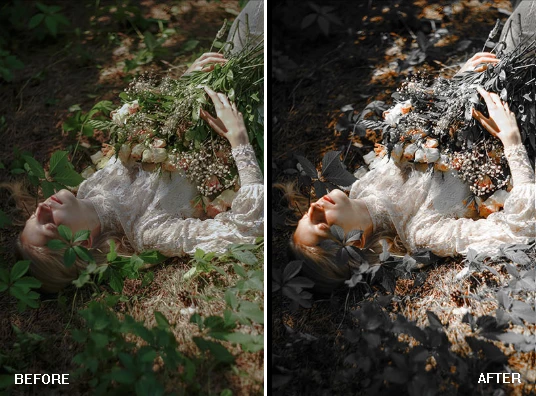
Imagine a wedding photographer editing hundreds of images from a single event. Instead of manually adjusting each photo, Milky White can instantly establish a cohesive visual style across the entire gallery.
Lifestyle influencers can create a recognizable feed with bright, elegant tones that strengthen their personal brand.
Fashion photographers can use the soft highlights and balanced warmth to enhance clothing textures while maintaining a sophisticated editorial feel.
Product photographers can create clean, premium-looking images that help products appear more attractive and professionally presented.


Professional Tips for Better Results
Start with Well-Exposed Photos
Although the presets work on a wide range of images, starting with a properly exposed photo will always produce the best results.
Fine-Tune White Balance
After applying the preset, adjust the white balance slightly if necessary. Small temperature changes can help match the mood of the scene perfectly.
Preserve Natural Skin Tones
For portrait work, monitor skin tones carefully and make minor corrections when needed to maintain a realistic appearance.
Use Local Adjustments
Adding subtle masks or brush adjustments can help emphasize important details and create an even more polished final image.
Build a Consistent Portfolio
Using the same Milky White aesthetic across multiple projects creates a recognizable visual identity and strengthens your overall brand.
Final Thoughts
Milky White is a complete editing software solution for photographers and editors who want to work with a luxurious and elegant editing style.
From the dreamy highlights to the creamy whites and the one-click editing workflow, Milky White will help you transform your ordinary photographs into edited masterpieces. Use this editing software for your portraits, weddings, lifestyle, or even product photography to achieve that dreamy look in all your projects.
If you are looking for a creative editing software that will allow you to create timeless aesthetics for all your projects, Milky White is a tool that every editor should have in their digital toolkit.

Files Password : gfxplugin.com OR 123456