Downloadable Files
You can download ClickZoom Pro for free from the end of this page.
Turn Simple Screen Recordings into Dynamic Visual Stories
Have you ever watched a video demonstrating a SaaS product, mobile application, or some other product and wondered how the camera smoothly zipped in and out of close-ups of the important product features? Creating these types of movements manually within After Effects can take a considerable amount of time.
ClickZoom Pro allows you to create these types of camera movements in After Effects with just a few clicks. Whether you are creating a tutorial for your software or presenting your products to the public, ClickZoom Pro will allow you to quickly and easily create cinematic visuals that will draw your viewers in and keep them interested.
What Makes Cinematic UI Animation So Effective?
In today’s world, viewers consume information at a rapid rate. A video composed of screen recordings with no camera movement can quickly lose the viewer’s attention. By adding camera movement within the video that smoothly zips into specific areas of your screen, the viewer can easily follow your content and feel as if you are creating a more professional and engaging video for your audience.
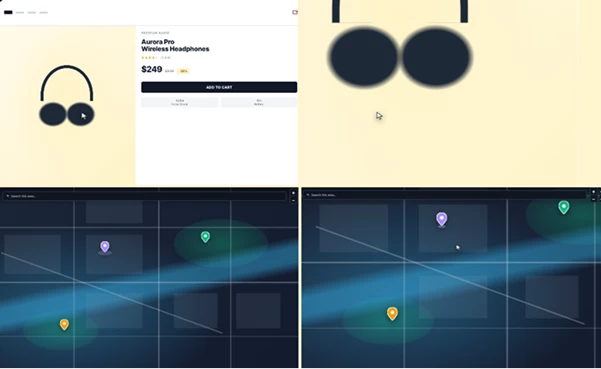
Some of the ways that ClickZoom Pro allows you to accomplish this include the ability to zoom into SaaS product features, focus on product images and buttons, highlight mobile application features, or even navigate smoothly from one location to another on a map within your video.
Meet ClickZoom Pro
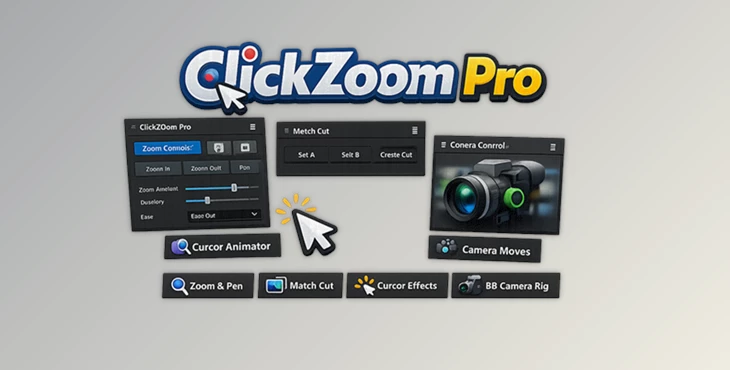
This product is an advanced After Effects tool designed to automate cinematic camera movements for screen recordings and interface-based videos.
Instead of manually building complex camera animations, users can create smooth zooms, directional pans, cursor interactions, match cuts, and 3D camera effects directly from simple clicks.
The result is faster production, cleaner animations, and more polished final videos.
Features
Click-to-Zoom on Any Interface Element
One of the most powerful features of ClickZoom Pro is its Click-to-Zoom workflow. Simply click on any element inside the preview window—such as:
- Product images
- Buttons
- Price tags
- Dashboard widgets
- Interface controls
The tool automatically creates an eased zoom animation complete with motion blur and recalculated anchor points.
This allows creators to direct attention exactly where it matters while maintaining smooth cinematic movement.
Smart Pan Navigation
After zooming into a section, viewers often need to see another area of the interface.
Instead of creating additional keyframes manually, ClickZoom Pro offers a dedicated Pan mode.
Simply click another location and the camera smoothly glides to the new destination with frame-perfect easing.
This is particularly useful for:
- Interactive map tours
- Analytics dashboards
- Website walkthroughs
- Educational software tutorials
The movement feels intentional and natural, making the content easier to follow.
Cursor Animator
Screen recordings often feel lifeless because viewers cannot clearly follow mouse interactions.
The built-in Cursor Animator solves this by adding:
- Animated cursor movement
- Click pulse effects
- Click sounds
- Automatic hand-to-arrow switching
- Natural direction-based orientation
This creates a polished and cinematic feel while making every interaction easier for viewers to understand.
Match Cut Automation
Creating a fast-paced interface usually requires extensive editing.
The Match Cut system allows creators to rapidly connect multiple scenes, such as:
- Websites
- Mobile applications
- Video editors
- Image galleries
This tool automatically centers anchors, aligns cuts on the timeline, and applies sound effects to transitions. The result resembles the energetic editing style commonly used in modern startup, SaaS, and productivity videos.
Powerful 3D Camera Rig
For creators who want even more cinematic depth, ClickZoom Pro includes a one-click 3D Camera Rig system. The setup automatically creates:
- A perpendicular camera
- A 3D null controller
- Automatic parenting
- Seamless transitions without visual jumps
Additional controls include:
- Rotation X
- Rotation Y
- Blur settings
- Camera cone adjustments
- Smart Spot Light integration
These tools make it easy to create subtle parallax effects and cinematic depth without complicated camera setups.
Smart Lighting Controls
Lighting can dramatically improve the quality of UI presentations. This tool includes a Smart Spot Light system that automatically enhances scenes using:
- Adjustable spotlight cones
- Depth of field support
- Integrated lighting controls
This helps create more realistic and visually appealing camera shots while maintaining workflow simplicity.
Real-World Benefits
Using ClickZoom Pro can significantly improve both productivity and visual quality.
Instead of manually animating every movement, creators can focus on storytelling and presentation.
Typical projects that benefit include:
- SaaS product demos
- Startup promotional videos
- App Store preview videos
- Software tutorials
- Online courses
- Product reveal animations
- UI and UX presentations
- Map navigation videos
What once required an hour of animation work can often be completed in a matter of minutes.
Pro Tips for Better Results
Use ClickZoom Pro to highlight the most important features of your products
Combine ClickZoom Pro zooms with pans for a more professional result than using multiple zooms
Use the Cursor Animator to highlight product interactions
Add subtle 3D effects to provide a more premium visual quality to your videos
Keep all animations even throughout your project for a more professional look
Final Thoughts
ClickZoom Pro is a valuable tool that any creator who produces screen recording videos for products, software, or educational content can utilize. By automating many of the most time-consuming features of After Effects - such as creating zoom animations, pan animations, cursor animations, match cuts, and 3D camera features - ClickZoom Pro allows even non-professional creators to produce professional-quality videos in After Effects that will keep their viewers interested in the project and the product.
Whether you are creating videos for SaaS products, software applications, mobile applications, online stores, or even map-based educational content, this product will help transform your screen recording projects into visually compelling videos with minimal effort. For these reasons and many more, ClickZoom Pro is a valuable tool that any creator should add to their After Effects authoring tool kit.

Files Password : gfxplugin.com OR 123456