Downloadable Files
You can download RXXR for free from the end of this page.
Turn Ordinary Footage into Digital Chaos
Can you envision transforming your ordinary footage into futuristic digital glitch animations filled with ASCII symbols? In the world of motion graphics, unique visual effects are required to catch the viewer’s attention in several types of videos, such as music videos, tech videos, and more.
Enter RXXR - a tool that will give you the ability to quickly create ASCII and pixel-based techno-glitch visuals that will allow you to transform your ordinary footage into digital chaos with ease.
What Are ASCII and Techno-Glitch Effects?
ASCII glitch effects involve taking the visual components of your footage and converting them into ASCII text symbols. These types of visual effects are often used for creating a cyberpunk visual design, combined with digital glitch visual elements to attract the viewer’s attention.
Some of the most common uses of ASCII glitch visual effects include the following:
- Cyberpunk videos
- Music visualizers
- Tech videos
- Video game trailers
- Motion graphic titles
- Digital art designs
- Experimental videos
The reason that ASCII glitch visual effects are so popular in the motion graphics world is that they instantly convey a sense of digital, futuristic, and high-tech designs to the viewer. Additionally, these visual effects make the videos more dynamic.
Meet RXXR
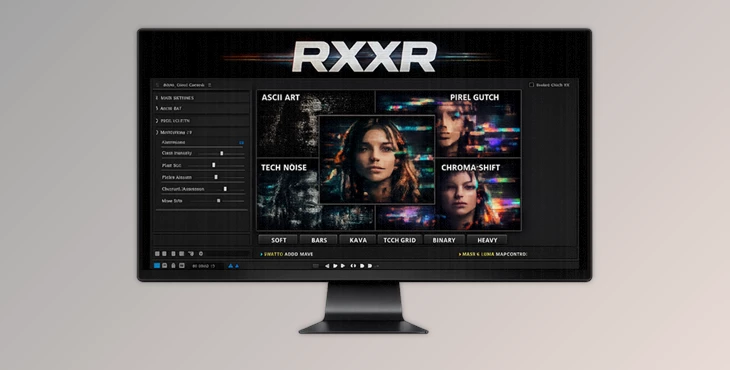
This tool is a glitch visual effect generator for Adobe After Effects that allows you to create ASCII and pixel-based glitch visual effects for your videos. It also offers you complete control and freedom to create the type of glitch visual effect that best suits your project.
Features
Extensive ASCII Style Presets
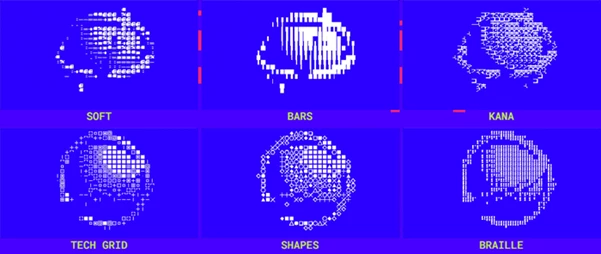
RXXR includes a wide range of built-in styles that can dramatically change the appearance of your footage:
- SOFT
- BARS
- KANA
- TECH GRID
- SHAPES
- BRAILLE
- LINES & CIRCLES
- GRID MODE
- LETTERS
- BLOCKS
- BINARY
- HEAVY
Each preset produces a different visual personality, making it easy to switch between subtle digital textures and aggressive glitch-heavy designs.
Full Control Over the Effect
Using RXXR, you have full control over the appearance of the glitch visual effect. You can change the following:
- ASCII style
- Effect intensity
- Color schemes
- Blending methods
- Symbol visibility
Connect Custom Animated Elements
One of the most unique features of RXXR is the ability to connect your own animated symbols and graphic elements. This allows you to:
- Create custom symbol systems
- Design unique visual languages
- Build branded digital effects
- Generate personalized glitch animations
Audio-Reactive Glitch Effects
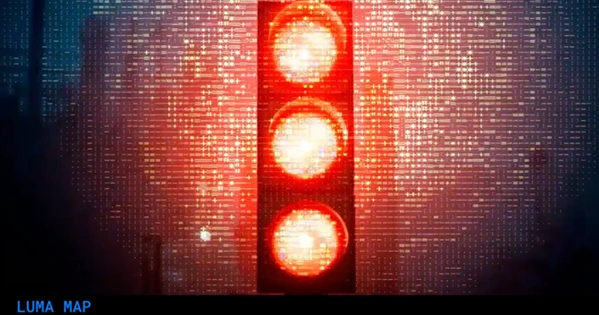
This product can connect directly to audio tracks and synchronize distortions with the rhythm of music. Supported inputs include:
- Audio Wave
- Mask Inputs
- Luma Maps
For example, music producers can create visuals that pulse with every beat, while motion designers can trigger glitch effects based on specific image areas using masks and luminance information.
Built-In Distortion Systems
RXXR goes far beyond simple ASCII conversion. Additional visual effects include:
- Echo
- Posterize Time
- Flicker
- Line Switch
- Offset
- Chromatic Aberration
- Distortion Systems
These tools can be combined to create highly detailed digital degradation effects that feel alive and unpredictable.
Creative Freedom Without Complexity
Rather than stacking multiple effects manually, RXXR centralizes the entire workflow into a single flexible system. This saves time and encourages experimentation, allowing artists to focus more on creativity and less on technical setup.
Real-World Creative Uses
RXXR can be used in many professional projects, including:
- Tech company promotional videos
- Cyberpunk title sequences
- Music visualizers
- YouTube intros
- Streaming overlays
- Gaming content
- NFT and digital art animations
- Experimental motion graphics
For example, a gaming trailer can use BINARY mode combined with chromatic aberration and audio-reactive flickers to create a futuristic hacking sequence that immediately captures attention.
Tips for Better Results
Start With Moderate Intensity
Avoid using maximum intensity settings for the glitch visual effect right away. Instead, start with the default, moderate settings for your footage and gradually increase the intensity until you are happy with the outcome.
Combine Multiple Presets
Try using two or more ASCII glitch visual effect presets at once. This can help your footage feature more complex glitch visual elements.
Use Audio Reactivity Carefully
When using the audio-reactive glitch features in RXXR, ensure that only a few visual elements in your video react to the audio tracks to maintain the aesthetic design of your project.
Experiment With Custom Symbols
Try uploading your own set of animated symbols or graphics to RXXR to create glitch visual effects that are uniquely yours and stand out from other glitch visual projects using Adobe After Effects.
Use Color Strategically
RXXR’s glitch visual effects work best with colors such as neon blues, greens, magentas, and reds. These colors best pair with glitch visual designs and reinforce the futuristic visual design of your motion graphics project.
Final Thoughts
Overall, RXXR is much more than just a glitch visual effect generator for your videos. It is a complete toolkit for creating ASCII glitch-based digital visual effects, audio-reactive visual glitches, and techno-glitch visual effects that will allow you to create anything from subtle digital glitches to full-scale visual chaos in your projects.
With its extensive collection of ASCII visual effect presets, built-in visual distortion effects, built-in audio-reactive features, and the ability to upload your own custom animated symbols, RXXR gives you complete freedom and creative control over your projects.
Therefore, if you enjoy creating futuristic animations, cyberpunk visuals, music visualizations, graphics, or any form of experimental motion graphics projects using After Effects, RXXR will provide you with an efficient and highly creative method of bringing your ideas to life.

Files Password : gfxplugin.com OR 123456