Downloadable Files
You can download Parallax Pro for Davinci Resolve for free at the end of this page.
Turn Ordinary Photos into Cinematic Scenes
Sometimes a great photo has everything you need for a video—except movement. That's where parallax animation comes in. With the right depth and camera motion, a simple image can suddenly feel alive, creating a much more immersive experience for the viewer.
If you've ever seen a documentary, travel video, or cinematic slideshow where a still image seemed to have real depth and motion, you've already seen the power of the parallax effect. The challenge is that building these animations manually can take time, especially inside Fusion. That's exactly the problem Parallax Pro is designed to solve.
What Is a Parallax Effect and Why Do Creators Use It?
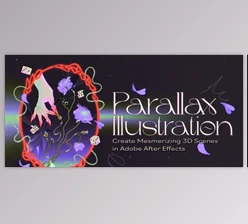
A parallax effect creates the illusion of depth by moving different parts of an image at different speeds. Elements closer to the camera move more noticeably, while background elements move more slowly. This simple technique can make a flat image feel much more dynamic and three-dimensional.
Content creators use parallax effects in a wide range of projects, including:
Documentary storytelling
Travel videos
YouTube intros and B-roll sequences
Social media content
Promotional and commercial videos
The biggest advantage is that you can create a cinematic look without building an actual 3D scene. A single image can become far more engaging, helping keep viewers interested and making your edits feel more professional.
Introducing Parallax Pro for DaVinci Resolve
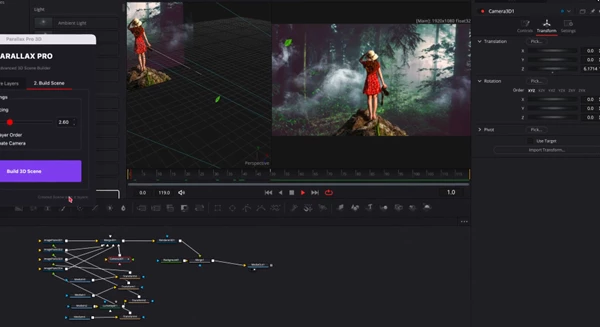
Parallax Pro is a handy script built for the Fusion page inside DaVinci Resolve. Instead of spending time creating a parallax setup from scratch, the script automatically generates the structure for you in just a few clicks.
The workflow is simple: select your image or composition, run the script, and let it create the parallax setup. From there, you can fine-tune the depth and animation controls to match your creative vision.
Features
One-Click Setup
One of the most appealing aspects of Parallax Pro is its simplicity. The script automatically builds the necessary parallax structure, saving time and removing repetitive setup work.
Built Directly for Fusion
Because it works inside the Fusion page, you don't have to leave DaVinci Resolve or rely on external software. Everything stays within your existing workflow.
No Extra Plugins Needed
There's nothing additional to purchase or install beyond the script itself. The setup works natively inside DaVinci Resolve.
Beginner-Friendly Design
Even if you're still learning Fusion, the organized structure makes it much easier to understand and customize your animation.
Clean Node Organization
A tidy node tree can make a huge difference when revisiting projects later. Parallax Pro creates a clear and manageable structure that helps keep your workflow efficient.
Where It Can Make a Difference
Parallax Pro is especially useful when working with projects that rely heavily on still images.
For example, if you're editing a travel video, you can add subtle camera movement to landscape photos and create a more cinematic atmosphere. Documentary editors can bring archival images to life, while YouTube creators can add depth to intros, storytelling segments, and B-roll shots without spending hours building complex Fusion setups.
The result is content that feels more polished and engaging, even when you're working with simple image assets.
Tips for More Natural-Looking Results
Don't Overdo the Motion
Subtle movement to your image often looks better than more aggressive parallax animation movements.
Choose High-Quality Images
The better the source image, the better the final result. High-resolution images give you more room for camera movement and zoom effects.
Use Depth Carefully
Creating too much separation between layers can make the effect feel artificial. Balanced depth values usually produce the most believable results.
Match the Movement to the Scene
A calm landscape might benefit from slow, smooth camera motion, while a dramatic scene could handle slightly more movement. Let the content guide the animation style.
Keep the Focus on Storytelling
The effect should support the scene, not distract from it. Good parallax animation enhances the viewer's experience without drawing attention to itself.
Final Thoughts
Parallax Pro for DaVinci Resolve is a practical tool for creators who want to add depth and cinematic motion to still images without dealing with a complicated setup process. Its one-click workflow, clean Fusion integration, and beginner-friendly design make it a useful addition to a wide variety of editing projects.
From YouTube videos to documentaries and promotional content, this tool can significantly enhance your editing projects. As with all great tools, the smaller the camera's movement in your still images, the better the viewer’s experience. This is exactly the intention behind Parallax Pro shi

Files Password : gfxplugin.com OR 123456