Downloadable Files
You can download Project Doctor for free from the end of this page.
When After Effects Projects Start Getting Out of Control
Have you ever tried to work on a large After Effects project only to find it has become somewhat out of control? Missing footage files, duplicated project files, and scattered media assets can all make for a frustrating editing experience.
Project Doctor was created to help After Effects users fix and organize their projects in the most efficient way possible.
Understanding Project Cleanup in After Effects
Project cleanup is often one of the most overlooked aspects of After Effects projects. Over time, projects often grow in size and complexity, and media assets are often imported numerous times into the project. Additionally, those files are often moved between drives and media during the editing process.
Opening a project that contains various missing media files is always an issue for After Effects editors. Normally, editors must search for each media file manually before being able to relink them to the project. A tool that allows for automatic detection of those issues would save editors considerable amounts of time.
Another common problem associated with After Effects projects is the duplicated media and assets that can be found within large projects. These duplicated files increase the complexity of the project, making it more difficult for editors to navigate their projects. Additionally, it can be frustrating for editors to have multiple versions of the same file in a project.
Organizing media within a project allows editors and teams to work more efficiently on a project.
Meet Project Doctor
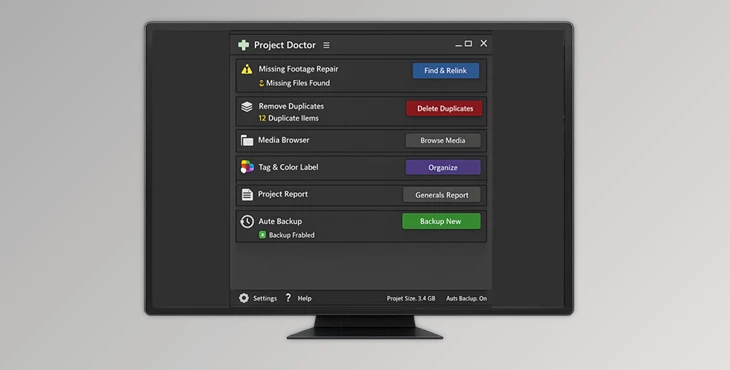
Project Doctor is a professional After Effects utility built to simplify project maintenance and asset management. It brings together several essential tools into one focused panel, allowing users to repair missing footage, clean duplicate assets, browse media, create backups, and generate reports without leaving After Effects.
Whether you’re working on a complex motion graphics package, a commercial campaign, or a large client project, Project Doctor helps keep everything organized and running smoothly.
Features
Fix Missing Footage Quickly
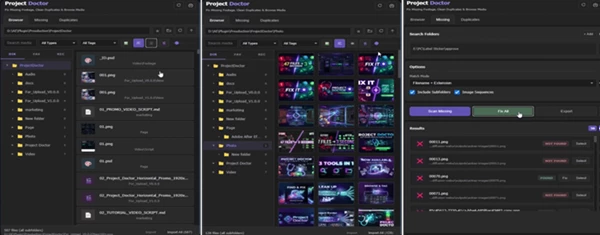
One of the most valuable features of Project Doctor is its missing footage repair system. Users can:
- Scan one or multiple folders for missing media.
- Search through subfolders automatically.
- Detect image sequences.
- Review the found and missing files before applying changes.
- Relink selected files or repair all matching assets at once.
Instead of manually searching through hundreds of folders, users can reconnect media directly from the Project Doctor panel.
Clean Duplicate Assets Safely
Duplicate files can quickly clutter large projects and make asset management difficult. Project Doctor helps by allowing users to:
- Detect duplicate project items.
- Group duplicates based on matching rules.
- Select the preferred master asset.
- Consolidate duplicates safely.
- Create automatic backups before making changes.
This provides greater control over cleanup operations while reducing the risk of accidental project damage.
Built-In Media Browser
Switching between operating system folders and After Effects can interrupt creative flow. Project Doctor includes a dedicated media browser that allows users to:
- Browse folders directly inside After Effects.
- Preview media before importing.
- Import files without leaving the application.
- Organize assets using color tags.
- Work with images, videos, audio files, and image sequences.
This creates a smoother and more efficient media management workflow.
Automatic Backup Protection
Project maintenance often involves major changes. To help protect users from mistakes, Project Doctor includes an automatic backup system. Features include:
- Backup creation before duplicate cleanup.
- Backup creation before footage repair operations.
- Multiple backup version support.
- Easier recovery if something goes wrong.
This safety layer allows users to work with greater confidence during cleanup sessions.
Exportable Reports
Keeping track of project status can be useful for larger productions and team environments. Project Doctor helps users generate reports that provide a clearer overview of project health, repaired assets, and cleanup operations.
Real-World Benefits for Motion Designers
Imagine receiving an archived client project from two years ago. Several media files are missing, assets have been duplicated multiple times, and nobody remembers which version is correct.
Instead of spending hours manually fixing everything, Project Doctor can scan folders, identify matching footage, relink files, remove duplicate assets, and organize the project structure from a single interface.
For agencies and freelancers working on recurring client revisions, this can save significant amounts of time while reducing project management stress.
Pro Tips for Better Results
Create Backups Before Major Cleanup
Even though Project Doctor includes automatic backup functionality, keeping additional project backups before large changes is always a smart habit.
Organize Media Early
Applying color tags and organizing assets from the beginning of a project makes future revisions much easier.
Review Duplicate Groups Carefully
Before consolidating duplicate assets, take a moment to verify which file should remain as the master version.
Use Folder Scanning Strategically
When relinking missing footage, scanning only relevant project folders can speed up the repair process significantly.
Keep Projects Healthy Regularly
Instead of waiting until a project becomes chaotic, run periodic cleanup sessions to maintain a clean and efficient workflow.
Final Thoughts
After Effects projects often contain complexity and the potential for issues to develop over time. Whether it is issues with missing media files, duplicated project assets, scattered media, or unclear project structures, Project Doctor offers a solution.
Project Doctor is a free tool that offers motion designers, editors, and studios all the tools necessary to maintain their After Effects projects in a state of cleanliness and efficiency.