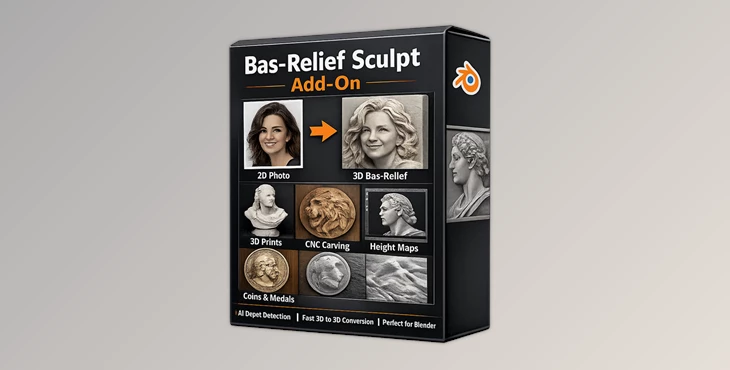
Downloadable Files
You can download Bas-Relief Sculpt Add-On for free at the end of this page.
Turn Flat Images Into Stunning Sculptures
Creating detailed bas-relief artwork used to require hours of manual sculpting, complex displacement workflows, and endless adjustments. Bas-Relief Sculpt Add-On changes that completely by transforming simple 2D images into beautiful 3D relief models inside Blender with only a few clicks.
Whether you are preparing models for 3D printing, CNC carving, decorative art, coins, wall panels, or artistic experiments, this add-on makes the entire process faster, cleaner, and far more enjoyable. Instead of struggling with complicated sculpting techniques, artists can focus on creativity and design.
The add-on becomes even more powerful when combined with depth map workflows, allowing users to generate highly accurate relief depth directly from images.
What Makes Bas-Relief So Powerful?
Bas-relief is a sculpting technique where shapes and details slightly rise from a flat surface, creating depth and dimensionality while remaining compact and elegant.
This style is widely used in:
Decorative wall art
Ancient-style sculptures
Coins and medals
Jewelry concepts
CNC carving projects
3D printed artwork
Architectural ornaments
Creating relief sculptures manually within 3D software like Blender can take a considerable amount of time. Artists usually have to sculpt each layer of the artwork by hand or spend hours fixing the displacement maps of their 3D models.
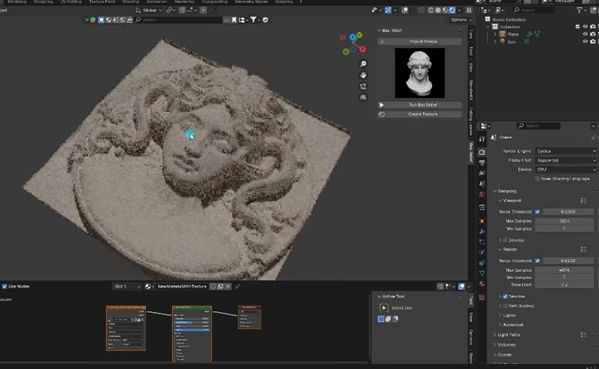
Bas-Relief Sculpt Add-On automates the relief sculpting process using AI technology. With the add-on, artists can transform their 2D art into 3D relief sculptures with a few easy steps.
For example:
A portrait photo can instantly become a printable sculpted plaque.
A logo can be transformed into engraved 3D signage.
Concept art can become a layered relief for CNC machining.
Historical artwork can be converted into realistic stone carvings.
These features improve workflow speed while helping artists achieve more professional-looking results with less effort.
Meet The Add-On
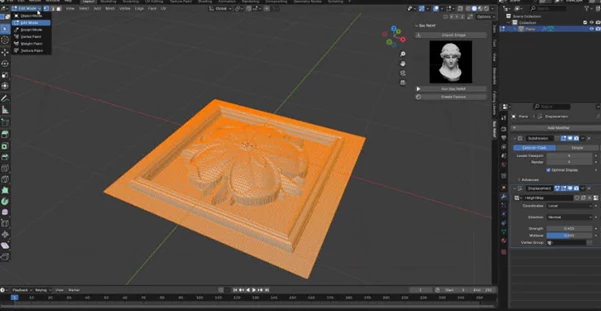
Bas-Relief Sculpt Add-On is a professional Blender extension designed to generate sculpt-ready height maps and detailed bas-relief models directly from 2D images.
The tool uses AI-based depth estimation powered by the MiDaS DPT-Hybrid model to analyze image depth automatically and generate realistic relief information.
Instead of manually painting depth or sculpting complex forms, users can simply import an image and let the add-on create the foundation automatically.
The workflow is beginner-friendly while still being powerful enough for advanced artists and production environments.
Features
AI-Powered Height Map Generation
The add-on intelligently analyzes images and creates depth-based height maps automatically. This helps preserve important details while reducing distortion and flattening problems often found in traditional displacement workflows.
Fast Bas-Relief Creation
With only a few clicks, users can generate detailed relief sculptures directly inside Blender. This dramatically speeds up concept development and production time.
DepthMap Gen Compatibility
The add-on works smoothly with DepthMap Gen, making it easier to generate highly accurate depth information for cleaner and more realistic reliefs.
Optimized for 3D Printing & CNC
The generated geometry is designed to work well for manufacturing workflows such as:
Resin printing
FDM printing
CNC carving
Laser engraving preparation
This makes the add-on extremely useful for makers, designers, and fabrication artists.
Automatic AI Model Download
The required AI model is automatically downloaded during first use, simplifying setup for beginners and reducing technical complexity.
Blender Integration
Everything works directly inside Blender, allowing artists to stay inside their familiar workflow without external software interruptions.
Real Creative Possibilities
Artists can use Bas-Relief Sculpt Add-On for many different creative projects:
Creating ancient stone-style character portraits
Designing fantasy wall decorations
Building embossed logos for branding
Producing collectible coins and medals
Generating layered reliefs from concept art
Preparing museum-style sculptural pieces
Converting photography into printable art
Because the process is fast and flexible, creators can experiment with multiple artistic directions without wasting hours on manual sculpting.
Pro Tips For Better Results
Use High-Contrast Images
Images with clear lighting and strong subject separation usually produce cleaner depth information and more readable relief details.
Simplify Busy Backgrounds
Removing unnecessary background clutter before generating the height map helps the AI focus on the main subject.
Combine With Blender Sculpt Tools
After generating the base relief, use Blender sculpt brushes for small refinements and artistic adjustments to make the final result feel even more handcrafted.
Test Depth Intensity Carefully
Too much depth can create exaggerated or noisy surfaces. Subtle depth values often produce more elegant and professional-looking reliefs.
Prepare Models For Printing
Before exporting for 3D printing or CNC, check mesh thickness and smooth sharp artifacts for cleaner physical production.
Final Thoughts
Bas-Relief Sculpt Add-On is an incredibly useful Blender extension for artists who want to transform flat images into detailed sculptural artwork quickly and efficiently.
By removing the frustrations of learning the technical aspects of creating relief art projects, this add-on significantly improves artists' creativity!
Whether you are a 3D artist, maker, sculptor, designer, or hobbyist, this tool can significantly improve your workflow and open the door to exciting new artistic possibilities.
If you enjoy creating stylized sculptures, decorative artwork, printable reliefs, or CNC-ready designs, this add-on is definitely worth exploring.

Files Password : gfxplugin.com OR 123456