Downloadable Files
You can download Blender Copilot for free at the end of this page.
Make Blender Easier With AI
Working inside Blender can sometimes feel overwhelming, especially when repetitive tasks, scripting, and technical setup slow down the creative process. That’s exactly where Blender Copilot becomes incredibly useful.
All you have to do is describe the Blender task that you would like it to complete, and it will automatically generate the scripts that are required to make that task happen within Blender.
Whether you are working on modeling, texturing, animating, or performing any other task within Blender, Blender Copilot will make your experience within the software as effortless as possible.
What Is Blender Copilot?
Blender Copilot is an AI-powered addon for Blender that connects natural language prompts with automated Blender scripting using OpenAI technology.
In simple words, you tell the addon what you want to do, and it creates the code required to perform that action inside Blender.
For example, you can type things like:
“Create a low-poly city”
“Add cinematic lighting”
“Generate procedural materials”
“Duplicate objects randomly”
“Create animation keyframes”
The addon interprets your request and performs the task automatically.
This dramatically reduces the time spent on repetitive technical work and makes Blender more approachable for beginners while still being powerful for professionals.
Why It Improves Your Workflow
One of the biggest challenges in 3D software is maintaining creative momentum. Constantly stopping to search tutorials, write scripts, or adjust repetitive settings can interrupt the flow of a project.
Blender Copilot helps solve that problem by turning complicated technical operations into simple conversations.
Here are some real-world benefits:
Faster scene creation
Easier automation of repetitive tasks
Reduced need for manual scripting
Better productivity during client projects
Faster prototyping and experimentation
Easier learning experience for beginners
For artists working on animations, product visualization, motion graphics, or game assets, this can save a huge amount of production time.
Features
Natural Language Commands
The standout feature of Blender Copilot is its ability to understand human language.
Instead of memorizing commands or Blender shortcuts, users can simply type instructions naturally. The addon translates those requests into Blender-compatible Python code automatically.
This makes complex workflows feel much more intuitive.
AI-Powered Script Generation
Blender Copilot uses AI to generate scripts dynamically based on your request.
This is especially useful for:
Object generation
Scene organization
Animation setup
Geometry operations
Batch editing
Procedural workflows
Even advanced scripting tasks become accessible to non-programmers.
Texture & Material Generation
Creating materials manually can take a lot of time. Blender Copilot can assist with generating textures and material setups much faster through AI-assisted workflows.
This allows artists to experiment more freely and iterate faster during look development.
User-Friendly Interface
The addon includes a clean and beginner-friendly dialog interface directly inside Blender.
You do not need deep technical knowledge to start using it. The workflow feels conversational and lightweight, which makes it approachable even for new users.
History & Workflow Tracking
One very useful feature is the history system.
It keeps track of previous commands, making it easy to revisit or reuse successful workflows. This becomes extremely valuable during larger projects where repeated operations are common.
Real Creative Use Cases
Faster Environment Creation
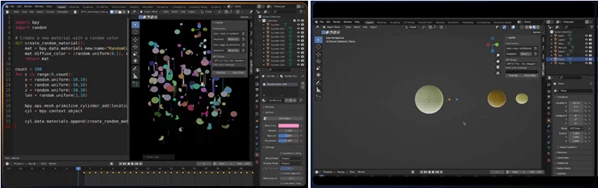
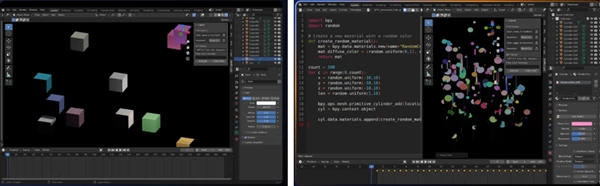
Imagine building a sci-fi environment and needing dozens of duplicated objects with randomized scaling and rotation.
Instead of manually editing each object, you can simply describe the operation and let Blender Copilot handle it instantly.
Speeding Up Animation Tasks
Animation workflows often involve repetitive setup steps like creating keyframes, adjusting timing, or generating camera movement.
Blender Copilot can automate many of these repetitive tasks, helping animators spend more time polishing the final result.
Helping Beginners Learn Blender
New Blender users often struggle with scripting and technical workflows.
Because Blender Copilot translates natural language into working Blender actions, it also becomes a learning tool. Users can observe generated code and better understand how Blender automation works behind the scenes.
Professional Tips For Better Results
Use Clear Instructions
The more specific your prompts are, the better the generated results will be.
Instead of:
“Make animation”
Try:
“Create a smooth rotating camera animation around the object”
Clear prompts produce cleaner and more accurate outcomes.
Combine AI With Manual Creativity
Blender Copilot is an excellent assistant tool for users to learn Blender and to automate their projects.
However, do not rely upon Blender Copilot to complete all of your projects in Blender software.
Save Successful Commands
If you discover workflows that work particularly well, keep them saved using the history feature.
This can dramatically accelerate future projects and repeated client work.
Experiment Frequently
Try to experiment with Blender Copilot as often as possible.
Because Blender Copilot automatically generates scripts for users, there is no loss of time in trying out new ideas for projects - all that is required is a description of those ideas!
Installation Process
Installing Blender Copilot is done through the following steps:
Download the Blender Copilot addon ZIP file
Open the Preferences within Blender
Navigate to the Add-ons section
Click on the Install button
Select the downloaded ZIP file
Enable Blender Copilot
Add your OpenAI API key
Start using Blender Copilot to automate your Blender software projects
Final Thoughts
Blender Copilot is one of the better tools to help improve Blender for all of its users. By integrating AI and natural-language command support, Blender Copilot removes the technical aspects of Blender that often get in the way of artists.
Whether you are a beginner trying to learn Blender faster or a professional looking to automate repetitive production tasks, Blender Copilot offers a modern and highly practical solution.
It makes 3D creation feel more fluid, accessible, and creative — exactly the kind of improvement many artists are looking for today.

Files Password : gfxplugin.com OR 123456