Downloadable Files
You can download System Monitor Pro for After Effects for free at the end of this page.
Keep Your After Effects Workflow Under Control
Working inside Adobe After Effects can become extremely demanding on your system, especially when dealing with heavy compositions, 3D layers, simulations, or GPU-accelerated effects. One of the biggest frustrations for motion designers is unexpected slowdowns, memory overloads, or crashes that appear without warning.
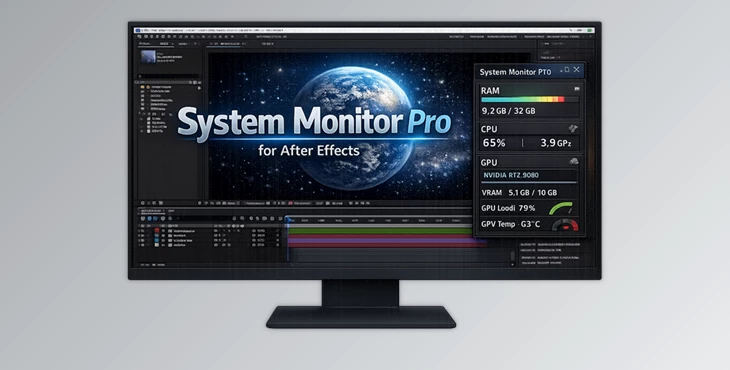
System Monitor Pro for After Effects helps you to monitor your system while working within the software. Instead of having to open Task Manager or other monitoring software, System Monitor Pro for After Effects will display all of the information you need directly within After Effects.
From your available RAM to your GPU temperatures, System Monitor Pro for After Effects will make your workflow smoother by giving you insight into how your system is performing in After Effects.
Why Real-Time System Monitoring Matters
Due to the demands of modern motion graphics design, After Effects can consume significant amounts of RAM and GPU resources.
Without proper system monitoring while using After Effects, you may encounter the following issues:
- Crashes while rendering
- Slow playback of your After Effects compositions
- Overload of VRAM
- Overheating of your CPU
- Slow performance while multitasking
System Monitor Pro for After Effects gives you the monitoring tools you need directly within your After Effects composition.
For example:
While rendering a heavy composition, you can instantly see if your RAM usage is approaching critical levels.
During GPU-intensive effects, you can monitor VRAM and GPU temperature in real time.
If preview playback becomes slow, CPU load and clock speed help identify bottlenecks quickly.
This kind of visibility helps artists make smarter workflow decisions and avoid unnecessary interruptions.
A Smart Monitoring Tool Built for Motion Designers
Unlike external monitoring software, System Monitor Pro for After Effects is designed specifically for creative workflows inside After Effects.
System Monitor Pro for After Effects was built with motion designers and After Effects professionals in mind. It features a dockable panel that will automatically update while you work within After Effects.
System Monitor Pro for After Effects is ideal for professionals who work with the following project types:
Motion graphics
VFX projects
3D animation
UI animations
High-resolution advertising content
Multi-GPU rendering setups
Features
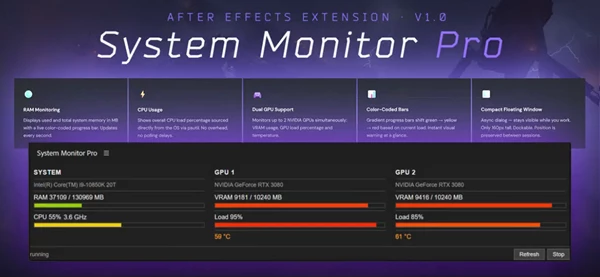
Real-Time RAM Monitoring
Keep an eye on your available RAM while working within After Effects. This is especially helpful when rendering projects.
CPU Usage and Live Clock Speed
Monitor your CPU and its clock speed while within After Effects. The information is updated every 500ms to provide an accurate representation of your system’s performance within After Effects.
CPU Information Header
At startup, the extension automatically reads and displays your processor model and thread count.
This makes it easier to understand how After Effects is interacting with your hardware.
Multi-GPU NVIDIA Support
System Monitor Pro for After Effects will automatically detect all of the NVIDIA GPUs installed in your machine. If you have a complex rendering machine with multiple GPUs, each of them will be represented in the System Monitor Pro for After Effects panel with its own set of monitoring statistics.
VRAM and GPU Utilisation
GPU memory usage and GPU load percentages are displayed with live progress bars for every connected card.
This is especially useful when working with GPU-accelerated plugins, 3D rendering tools, or AI-powered effects.
GPU Temperature Tracking
The extension also monitors GPU temperatures directly using NVIDIA driver tools.
This helps users avoid overheating problems during long rendering sessions or demanding animation projects.
Responsive Dockable Layout
The panel automatically adjusts its layout depending on available interface space.
Whether docked vertically or horizontally inside After Effects, the interface remains clean and readable.
Practical Workflow Benefits
One of the biggest advantages of System Monitor Pro for After Effects is how it improves decision-making during production.
Instead of guessing why a project feels slow, creators can immediately identify whether the issue comes from:
RAM limitations
CPU overload
GPU temperature spikes
VRAM exhaustion
This can save hours of troubleshooting during deadlines.
For studios and freelancers working with complex timelines every day, this level of monitoring adds stability and confidence to the creative process.
Tips for Better Results
Monitor VRAM During Heavy Effects
When using GPU-heavy plugins or 3D rendering tools, keep an eye on VRAM usage to avoid sudden slowdowns or crashes.
Watch CPU Speed During Rendering
If CPU clock speed suddenly drops, it may indicate thermal throttling caused by overheating.
Good airflow and cooling can improve render consistency significantly.
Use the Dockable Layout Efficiently
Place the panel near your timeline or preview window for quick visibility without interrupting your workflow.
Combine With Smart Cache Management
Watching RAM usage in real time helps you understand when it’s time to purge memory or optimize previews.
Final Thoughts
System Monitor Pro for After Effects is a simple yet powerful tool that can significantly enhance your experience with After Effects.
By providing you with real-time information about your machine, you do not have to keep switching between the task manager and other system monitoring software. It prevents performance issues from developing in the first place.
This tool will help you or your team manage your complex projects more efficiently and optimize your performance in After Effects.