Downloadable Files
You can download the product Sandbox for free at the end of this page.
Meet the Future of Motion Design
Creating animations in software such as Adobe After Effects or Adobe Premiere Pro involves extensive knowledge of scripting and effects plugins, as well as significant time spent performing each task manually. That is where Sandbox changes the game for motion graphics designers.
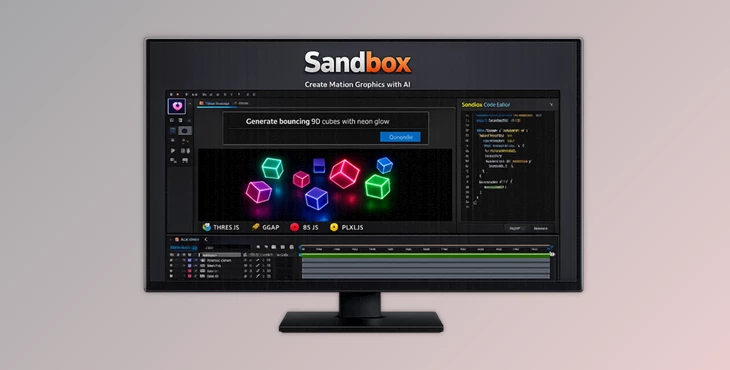
Sandbox is an AI tool that allows users to generate editable animations by simply describing the type of animation they would like to create. There is no need to know much about programming or animation software to use this product.
For example, users can describe an animation that features a logo floating onto the screen with cinematic lighting, and the software will generate it for them within seconds.
With Sandbox, users can create professional-level animations that are editable after creation. This makes it an ideal tool for those who would like to experiment with different animation features without having to spend significant time on the tasks themselves.
What Exactly Is Sandbox?
Sandbox is a revolutionary extension designed for professional motion graphics workflows. It connects powerful AI models like Gemini, OpenAI, and Claude with industry-standard animation engines such as:
- Three.js
- GSAP
- Pixi.js
- p5.js
- HTML5 animation systems
The result is a system capable of generating advanced visual content directly inside your editing timeline. Instead of coding animations manually, users can describe scenes, interactions, typography, simulations, or visual effects in plain English. Sandbox then converts those instructions into production-ready assets.
This dramatically speeds up the creative process because artists spend less time building technical foundations and more time refining the final look.
Why Sandbox Feels Different
Most AI creative tools generate flat images or limited templates. Sandbox goes much further by producing editable, animation-ready systems that work inside professional Adobe environments. This means users can:
- Generate motion graphics instantly
- Edit generated animations manually afterward
- Combine AI results with existing workflows
- Export render-ready assets directly into projects
- Create interactive experiences without advanced coding
For motion designers, this can save hours or even days during production.
Features
AI-Powered Animation Generation
The core feature of Sandbox is its ability to transform simple text prompts into complex animated scenes. Users can create:
- Kinetic typography
- Physics simulations
- 3D environments
- Interactive graphics
- Animated interfaces
- Motion-driven data visualizations
For example, a designer can type:
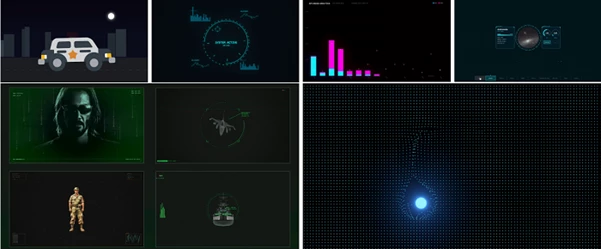
“Create a futuristic hologram dashboard with animated charts.”
and Sandbox automatically generates the visual structure and motion behavior. This helps creators prototype ideas much faster while maintaining creative flexibility.
Real-Time Interaction System
One of the most exciting parts of Sandbox is its live interaction workflow.
Capture Live Motion
Sandbox can record real-time movement and export it directly into After Effects as animation data or PNG sequences.
AE → Canvas Interaction
Users can select layers inside After Effects and let Sandbox simulate movement based on layer position data.
Canvas → AE Workflow
Mouse movements performed inside Sandbox can be captured and exported back into After Effects as fully animated Null layers with keyframes. This creates a powerful bridge between interactive design and traditional animation workflows. For creators working on dynamic UI animation, motion tracking, or experimental visuals, this feature can massively improve workflow speed.
SVG Rigging Mode
Sandbox also includes a built-in professional rigging system for SVG characters and illustrations.
Smart Labeling
Users can assign labels such as:
- HEAD
- BODY
- LEFT_ARM
- RIGHT_ARM
The AI understands these semantic labels and uses them intelligently during animation generation. For example:
“Raise the left arm and rotate the head.”
becomes instantly understandable to the system. This makes character animation significantly easier for artists who are not experienced with traditional rigging systems.
Data Visualization Tools
Sandbox can import:
- JSON files
- CSV files
- TXT data
The AI automatically analyzes the uploaded information and converts it into animated charts, graphs, and visual presentations. This is incredibly useful for:
- Business presentations
- YouTube explainers
- Infographics
- Financial animations
- Scientific visualizations
Instead of manually animating every graph element, users can generate dynamic data-driven motion graphics in minutes.
Voice-Controlled After Effects Workflow
Sandbox can even connect to external servers for real-time voice interaction. This means creators can potentially control parts of After Effects using spoken commands. For fast-paced production environments, this creates a futuristic workflow where artists can trigger actions, animations, or creative operations without constantly navigating menus.
Real Creative Use Cases
Cinematic Title Sequences
Generate advanced typography animations with particle systems, camera movement, and dynamic transitions instantly.
Social Media Motion Graphics
Quickly create eye-catching Instagram reels, TikTok animations, and YouTube intros without building every effect manually.
Interactive Motion Design
Build interactive scenes using real-time mouse movement and live animation capture systems.
Character Animation
Rig SVG characters quickly and generate AI-assisted movement for explainer videos or animated content.
Data-Driven Videos
Turn boring spreadsheets into cinematic animated infographics using automatic visualization tools.
Pro Tips for Better Results
Write Clear Prompts for Desired Animations
The better the description of an animation that users define, the better the result will be from Sandbox. Instead of creating animations with “Make cool text,” users can say, “Create metallic text that slowly moves into the screen with floating particles around it.”
Combine AI-Powered Animation with Manual Editing
While Sandbox can create a variety of professional animations, users can manually edit them to their hearts’ desire. This allows for even more control over the final product.
Use the SVG Rigging Mode to Create Characters
When preparing any characters that should move within a project, users should use the SVG rigging system to prepare their characters and label their features. This will allow for much easier movement definition within Sandbox.
Experiment With Data Tools
Sandbox can import various data files. Simply creating a CSV file of the information that you wish to visualize will allow the software to automatically create an animated visualization of that data.
Final Thoughts
Sandbox sets a precedent for how AI tools can work directly within editing programs for motion graphics. It helps to remove barriers to entry for those who would like to experiment with creating their own animations but do not have the time to create them manually.
This tool allows users to generate a wide variety of animations, from cinematic titles to data visualizations and social media videos. It is also helpful for anyone who would like to take control of their projects without needing to know any programming languages.
If you are someone who works with motion graphics in any capacity, Sandbox will drastically speed up your production process.
In some ways, it is as if you have an AI animation team working directly within your computer screen in After Effects.