Downloadable Files
You can download the Thatcher Imaging product for free at the end of this page.
Stop Fighting Node Trees
Color grading in DaVinci Resolve can sometimes feel more complicated than filmmaking itself. Many editors spend hours tweaking curves, balancing colors, stacking LUTs, and building giant node trees just to achieve a cinematic look that still doesn’t feel quite right.
That’s exactly where Thatcher Imaging changes the workflow.
Instead of forcing creators to choose between complicated grading and generic presets, Thatcher Imaging introduces a faster and more creative approach. It gives filmmakers, content creators, and colorists the ability to create professional cinematic looks in seconds using a clean one-node workflow inside DaVinci Resolve.
The result feels less technical and far more creative.
What Is Thatcher Imaging?
Thatcher Imaging is a professional color grading toolkit designed for DaVinci Resolve. It focuses on simplifying cinematic grading while still giving users deep creative control.
The core idea is simple:
Instead of building huge node structures manually, users can apply carefully designed cinematic looks instantly with a single node.
This workflow helps editors spend less time managing technical adjustments and more time focusing on storytelling, mood, and visual identity.
Whether you create short films, YouTube videos, commercials, documentaries, or music videos, Thatcher Imaging helps deliver polished cinematic results much faster.
Why Creators Love This Workflow
Traditional grading often requires multiple layers, corrections, LUTs, masks, and adjustments. Thatcher Imaging reduces all of this into a streamlined process. A creator can move from flat footage to a polished cinematic image almost instantly.
This is especially useful for:
- Fast client deadlines
- YouTube production
- Commercial editing
- Independent filmmaking
- Social media content
- Documentary workflows
The faster workflow allows creators to focus more on storytelling rather than technical correction.
Custom Looks That Grow With You
One of the strongest features is the ability to save custom looks. Editors can build a unique visual style for a brand, client, or film project and reuse it later with one click. This creates consistency across multiple videos while saving enormous amounts of time. For production studios or freelance editors, this becomes incredibly valuable because every project can maintain a recognizable visual identity.
On-Set LUT Export
Thatcher Imaging is not limited to post-production. Users can export their looks as show LUTs and use them directly on set. This helps cinematographers preview the final aesthetic during filming instead of waiting until editing begins. This creates:
- Better lighting decisions
- More accurate exposure choices
- Faster post-production
- Stronger visual consistency
It bridges the gap between production and color grading in a very practical way.
Features
One-Click Look System
The centerpiece of Thatcher Imaging is its one-click cinematic grading system.
Instead of endlessly tweaking settings, creators can instantly apply professionally designed looks inspired by modern cinema.
The system includes continuously expanding collections of cinematic styles created by experienced colorists. Popular looks include:
- Interstellar-inspired tones
- Children of Men cinematic mood
- Clean commercial looks
- Retro film aesthetics
- High gloss advertising styles
- Soft cinematic palettes
- Teal and orange blockbuster grading
This dramatically reduces setup time while still allowing full customization afterward.
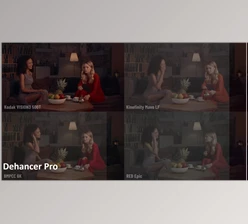
Film Emulations
The film emulation tools recreate authentic film negative and print characteristics inspired by famous productions.
These emulations help digital footage feel more organic, textured, and cinematic. Instead of harsh digital sharpness, footage gains:
- Softer highlight rolloff
- Richer color separation
- More natural contrast
- Film-like tonal depth
This is especially useful for narrative filmmaking and cinematic commercials.
Lens FX
The Lens FX section adds realistic optical imperfections and cinematic texture to footage.
These effects help footage feel less “digitally perfect” and more emotionally cinematic. Users can introduce subtle:
- Lens softness
- Atmospheric texture
- Organic glow
- Cinematic bloom
- Vintage character
This creates visuals that feel more immersive and professional.
Advanced Skin Tone Separation
Skin tones are one of the hardest parts of color grading. Thatcher Imaging introduces a unique method for separating subjects from backgrounds naturally without relying on heavy qualifiers or masks.
The result is cleaner and more realistic skin rendering with fewer artifacts.
This is especially valuable for:
- Interviews
- Portrait footage
- Commercial work
- Fashion videos
- Narrative cinema
Seasonal Foliage Transformation
One particularly creative feature is the foliage adjustment system. Editors can transform the feeling of an environment with simple controls — for example, changing green summer foliage into warm autumn tones. This allows filmmakers to dramatically alter mood and seasonal atmosphere without reshooting footage.
Dynamic Range Recovery
The Dynamic Range tools help recover detail in highlights and shadows using film-style stop adjustments. Compared to standard correction tools, the results often appear cleaner and more cinematic.
This becomes useful when working with:
- High-contrast scenes
- Outdoor daylight footage
- Difficult lighting conditions
- Log footage
- Underexposed clips
Film Mode Styles
Film Mode unlocks highly stylized cinematic aesthetics inspired by classic cinema processes. Examples include:
- Orthochromatic black-and-white looks
- Vintage two-strip color styles
- Experimental film textures
- Retro cinematic palettes
These modes allow creators to explore unique artistic directions quickly.
Real Creative Impact
The biggest strength of Thatcher Imaging is not just speed — it is consistency.
Many editors struggle because every project starts from zero. Thatcher Imaging creates a repeatable cinematic workflow where beautiful results can be achieved quickly and reliably.
For example:
- A YouTube filmmaker can develop a signature cinematic look for every upload.
- A wedding filmmaker can maintain consistent emotional tones across an entire season of projects.
- A commercial editor can quickly create polished client previews without building complex grading structures from scratch.
This consistency helps creators look more professional while saving massive editing time.


Professional Tips for Better Results
Start With Balanced Footage
Thatcher Imaging will produce the best results if your footage is properly exposed.
While the software can fix many color grading issues, starting with a properly exposed project will make the editing process much easier.
Use Looks As A Foundation
Some of the best color grading looks can be produced by editing the defaults provided by Thatcher Imaging.
By creating very small changes to the color grading looks that are automatically applied to your project, you can ensure that your final edit is unique and features your desired colors.
Focus On The Mood
Color grading can have a great deal of impact on the audience’s emotional response to your editing project.
For instance, color grading to utilize warm colors can evoke a sense of nostalgia and happiness from the audience, while utilizing cool colors can create a sense of mystery or tension in the editing project.
Focus on the color of your editing project when you are choosing a color grading look to ensure that the most emotional response is elicited from your audience.
Avoid Overprocessing
Thatcher Imaging features a variety of tools that editors can use to fix digital footage.
However, the best results are achieved with subtle editing choices instead of pushing the features to their limits. A subtle edit may produce an outcome that is more professional-looking than if the editor overprocessed the project.
Final Thoughts
Thatcher Imaging can change the nature of color grading in DaVinci Resolve.
The color grading software allows editors to produce faster, more creative edits without spending hours within complex node trees.
The feature set of Thatcher Imaging includes tools for film emulations, Lens FX, skin tone enhancement, and a variety of other professional filmmaking tools.
Looking for a professional color grading software for DaVinci Resolve? Thatcher Imaging might be for you.

Files Password : gfxplugin.com OR 123456