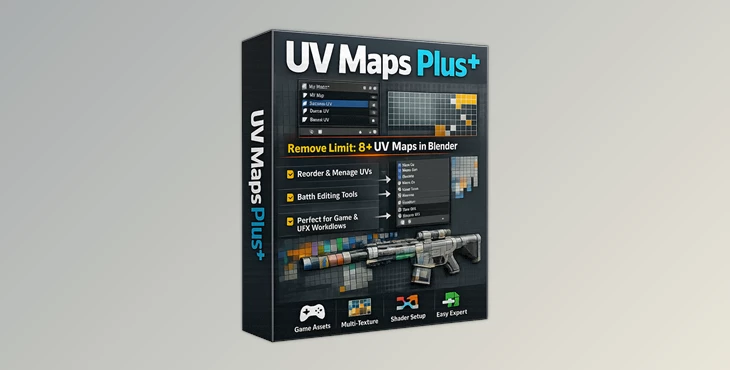
Downloadable Files
You can download UV Maps Plus for free at the end of this page and instantly improve the way you manage UV maps inside Blender.
Finally Break the 8 UV Map Limit
Working with multiple UV maps within Blender can become rather frustrating when working on more complex projects. Any attempts to manage multiple UV maps across several objects within your project can add to the frustrations that many Blender artists face while working in their favorite 3D creation environment.
This is where UV Maps Plus becomes remarkably useful for artists looking to improve their workflow within Blender.
The extension allows artists to remove the traditional limit of eight editable UV maps within Blender and provides more flexibility to artists who are creating game assets, environment art, product art, and more.
The most important aspect of UV Maps Plus is the fact that it makes it significantly easier to manage your UV maps in Blender, especially if you are working on more advanced projects.
Understanding UV Map Management in Blender
In professional art and game production pipelines, artists often rely on multiple UV maps for handling essential texture processes within game engines and other 3D applications.
These UV maps can include, but are not limited to:
- Lightmaps for game engines
- Decal placement
- Texture variations
- Masking systems
- Baking processes for normal and ambient occlusion maps
- Material blending
Due to the fact that Blender limits artists to only eight editable UV maps, this can become a significant issue in the production pipelines of larger art teams. It forces them to find ways of working around this and often limits the ways in which their production pipelines can develop.
UV Maps Plus was created to fix this exact problem and provide artists with a more comprehensive tool for managing their UV maps, especially across multiple objects within their Blender scene.
Meet UV Maps Plus
UV Maps Plus is a professional extension for Blender, targeting artists who wish to manage their complex UV maps and enhance their overall workflow in Blender.
The extension is helpful for environment artists, game asset creators, hard surface modelers, texture artists, technical artists, and motion graphics designers.
It is compatible with Blender 4.2 LTS and newer versions.
Features
Unlimited-Feeling UV Workflow
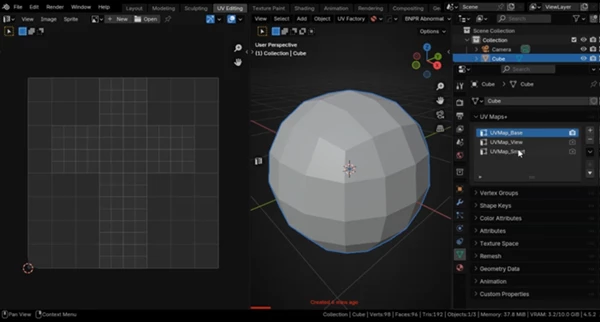
One of the most important improvements is the removal of Blender’s traditional 8 UV map workflow restriction. Artists can manage far more UV maps without losing organization or flexibility.
The addon also includes a warning system that highlights UV maps placed beyond slot 8, helping users quickly understand which maps cannot currently be edited inside Blender’s native UV Editor. This makes large UV setups much easier to control.
Easy UV Reordering
Reorganizing UV maps is now fast and intuitive. You can:
- Move UV maps up or down
- Send maps directly to the top or bottom
- Reverse UV map order
- Sort UV maps automatically
This is especially useful when exporting assets to game engines or external software that rely on specific UV channel ordering.
Imagine preparing a large asset pack for Unreal Engine where lightmap UVs must always remain in a specific slot. Instead of manually rebuilding UV structures, you can reorganize everything in seconds.
Powerful Batch Editing Tools
One of the biggest time-saving features is the batch operation system for multiple objects. You can:
- Sync UV map order across selected objects
- Copy unique UV map names
- Transfer UV data between meshes
- Keep multi-object projects organized
This becomes extremely valuable in production environments where dozens or hundreds of assets must maintain consistent UV structures. For example, when creating modular building kits or large prop collections, batch UV synchronization can save hours of repetitive work.
Faster UV Coordinate Editing
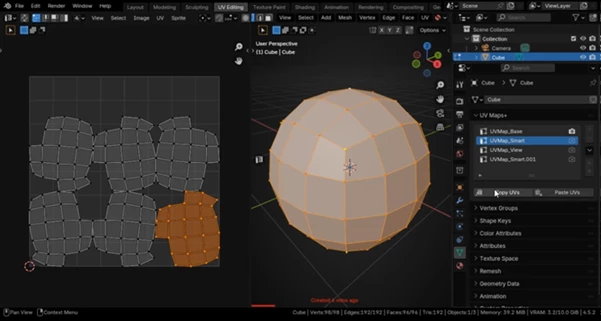
Inside Edit Mode, the addon adds tools for copying and pasting UV coordinates directly between selections.
This makes repetitive UV adjustments much faster and helps maintain consistency between similar mesh parts.
Artists working on mirrored objects, repeated design elements, or hard surface details can significantly speed up their workflow with these tools.
Professional Tips for Better Results
Keep Important UV Maps in Slots 1–8
Even though the addon removes many workflow limitations, Blender’s UV Editor still only edits the first 8 slots directly. Keep your most actively edited UV maps in those positions for smoother workflows.
Use Batch Sync Early
When working on large projects, synchronize UV naming and ordering early in production. This prevents export problems later and makes textures easier to manage.
Organize UV Naming Clearly
Using clear naming structures like:
- BaseColor_UV
- Lightmap_UV
- Decal_UV
- Mask_UV
can make complex scenes much easier to navigate, especially when collaborating with teams.
Combine with Texture Baking Workflows for Games and Cinematic Assets
As with any texture management and editing tools, the best way to make use of UV Maps Plus is to combine it with your favorite texture baking workflows. By keeping your UV channels properly organized in Blender, you can avoid any baking errors.
Final Thoughts
UV Maps Plus is a great extension that will save artists time when working on projects that contain numerous UV maps. While Blender has many capabilities for artists to manage their UV maps, there are some limitations.
By using this extension, artists will be able to better manage their projects and focus on their area of expertise.
For those working on game assets, environments, and any other complex projects, UV Maps Plus is a tool that will significantly improve the way artists in your studio manage their textures and UV maps within Blender.
If you have ever struggled with the limitations of Blender’s built-in UV map system, then UV Maps Plus is definitely worth exploring to improve your production workflow.

Files Password : gfxplugin.com OR 123456
![Download Blender - Rizomuv/Uvlayout [B2Ruvl] v18](https://dls4.gfxplugin.ir/Download_Files/28629/SearchSmall/banner.jpg)