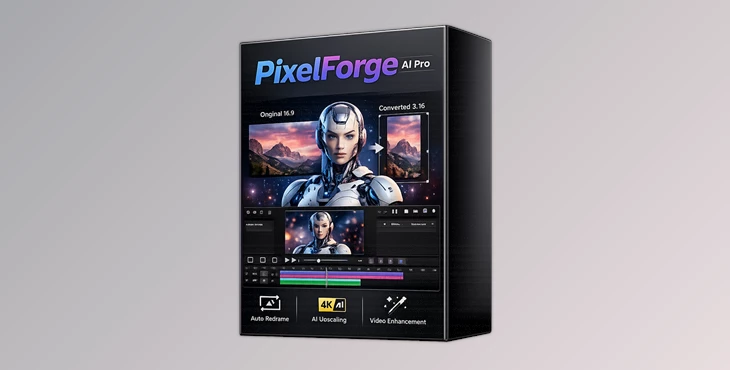
Downloadable Files
You can download PixelForge AI Pro for free at the end of this page.
Turn Low-Resolution Images Into Sharp High-Quality Visuals
Working with blurry or low-resolution images can ruin a project that otherwise has a great deal of potential. Whether you are a digital artist, photographer, social media content creator, or someone who likes to restore old family pictures, PixelForge AI Pro can be of great use in such situations.
Using the Real-ESRGAN engine, the software can upsample your images and recover some of the lost image details and resolutions. The AI models included in the software were trained on high-resolution photos, anime art, and digital illustrations to ensure that when your images are upscaled, they look natural and professional.
What Is AI Image Upscaling?
AI upscaling performs the same task as enlarging your image using traditional image editing software. However, instead of using traditional means of enlarging an image, AI upscaling uses artificial intelligence algorithms to recover the lost image details and textures. With PixelForge AI Pro, AI upscaling becomes incredibly practical for your projects.
Here are some of the ways in which you can use AI upscaling within the software:
- Restore old family pictures
- Upscale AI art projects
- Improve anime screenshots
- Find product pictures for ecommerce platforms
- Enlarge graphics for social media
Each of these projects will benefit from using the dedicated AI models in the software to restore the lost details in your projects.
Meet PixelForge AI Pro
PixelForge AI Pro is a fully offline professional image upscaler designed for creators who want high-quality results without subscriptions or cloud processing.
Unlike many AI services that require monthly payments or internet uploads, everything here runs locally on your GPU. Your files stay private, your workflow stays fast, and you maintain full control over the entire process.
One of the biggest strengths of the software is its professional batch processing system. Instead of scaling images one by one, you can load an entire folder, choose settings once, and let the software process everything automatically.
That makes it especially useful for photographers, AI artists, designers, content creators, and anyone handling large image libraries.
Features
Professional Batch Processing
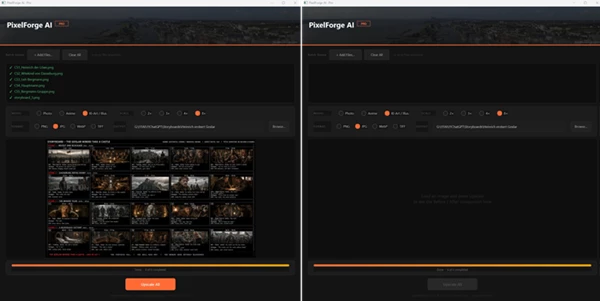
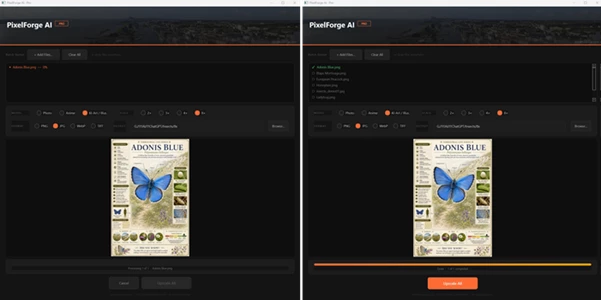
One of the most valuable features is the automatic queue system. Simply import a folder of images, choose the upscale model and resolution, then click “Upscale All.”
The software processes every image sequentially while showing live progress and before/after comparisons. This saves enormous amounts of time during large projects.
For creators handling hundreds of assets, this workflow can dramatically speed up production.
Three Specialized AI Models
Different image styles require different processing methods. PixelForge AI Pro includes three dedicated AI models:
Photo Model
Built on Real-ESRGAN x4plus, this mode is optimized for:
- Portraits
- Photography
- Real-life textures
- Landscapes
- Product images
It preserves natural detail while reducing artifacts and softness.
Anime Model
Designed specifically for:
- Anime frames
- Manga artwork
- Cel shading
- Crisp line art
This model keeps edges clean and sharp without introducing halos or blurry outlines.
AI Art / Illustration Model
Perfect for:
- Midjourney artwork
- Stable Diffusion renders
- Concept art
- Digital paintings
- Fantasy illustrations
It helps maintain painterly textures and stylized detail during enlargement.
Upscaling Up to 8× Resolution
The software supports:
- 2× scaling
- 3× scaling
- 4× scaling
- 8× scaling
The 8× mode combines AI reconstruction with advanced resampling techniques to generate extremely large outputs while preserving image quality. This becomes useful for:
- Printing posters
- Large-format artwork
- Wallpapers
- Presentation visuals
- Commercial design assets
Multiple Export Formats
PixelForge AI Pro supports several professional export formats:
- PNG
- JPG (95% quality)
- WebP
- TIFF with LZW compression
This flexibility makes it easy to integrate into photography, web, print, and production workflows.
Fully Offline Workflow
Everything runs locally on your computer:
- No cloud upload
- No internet requirement
- No external processing
- No privacy concerns
For professionals working with client files or sensitive artwork, this is a major advantage.
GPU-Accelerated Performance
The software uses Vulkan acceleration and supports:
- NVIDIA GPUs
- AMD GPUs
- Intel GPUs
This significantly improves processing speed compared to CPU-only solutions.
Real Creative Use Cases
The practical applications for PixelForge AI Pro are surprisingly broad.
A photographer can restore compressed portrait photos into cleaner, high-resolution images for printing.
An AI artist can upscale generated artwork for commercial posters or merchandise.
A YouTube creator can enlarge old thumbnails or visual assets without losing quality.
Anime editors can clean up screenshots and artwork for sharper edits and motion graphics.
Even casual users can improve old family photos or low-resolution wallpapers with minimal effort.
Pro Tips For Better Results
Choose The Correct AI Model
Ensure the AI model matches the type of image you are upscaling. For instance, using the anime model to upscale a portrait will create blurry portraits.
Avoid Extreme Upscaling For Small Images
If you have a very small image, try to avoid upscaling it to 8 times its size. Try a 4 times enlargement first.
Use High-Quality Source Images
The software cannot recover image details that are severely lost or compressed in the original image file. Use high-quality files for best results.
Export In TIFF Or PNG For Further Editing
If you will be editing the upsampled image, export it in a lossless format such as PNG or TIFF.
Batch Processing Of Similar Images
Grouping similar images in a batch together will result in fewer errors and better upscaling results for your image projects.
Final Thoughts
PixelForge AI Pro offers a strong combination of professional AI upscaling, offline privacy, GPU acceleration, and efficient batch processing in a single package.
The dedicated AI models for photos, anime, and digital art help produce cleaner and more natural results than traditional resizing methods. Combined with support for massive 8× enlargement and local processing, it becomes a practical tool for both professionals and everyday creators.
Whether you work with photography, AI-generated art, anime edits, or digital illustrations, this software can significantly improve image quality while saving time during production workflows.
If you regularly deal with low-resolution assets, PixelForge AI Pro is definitely worth exploring.

Files Password : gfxplugin.com OR 123456