Downloadable Files
You can download the Aquon product for free at the end of this page.
Bring Liquid Motion Into Your Animations
Creating realistic liquid movements in motion graphics usually requires complex simulations in 3D software. Aquon, however, allows motion graphic designers to create beautiful 2D fluid motion in their projects in Adobe After Effects.
Be it water, liquid overflowing out of an object, ink movement, or fluid motion for abstract art projects, Aquon makes it easier for designers to create these effects. With masks, gravity, and various render options, designers can create realistic-looking liquid movement without spending hours creating simulations.
Moreover, the fluid movement is rendered on the GPU, which accelerates the simulation to make it look realistic and dynamic in real time. This fluid simulation plugin for Adobe After Effects is not only powerful but fun to use.
What Is Aquon and Why Is It Useful?
Aquon is a fluid simulation plugin designed for Adobe After Effects users. It allows artists to create 2D simulations of water-like liquids within their projects.
Using masks, artists can add walls into the project that the simulated liquid can reflect off of or overflow over. This makes it ideal for motion graphics designers looking for a way to add fluid motion to their projects with more control and without complex software.
For example, you can:
- Simulate water filling up a logo
- Create liquid transitions between scenes
- Design futuristic interface animations
- Build stylized ink or paint effects
- Generate abstract flowing backgrounds
- Produce overflowing liquid inside typography
Because the simulation is interactive and highly customizable, the final result feels more natural and dynamic compared to static overlays or fake distortion effects.
Why These Features Improve Motion Design Results
Fluid movement instantly adds life and realism to animation. Small flowing details can make a scene feel more cinematic and visually rich.
Aquon improves workflow quality because:
- GPU acceleration keeps previews fast
- Mask-based walls simplify scene creation
- Gravity controls create believable movement
- Fluid rendering settings allow different artistic styles
- Inlet controls make liquid behavior easy to direct
Instead of manually animating dozens of layers, the plugin generates organic motion automatically, saving time while improving visual quality.
Meet Aquon - Professional Fluid Simulation for After Effects
Fast, Flexible, and Creative
Adobe After Effects is a popular program for motion graphics, but one that users often struggle a little bit with when trying to create realistic liquid simulations. Aquon solves this problem for designers by giving them a fluid simulation within the program. Aquon was built to serve two purposes: experimentation and project creation.
Features
GPU-Accelerated Fluid Simulation
Aquon uses GPU acceleration to render simulations much faster than traditional CPU-based effects. This makes real-time adjustments smoother and allows artists to experiment freely without slowing down the workflow.
Fast previews are especially important when working on commercial animations, title sequences, or social media motion graphics with tight deadlines.
Mask-Based Liquid Physics
One of the most powerful features is the ability to use masks as walls for the simulation. You can create custom containers, channels, or shapes where the liquid moves naturally.
This gives motion designers huge creative freedom while keeping the workflow intuitive.
Flexible Inlet Controls
Aquon allows users to control:
- Liquid direction
- Speed
- Amount
- Flow size
This flexibility helps create everything from slow cinematic pours to energetic splashes and dynamic streams.
Gravity and Motion Control
Gravity settings can be adjusted freely, allowing artists to simulate realistic downward motion or completely stylized directional flow. This is especially useful for experimental motion design and abstract visual effects.
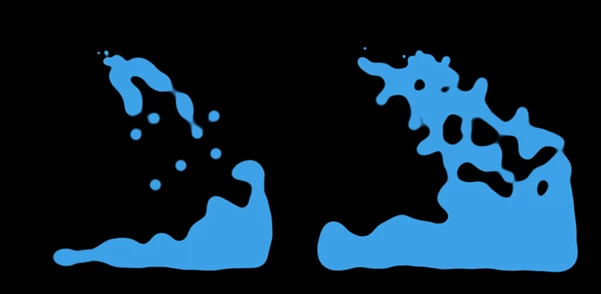
Multiple Fluid Rendering Styles
The plugin includes rendering controls that help generate different visual styles for the liquid simulation. You can create:
- Clean water effects
- Thick paint-like motion
- Abstract glowing fluid
- Stylized digital liquid visuals
These rendering options make Aquon suitable for both realistic and artistic projects.
Real Creative Uses for Aquon
Motion designers can use Aquon in many different production styles, including but not limited to:
- Music video visual effects
- Logo reveal animations
- Liquid typography
- Sci-fi HUD animations
- Social media motion graphics
- Abstract experimental visuals
- Commercial advertising effects
Aquon works directly within After Effects, so it seamlessly integrates into your current production pipeline.


Pro Tips for Better Fluid Simulations
Use Simple Masks First
Rather than creating your desired mask for the fluid simulation design project right away, start with simple masks to understand the fluid simulation better before creating complicated simulations.
Adjust Gravity
Make subtle changes to the gravity of the liquid simulations. Consider how much the gravity impacts the simulation when adjusted.
Combine With Glow and Blur Effects
Add glow and blur effects to the fluid simulations for a more cinematic look.
Experiment With Overflow Effects
Create highly dynamic fluid simulations by creating overflow effects. An easy way to do this is to animate the project masks to reveal new pathways for the simulated fluid.
Use Slow Motion for Cinematic Results
Slower fluid movement often looks more premium and dramatic, especially in title sequences or artistic projects.
Final Thoughts on Aquon
Aquon gives motion designers a fast and creative way to generate beautiful, water-like simulations. The combination of GPU acceleration, simulated masks, gravity options, and the ability to customize the simulation makes this a powerful tool for motion graphics designers of all skill levels.
Aquon allows designers to avoid complicated simulations and to create fluid motion that feels natural and engaging for the viewer.
For any motion graphics designer who loves to create visually interesting and experimental designs, Aquon could become the next exciting addition to their Adobe After Effects software.