Downloadable Files
You can download Post-Apocalyptic Smart Materials for free from the end of this page.
Bring Your 3D Assets to Life
Creating believable post-apocalyptic environments and assets is not just about adding random dirt or rust. The magic comes from layered surface storytelling — scratches, worn paint, oxidized metal, dust buildup, and realistic material aging.
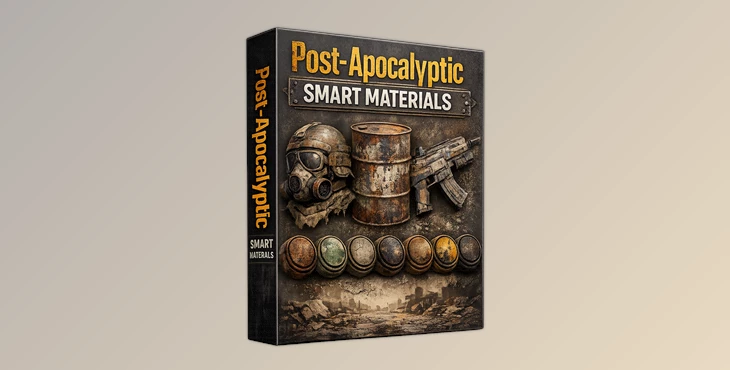
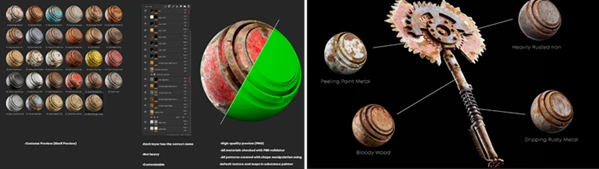
That is exactly where Post-Apocalyptic Smart Materials becomes incredibly useful. This pack includes 29 high-detail smart materials designed specifically for artists who want fast, professional-quality results directly inside Substance 3D Painter.
Instead of building complex material stacks from scratch every time, you can instantly apply polished materials and customize them to fit your project. Whether you are texturing abandoned vehicles, damaged weapons, industrial props, ruined architecture, or cinematic environment assets, these smart materials help you achieve realistic results much faster.
What Makes Smart Materials So Useful?
Smart materials in Substance Painter are more than simple textures. They are intelligent layered systems that react to mesh information like curvature, ambient occlusion, edges, and surface wear.
This means your textures automatically adapt to the shape of the model. Rust appears naturally on corners, scratches follow believable patterns, and dirt accumulates in realistic areas. The biggest advantage is consistency and speed.
Instead of manually painting every detail, artists can focus more on creativity and less on repetitive technical work. For example:
- A sci-fi corridor can instantly gain realistic, worn metal surfaces.
- A destroyed vehicle can look aged and abandoned within minutes.
- A game prop can receive cinematic damage details without a complicated setup.
Because all materials are fully customizable, you still maintain complete artistic control over colors, roughness, wear intensity, and layered effects.
Professional Texturing Made Faster
Post-Apocalyptic Smart Materials is fully created inside Substance Painter and works with version 7.3.0 and higher. The materials are optimized for professional workflows while remaining lightweight and easy to use.
Every material has organized layers with proper naming, making customization simple even for intermediate users. The pack also includes custom shelf previews, helping artists quickly browse and identify materials during production.
Features
29 High-Detail Smart Materials
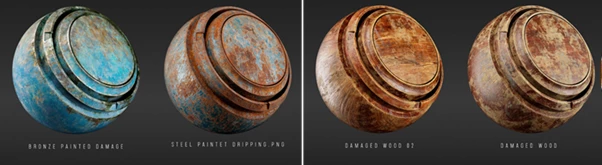
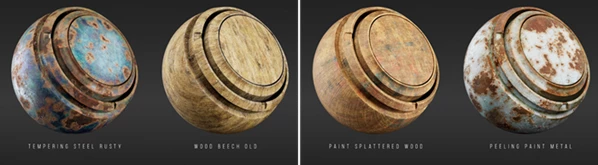
The collection contains 29 carefully designed smart materials focused on post-apocalyptic and damaged surface aesthetics. Each one delivers realistic wear patterns and cinematic texture depth.
Fully Customizable Layers
Every layer is editable, allowing you to tweak colors, surface damage, dust intensity, scratches, and aging effects based on your project needs.
Optimized and Lightweight
Despite their great detail quality, the materials are not overly heavy, helping maintain smoother performance inside Substance Painter projects.
Proper Layer Organization
All layers use correct naming conventions, making the workflow cleaner and much easier to understand during editing.
PBR Validated
Every material has been checked using a PBR validator to ensure physically accurate results for modern rendering pipelines.
Procedural Pattern Creation
The patterns and effects are generated using Substance Painter’s internal tools and shape manipulation systems, ensuring flexible procedural control.
Custom Shelf Preview Support
The included custom previews make asset browsing more visual and production-friendly.
Real Creative Use Cases
Artists can use Post-Apocalyptic Smart Materials for many different projects:
- Game environment texturing
- Sci-fi props and weapons
- Cinematic destroyed environments
- Industrial asset creation
- Hard-surface modeling presentations
- Unreal Engine and Unity projects
- Film-quality asset rendering
- Portfolio projects with realistic aging effects
For example, a simple metal container can instantly transform into a believable abandoned asset with layered rust, chipped paint, dust, and surface wear.
Tips for Better Results
Combine Multiple Materials
Instead of using only one smart material, try blending several together. Combining rust, dust, and painted metal layers can create more realistic storytelling.
Adjust Roughness Carefully
Small roughness changes dramatically affect realism. Lower roughness creates cleaner reflective surfaces, while higher roughness enhances aged and dusty looks.
Use Mesh Maps Properly
Always bake high-quality mesh maps before applying smart materials. Better curvature and AO maps produce much more believable wear effects.
Add Subtle Variation
Real surfaces are never perfectly uniform. Slightly changing color tones and dirt intensity helps avoid repetitive-looking textures.
Test Under Different Lighting
Post-apocalyptic materials can look very different depending on the lighting setup. Preview your textures under multiple HDRI environments for the best final result.
Why Artists Love This Pack
One of the biggest challenges in texturing is balancing realism with speed. Building advanced layered materials manually takes time and experience. Post-Apocalyptic Smart Materials simplifies that process by giving artists professionally crafted starting points that still remain highly customizable. This makes the pack useful for:
- Beginners learning Substance Painter
- Freelance texture artists
- Indie game developers
- Environment artists
- Cinematic creators
- Hard-surface modelers
The result is a smoother workflow and more visually impressive textures without wasting hours on repetitive setup work.
Final Thoughts
If you are interested in creating 3D models that represent damaged, post-apocalyptic environments and assets, then these smart materials are worth adding to your 3D painting toolkit.
Not only are they high quality, but they are also optimized for usability and performance within 3D Painter projects. By using these assets, artists can avoid spending hours creating each of these materials from scratch. Instead, they can focus more on the creative aspects of their projects.

Files Password : gfxplugin.com OR 123456