Downloadable Files
You can download RenderSmith for free at the end of this page.
Render Faster, Smarter, and Without Stress
Working on heavy After Effects projects can quickly turn into a nightmare for every designer out there. From unstable renders, crashed plugins, to overwriting their precious projects without meaning to, these all contribute to a stressful experience with the software. Enter RenderSmith.
With RenderSmith, designers can have a much more streamlined experience with their project workflow from start to finish without having to deal with any of the typical pain points associated with the software.
Whether you are working on motion graphics projects, VFX productions for film or television, social media content, or even cinematic projects, RenderSmith was built with these workflows in mind.
Why Smart Render Management Matters
Due to the complexity of After Effects projects, designers often encounter issues along the rendering process that make it difficult to manage their projects effectively.
Commonly encountered problems include:
- Plugin crashes on final export
- Heavy compositions crash during aerender
- Must rebuild compositions from scratch after a minor change
To fight against these issues, various smart rendering techniques have been implemented into After Effects over the years:
- Proxy creation and rendering
- Pre-rendering
- Automated backups
- Render crash recovery
- Compatibility checking
- Background rendering
For instance, by using proxy workflows, editors can avoid performance issues caused by heavy footage by using lightweight versions of their projects to render and preview their projects in After Effects.
Similarly, using pre-rendering techniques, editors can bake complex elements into their projects to avoid performance issues during the export stage. Using these systems, editors can experience more stable renders, fewer errors, and more time to focus on their craft and creative ideas.
Meet RenderSmith
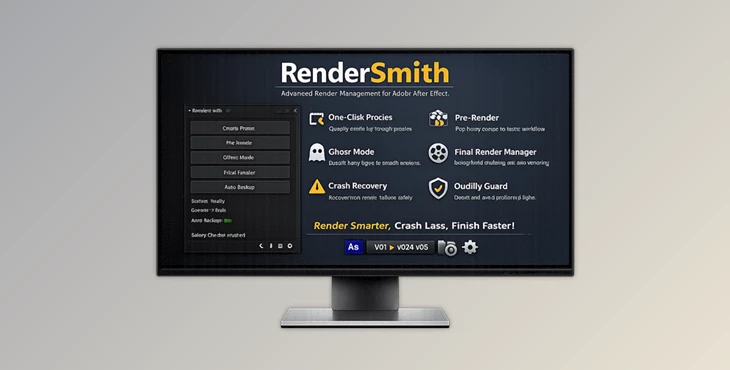
RenderSmith is a powerful toolkit for After Effects that allows editors to significantly improve their render workflows within the software. It offers features for proxy rendering, pre-rendering, crash recovery, and more, all within one panel that editors can use to enhance their projects at any stage.
RenderSmith is ideal for After Effects designers who are constantly working on heavy projects to ensure smooth and stable render workflows.
Features
Ghost Mode
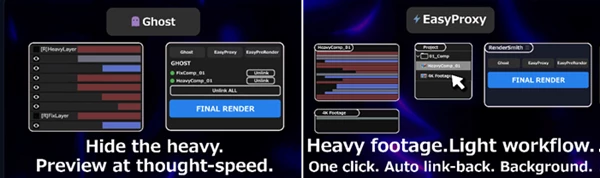
Ghost Mode allows editors to hide heavy After Effects layers to improve their project’s preview experience. Using Ghost Mode, editors can:
- Hide the layers that are creating the most strain on the software
- Preview their projects in real time without the strain of the heavy layers
- Reveal the hidden layers at any time without any negative impact on their projects
Ghost Mode is helpful for projects that include:
- Heavy particles
- 3D compositions
- Motion graphics projects
- VFX projects
Easy Proxy — Lightweight Workflow for Heavy Footage
The Easy Proxy feature in RenderSmith allows editors to instantly create proxies for their projects that contain heavy footage. Using Easy Proxy:
- RenderSmith will automatically generate proxy versions of the footage in its projects
- Link those proxies to their original projects
- Track the ownership of those projects
- Support batch processing
Easy PreRender
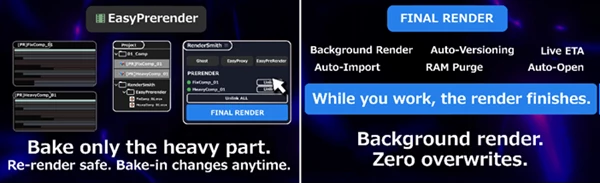
The Easy PreRender feature allows editors to bake specific parts of their composition into their projects. Benefits of Easy PreRender include:
- Faster project previews
- More stable After Effects renders
- Better project management
- Access to re-render specific parts of projects
Final Render — Professional Delivery Without Overwrites
Final output is where mistakes become expensive. RenderSmith protects this stage with a smarter rendering system. Key capabilities include:
- Background aerender support
- Live render progress tracking
- Auto-Versioning
- Existing Output Module compatibility
- Safe image-sequence handling
The Auto-Versioning system automatically appends version numbers like:
- _v01
- _v02
- _v03
This prevents accidental overwrites and keeps deliveries organized. For professional studios and freelancers alike, this alone can save massive amounts of time and stress.
Safe Mode — Crash Recovery Built-In
After Effects crashes are unavoidable in complex pipelines. RenderSmith minimizes the damage through Safe Mode. If Aerender crashes:
- RenderSmith detects the issue
- Identifies the suspected cause
- Offers one-click retry options
- Automatically creates stable intermediates
It can even report possible problematic effects or heavy layers, helping artists troubleshoot future renders more efficiently. This feature is particularly valuable for overnight rendering sessions or deadline-sensitive client work.
Quality Guard — Catch Silent Render Failures
Some plugins, such as Element 3D, may not crash during aerender — they simply render incorrectly. Quality Guard scans the work area before rendering and automatically switches to safer rendering methods when compatibility risks are detected. This proactive approach helps avoid:
- Corrupted frames
- Missing effects
- Incorrect plugin rendering
- Delivery mistakes
Instead of discovering problems after export, artists can prevent them before rendering even begins.
Auto Backup — Protection Beyond Undo
Every destructive action inside RenderSmith automatically creates a backup snapshot of your project file. Features include:
- Automatic AEP snapshots
- One-click rollback
- Configurable generation limits
- Async backup processing
Because backups happen silently in the background, the workflow never slows down. For professional projects, this safety net can become incredibly valuable during experimentation or last-minute revisions.
Notifications — Walk Away From the Render Queue
Long renders no longer require constant monitoring. RenderSmith can send notifications through:
- Discord
- Slack
- Telegram
Each message can include:
- Render status
- Comp name
- Render duration
- Error details
This allows artists to focus on other tasks while staying informed about render progress remotely.
Batch Queue Monitoring
Managing multiple renders becomes significantly easier thanks to live queue visualization. RenderSmith displays:
- Active render progress
- Waiting queue order
- ETA updates
- Current comp status
This creates a cleaner and more understandable rendering workflow, especially for large production environments.
Professional Tips for Better Results
Use Ghost Mode During Animation
When animating, precision is the goal, not final render quality.
Use Easy PreRender to Pre-Render Complex Elements
Elements like 3D layers and particles can be challenging to animate and export.
Use Auto Backup to Save Your Projects
Even experienced editors can accidentally destroy projects.
Use Quality Guard to Avoid Rendering Issues
Use Auto Backup and Quality Guard to prevent the most common issues editors face when using After Effects with RenderSmith.
Final Thoughts
RenderSmith is not just a render assistance tool for After Effects projects. It is a complete render management and workflow improvement system for After Effects editors. From proxy rendering to versioning, backup, and more, RenderSmith gives editors control over all aspects of their render processes.
For editors working on more demanding After Effects projects, tools like RenderSmith will prove themselves to be worth the investment. If you or your studio works on After Effects projects regularly, especially heavy projects, then RenderSmith is definitely worth exploring to improve the editing and rendering experience for your projects.

Files Password : gfxplugin.com OR 123456