Downloadable Files
You can download Pause Cleaner for free at the end of this page.
Remove Dead Air Without Breaking Your Workflow
If you edit podcasts, tutorials, interviews, or talking-head videos inside Adobe After Effects, you already know how much time disappears into manually cutting pauses between sentences.
A few seconds here, a few seconds there… and suddenly hours are gone. Pause Cleaner is designed to solve exactly that problem. Instead of manually slicing silence from your timeline, this tool automatically detects pauses in speech and creates a cleaner, tighter version of your audio or video.
The result feels faster, smoother, and more professional — without destroying the natural rhythm of the speaker. Whether you create YouTube tutorials, TikTok reels, online courses, podcasts, or corporate videos, Pause Cleaner helps you keep the flow moving while saving an enormous amount of editing time.
What Exactly Is Pause Cleaner?
Pause Cleaner is a professional cleanup tool for Adobe After Effects that detects silence and unwanted gaps inside audio or video recordings, then automatically removes or shortens them. Think of it as an intelligent assistant that handles the most repetitive part of dialogue editing for you. Instead of:
- Listening to long recordings
- Splitting layers manually
- Ripple deleting pauses
- Trying to keep audio and video synchronized
Pause Cleaner analyzes everything automatically and rebuilds your composition in seconds. The best part is that everything remains editable inside After Effects.
Why Faster Pacing Improves Videos
Modern audiences move fast. Long pauses, hesitation gaps, breathing delays, and empty dead air can make even valuable content feel slow or unpolished. By tightening those silent sections, videos immediately become:
- More engaging
- Easier to watch
- More energetic
- Better for retention
- More professional sounding
This is especially important for:
- Podcasts
- Online courses
- Tutorial videos
- Interview edits
- Social media reels
- Corporate explainers
- Audiobooks
- Lecture recordings
A cleaner pace keeps viewers focused on the message instead of the silence between words.
Meet Pause Cleaner
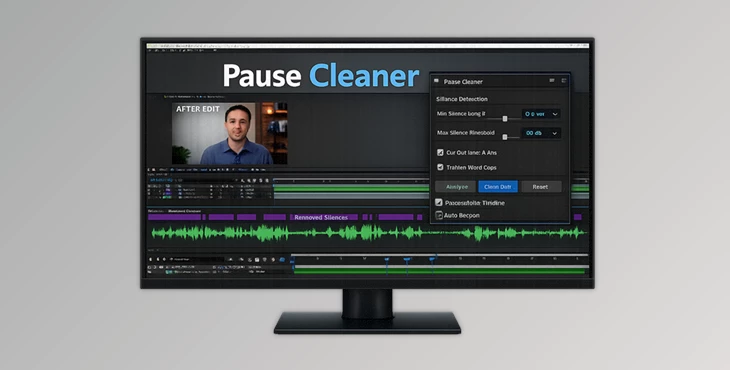
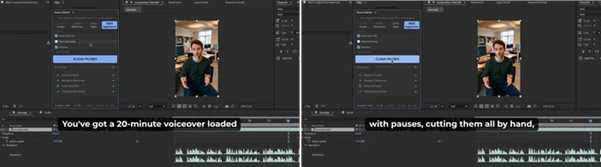
Pause Cleaner brings automatic silence cleanup directly into your editing workflow. The plugin works natively inside Adobe After Effects and supports both audio-only and full video editing projects. It can process voice-overs, interviews, screen recordings, podcasts, and talking-head footage while keeping everything perfectly synchronized.
The workflow is intentionally simple:
- Select a layer
- Choose a pacing preset
- Click “Clean Pauses”
- Review and apply the edits
That’s it.
Features
Smart Pause Detection
Pause Cleaner does more than detect simple silence. It can recognize:
- Quiet phrases
- Breath sounds
- Room tone
- Natural speech patterns
This helps avoid awkward cuts or false detections that often happen with basic volume-threshold tools. The result feels much more natural and human.
Native After Effects Workflow
One of the strongest parts of Pause Cleaner is that it works directly inside your existing composition. You can:
- Split layers instantly
- Create a cleaned precomp
- Render a finished export automatically
No complicated round-trip workflow is needed.
One-Click Presets
Different projects need different pacing. Pause Cleaner includes multiple presets, such as:
- Subtle
- Balanced
- Tight
- Aggressive
For example:
- Interviews usually benefit from softer cleanup
- Tutorials often need tighter pacing
- Short-form content works best with aggressive trimming
This makes it easy to match the editing style to the content.
Audio and Video Sync
Many tools only process audio. Pause Cleaner trims both audio and video together, which means lip sync and timing remain accurate throughout the project. This is extremely useful for:
- Talking-head YouTube videos
- Podcast camera recordings
- Educational content
- Social media edits
Preview Before Applying
Blind automatic cuts can be risky. Pause Cleaner solves this with a preview system that lets you:
- Inspect every detected pause
- Keep important pauses
- Shorten specific gaps manually
- Listen before applying changes
This gives editors much more confidence and control.
Hardware Accelerated Processing
Rendering large projects can be slow, especially with long recordings. Pause Cleaner uses hardware acceleration where available, including VideoToolbox support on macOS, allowing hours of footage to process in minutes instead of hours.
Multiple Export Formats
The tool supports many professional delivery formats, including:
- H.264
- HEVC
- ProRes 422
- DNxHR
- WAV
- MP3
- AAC
You can automatically match the source codec or customize export settings manually.
Real Editing Situations Where Pause Cleaner Helps
Podcast Editing
Long-form conversations usually contain:
- Thinking pauses
- Repeated phrases
- Empty gaps
Pause Cleaner speeds up cleanup dramatically while keeping the conversation natural.
Tutorial Videos
Educational content benefits from faster pacing. Removing hesitation gaps helps tutorials feel more polished and easier to follow.
Social Media Content
Short-form content depends heavily on pacing. Aggressive pause cleanup helps keep:
- TikTok videos
- Instagram Reels
- YouTube Shorts
fast, energetic, and attention-grabbing.
Voice-Over Production
Voice-over artists often record multiple takes with natural pauses between lines. Pause Cleaner helps clean these recordings quickly before final mixing.
Pro Tips for Better Results
Don’t Remove All Pauses
Natural pauses allow people to breathe. Removing all pauses can make vocal content sound robotic. Use the Balanced option as your starting point for most projects.
Review Content for Emotional Pauses
Some natural pauses in media content serve an emotional purpose. For example, pauses in interviews. Preview the edits before applying them to your project.
Match Pace to Your Intended Audience and Platform
Consider where you’ll publish your videos when editing with Pause Cleaner. For example:
- YouTube tutorials: Balanced or Tight
- TikTok/Reels: Aggressive
- Interviews: Subtle
- Audiobooks: Balanced
Use Precomps for Safer Editing
Pause Cleaner allows you to create a “precomp” of your edited project. This means the original content is untouched, but a faster version of your project is created. This is beneficial for projects with a lot of editing to perform.
Final Thoughts
Whether you edit podcasts, videos, or interviews, Pause Cleaner will save you hours of manual editing. Instead of editing silence and pauses out of each project, Pause Cleaner will do it automatically.
All within After Effects. Pause Cleaner is a tool that will dramatically increase your editing speed and the engagement factor of your videos. For editors of podcasts, tutorials, interviews, and more, Pause Cleaner is a tool that you will find difficult to edit without.

Files Password : gfxplugin.com OR 123456