Downloadable Files
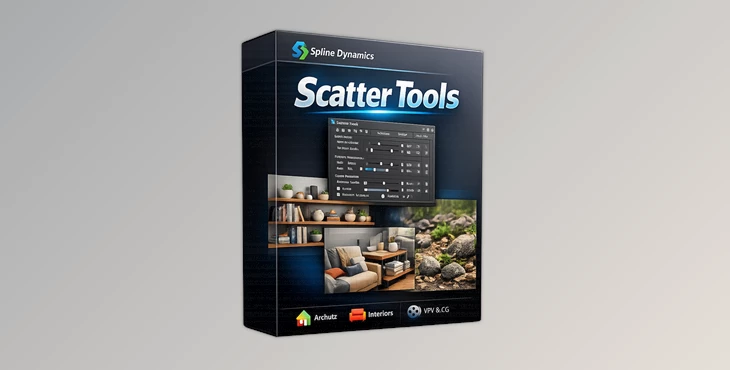
You can download Scatter Tools for free from the end of this page.
Make Object Placement Faster and Smarter
In large 3D scenes with hundreds of objects, manually placing each of them can become frustrating and time-consuming. Whether you are creating interior visualizations, decorating a shelf with multiple products, or even creating motion graphics with multiple objects in the scene, repeatedly performing similar actions on objects can slow you down in the creative process.
Scatter Tools becomes incredibly useful in these instances. It allows artists to scatter, organize, randomize, and redistribute their objects throughout their scene without the use of complicated particle systems.
What Is Scatter Tools?
This tool is a professional object placement and distribution plugin designed for 3ds Max users who want faster scene creation with more natural-looking results. Instead of manually moving furniture, books, decorations, trees, props, or assets one by one, the plugin intelligently distributes selected objects across surfaces, splines, vertices, or custom points.
This creates scenes that feel organic and believable while saving hours of repetitive work. For example:
- Filling bookshelves with books automatically
- Distributing decorative objects on tables
- Populating desks with accessories
- Scattering environmental props in game scenes
- Creating realistic room layouts in ArchViz projects
- Rearranging multiple objects instantly for design variations
Because objects remain editable after scattering, artists can still manually tweak details whenever needed. This flexibility is one of the biggest advantages of the plugin.
Why Artists Love Scatter Tools
One of the biggest strengths of Scatter Tools is how simple it feels despite being extremely powerful. Unlike many scattering systems that use particles or complicated dependencies, this plugin keeps everything clean and accessible. You can always move, rotate, edit, or restore objects at any time.
This makes scene building much more comfortable and non-destructive. The plugin is especially useful for:
- Architectural Visualization artists
- Motion graphics designers
- VFX artists
- Industrial designers
- 3D environment artists
- Game asset creators
- Interior designers
Its intelligent distribution methods also help scenes look less artificial. Random rotation, scaling, spacing, and collision detection create much more realistic compositions automatically.
Features
Smart Scatter Methods
This product includes multiple ways to distribute objects depending on your project needs. You can scatter objects:
- Across an entire surface
- Based on face orientation
- Using spline knots or vertices
- At object pivot locations
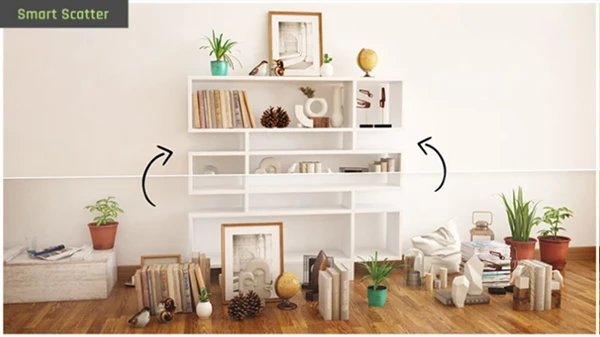
- With the intelligent Auto-Populate Furniture system
These methods help artists create realistic object placement much faster than manual editing.
Incredible Auto-Populate Furniture System
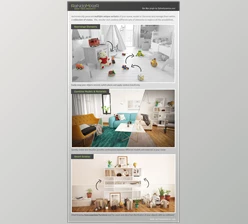
One of the most impressive features is the smart furniture population algorithm. This tool can automatically place books, decorations, toys, household items, and accessories across shelves, desks, bookcases, and tables in a natural way. The plugin avoids collisions automatically, helping scenes look believable instead of mechanically generated. For ArchViz artists, this feature alone can save massive amounts of production time.
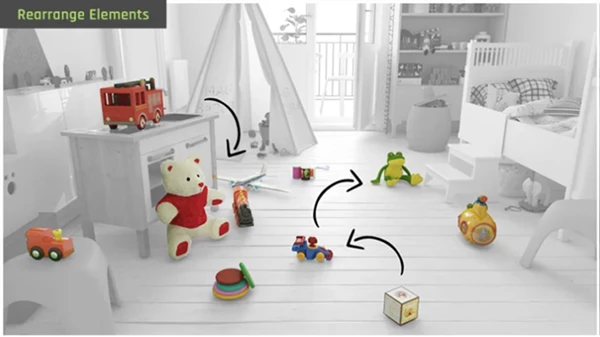
Switch Places Tool
The built-in Switch Places feature makes experimenting with layouts incredibly fast. Artists can instantly swap object positions while keeping rotations or restricting swaps based on object dimensions. This is extremely useful when testing different furniture arrangements or design variations during client work.
Randomize Transforms
Natural variation is essential in professional 3D scenes. Scatter Tools allows users to randomize:
- Position
- Rotation
- Scale
This prevents repetitive patterns and helps scenes feel organic and visually interesting. Small variations can dramatically improve realism in both close-up renders and large environments.
Collision Detection
The plugin includes automatic collision detection for all scattering methods. This prevents overlapping objects and keeps arrangements physically believable without manual cleanup. For crowded interior scenes or asset-heavy environments, this feature becomes a huge time saver.
Full Editable Workflow
Unlike particle-based scattering systems, Scatter Tools never locks your objects into a complicated setup. After scattering, every object remains fully editable and accessible inside the scene. Artists can:
- Move objects manually
- Adjust transforms
- Restore original placements
- Continue modeling normally
This freedom is one of the reasons many professionals prefer this workflow.
Professional Tips for Better Results
Use Small Rotation Variations
Adding a small amount of random rotation to objects can make them look much more natural when viewed up close or in a render. This is a helpful feature for any props where it is common to have multiple instances of the same object, such as books, decorative props, plants, and table accessories.
Combine Multiple Scatter Methods
Scatter Tools allows you to use multiple scatter methods so that your scenes can have more realistic and believable environments. For instance, you can scatter objects across a surface and then use the pivot scattering method to place additional objects at various points on the objects already in the scene.
Keep Collision Detection Enabled
Collision detection will automatically prevent objects from overlapping in your scene. This is a must-have feature if you are creating scenes with a lot of objects, such as kitchens, shelves of products, and desks in an office.
Manually Refine Hero Areas
While Scatter Tools automates the object placement process, you can manually adjust the position of important objects in your scene. Combining Scatter Tools with manual object placement adjustments will allow you to create the most realistic scenes.
Final Thoughts
For those 3ds Max artists looking to significantly speed up their scene construction process, Scatter Tools is an excellent plugin. The intelligent object placement, transform randomization, and editable object workflow make the most sense for ArchViz, VFX, and motion graphics projects.
By using Scatter Tools, artists can remove repetitive work from their scenes while still having complete control over the objects at any time. If you work with any kind of 3D scene construction in 3ds Max, Scatter Tools will make your life easier.

Files Password : gfxplugin.com OR 123456