Downloadable Files
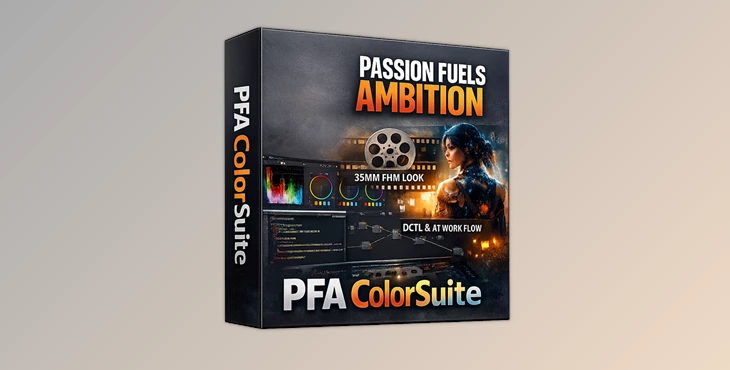
You can download PFA ColorSuite for free from the end of this page.
Bring Real Cinematic Depth to Digital Footage
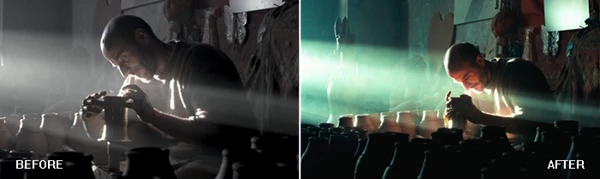
With modern digital cameras, footage is captured as the sharpest and most technically perfect possible record of the world as it reflects off the subject being filmed. The resulting imagery from digital cameras, however, can often feel sterile and lifeless when viewed on television or on screens as a result.
Colorists spend countless hours striving to achieve the same look and feel as that of traditional motion picture film stock. This is where the PFA ColorSuite comes in. By simulating the chemistry of film and the physics of how light interacts with moving subjects on film, PFA ColorSuite creates imagery that is not only cinematic but also deep with the organic look and feel of film.
Whether you make music videos, commercials, YouTube films, documentaries, or even social media content, the PFA ColorSuite will aid you in transforming your digital footage into cinematic scenes.
What Makes PFA ColorSuite Different?
Most color grading tools simply push colors around digitally. PFA ColorSuite approaches color grading from a completely different perspective by simulating the physics of real film emulsions and optical behavior. This means:
- Colors gain natural depth instead of artificial saturation
- Highlights roll off smoothly instead of clipping harshly
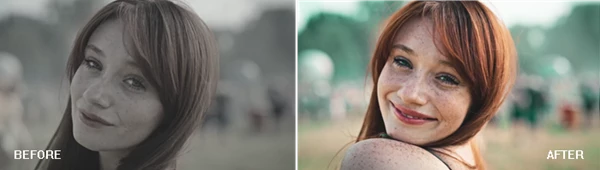
- Skin tones stay realistic during aggressive grading
- Images feel more dimensional and organic
- Digital footage becomes softer, richer, and more cinematic
For editors and filmmakers, these improvements create visuals that immediately feel more professional and emotionally engaging.
Features
AI-Powered Color Intelligence
One of the most impressive parts of PFA ColorSuite is its intelligent AI engine.
Cinepulse AI
This system learns your personal grading style and adapts to your workflow. Instead of fighting random automated tools, the plugin studies your preferences and helps automate repetitive grading tasks. This can dramatically speed up professional workflows for colorists working on large projects or recurring client work.
Cinepalette AI
This feature can analyze a reference frame and recreate its look on your own footage using over 125 adjustable parameters. For example, if you want your footage to resemble a specific cinematic movie scene, the AI can intelligently rebuild that aesthetic while still allowing full creative control.
Advanced Film Color Physics
Color Density
Traditional film becomes darker as colors intensify because of layered chemical dyes. Digital cameras do not naturally behave this way. This product recreates this film behavior, giving saturated colors more cinematic weight and realism. This helps eliminate the plastic and oversaturated digital appearance commonly found in modern footage.
Color Swap
Perform massive hue transformations without introducing ugly artifacts or broken color transitions. This is especially useful for:
- Music videos
- Fashion edits
- Stylized cinematic projects
- Commercial color transformations
Color Skin Protection
Aggressive color grading often destroys skin tones. This tool intelligently protects human skin colors while allowing the rest of the image to receive dramatic grading adjustments. The result is a more natural and believable final image.
Cinematic Contrast Engine
Film Tonal Curve
Digital highlights often clip harshly into pure white. Film behaves differently with softer highlight rolloff and deeper shadow transitions. This feature restores that smooth cinematic contrast curve, creating a much more expensive-looking image.
Film Spectral Contrast
Instead of adjusting contrast globally, this system manages contrast separately across color channels. This creates stronger color separation and a subtle three-dimensional depth that is difficult to achieve with traditional grading tools.
Film Split Tone
Adds luminance-reactive color separation that “breathes” naturally with the scene. This gives footage a more emotional and atmospheric cinematic feeling.
Organic Texture and Film Chaos
Digital footage can sometimes feel too clean and clinically sharp.
Film Texture
The plugin introduces procedural film grain, halation, bloom, and optical softness designed to mimic real film behavior. Unlike basic overlays, these effects are mathematically generated for higher realism and cleaner integration. This is extremely useful for:
- Narrative filmmaking
- Vintage cinematic looks
- Music videos
- Commercial fashion work
- Social media cinematic edits
Universal Preset Workflow
Traditional LUTs are limited because they only store fixed color information. PFA ColorSuite presets store over 60 adjustable parameters, allowing creators to transfer complete cinematic looks between projects and supported software. This gives much more flexibility and consistency across large productions.
Hardware-Based Licensing
Instead of locking users to one application, the license works across supported software on the same machine. This means creators can move more freely between workflows in:
- DaVinci Resolve
- Future Premiere Pro support
- Future After Effects support
- Future Final Cut Pro support
Real-World Creative Uses
Music Videos
Create bold cinematic palettes, glowing highlights, and film-style texture for visually striking edits.
Commercial Advertising
Give products richer color separation and premium cinematic contrast that immediately feels more expensive.
Short Films
Transform digital footage into emotionally immersive scenes with realistic film softness and organic tonal behavior.
YouTube Cinematic Content
Help creators stand out with polished visuals that look dramatically more professional than standard digital grading.
Pro Tips for Better Results
Start Subtle
The most common beginner mistake with color grading is to use too much of each effect. The best results often come from using the suggested levels for each parameter or even slightly reducing the effect for certain features within your project.
Protect Skin Tones
Use the skin tone protection feature in your project when applying color grading features that are likely to drastically change the colors within your footage.
Combine Texture Features Carefully
Do not use all of the texture features within PFA ColorSuite at once for your project. This will create an overly textured project that is not representative of motion picture film stock.
Use Reference Frames
Use the reference footage in your project to match some of the color grading features in your project to some of your favorite film scenes and advertisements.
Build Your Own Presets
Create your own color grading presets using the features and parameters of PFA ColorSuite and save them under your editing software for later use on other projects.
Final Thoughts
PFA ColorSuite is much more than a color grading plugin. It is a complete suite of tools that filmmakers and editors use to create digital projects that have the same depth, realism, and cinematic feel as motion picture cameras.
With AI-assisted color grading, film emulation, cinematic contrast adjustments, and procedural texture generation, the PFA ColorSuite allows editors and filmmakers of all levels to achieve high-end color grading results without the complex techniques required to produce such outcomes.
This tool is a deep, powerful tool for anyone who is truly dedicated to mastering the craft of color grading in digital editing.

Files Password : gfxplugin.com OR 123456