Downloadable Files
You can download Snap Measure for free at the end of this page.
Bring CAD-Level Precision Into Blender
If you are working on projects that require precise measurements, Blender may not be the ideal software for you. This is due to its limitations in accurately measuring and displaying dimensions within the software.
Snap Measure was made to give Blender users the accuracy required in modeling projects that need precise measurements. No more making estimations of measurements required for modeling projects. With Snap Measure, users can have accurate dimensions directly within Blender.
What is Snap Measure?
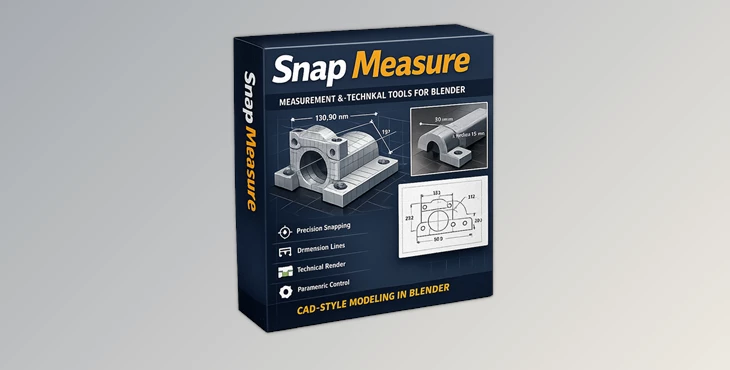
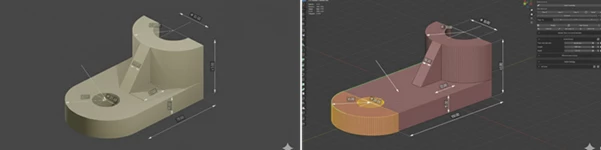
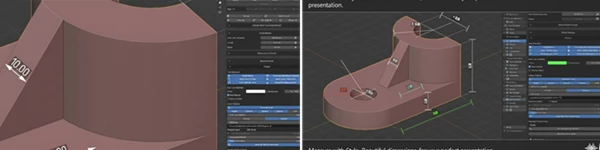
Snap Measure is a professional Blender add-on designed for precision measurement, technical visualization, and CAD-like workflows. It allows artists, architects, product designers, and engineers to create highly accurate dimensions while also turning those measurements into active modeling tools. The add-on supports:
- Linear measurements
- Angle dimensions
- Arc and bevel radius measurements
- Projected dimensions
- Technical drawing rendering
- Interactive modeling drivers
- Blueprint-style outputs
This makes it extremely valuable for projects such as:
- Architectural floor plans
- Product visualization
- Mechanical concepts
- Furniture design
- Technical illustrations
- Hard-surface modeling
- Engineering presentations
The biggest advantage is workflow efficiency. Instead of constantly switching between Blender and external drafting software, everything stays integrated in one environment.
Why Precision Matters in 3D Projects
Small inaccuracies in measurements can often have a significant impact on your project’s final outcome. For architectural projects, incorrect dimensions will make them not to scale. For product design projects, incorrect measurements may impact how well the product can be manufactured.
For projects that include hard-surface modeling, incorrect bevel radius measurements may make for unrealistic modeling within the project. Snap Measure was made to provide visual control over each dimension within your project. You can snap your measurements to the following:
- Vertices
- Edges
- Midpoints
- Faces
- Bounding box corners
Features
Intuitive Snapping System
One of the strongest parts of Snap Measure is its intelligent snapping workflow. You can quickly snap dimensions to exact geometry points with visual feedback, making the process feel smooth and natural. This is especially useful for:
- Architectural layouts
- Mechanical parts
- Modular assets
- Interior measurements
The ability to snap to existing virtual measurement points also speeds up complex drafting workflows dramatically.
Advanced Measurement Tools
Snap Measure supports far more than simple distance calculations. You can create:
- Linear dimensions
- Angle measurements
- Arc radius dimensions
- Bevel radius measurements
- Axis-projected distances
These tools are ideal for technical modeling and detailed presentations where standard Blender measurement tools may feel too limited. Chain Mode is another huge productivity boost because it allows you to continue placing measurements continuously without restarting the tool each time. For example, when dimensioning an entire floor plan or machinery layout, this can save a massive amount of time.
Full Annotation Customization
Professional presentations often require consistent visual styles. Snap Measure gives full control over:
- Colors
- Fonts
- Font sizes
- Line thickness
- Decimal precision
- Arrow styles
- Architectural tick marks
- ISO-style arrowheads
You can also add:
- Prefix text
- Suffix text
- Notes above dimensions
- Notes below the dimensions
This flexibility helps create cleaner technical drawings that match professional drafting standards or client branding requirements.
- Interactive Modeling Drivers
This feature makes Snap Measure much more than just a ruler. Measurements can actually drive Blender properties dynamically. You can use dimension values to control:
- Object scale
- Modifier settings
- Constraints
- Parametric adjustments
This creates an efficient procedural workflow where changing one measurement automatically updates connected elements. For architectural and industrial design projects, this can dramatically reduce repetitive adjustments.
Vertex Group Scaling
A very practical feature for model correction and resizing. You can assign vertex groups to measurement endpoints and then type a target dimension value directly into the interface. Snap Measure automatically scales the selected mesh section to the exact size. This is especially useful for:
- Correcting imported models
- Adjusting architectural layouts
- Refining product proportions
- Hard-surface scaling fixes
Technical Renderer
One of the most impressive tools included in Snap Measure is the built-in technical renderer. With a single click, you can generate clean blueprint-style renders complete with:
- Hidden line handling
- White backgrounds
- Technical dimensions
- Vector-like line art
This makes it ideal for:
- Engineering sheets
- Product manuals
- Client presentations
- Construction visuals
- Technical portfolios
The section view system is also extremely powerful because it can generate cutaway views with automatic cross-hatching for professional technical illustrations.
Overlay Measurements on Final Renders
Snap Measure also allows viewport dimensions to appear directly over Cycles or Eevee renders. This is perfect for:
- Product showcases
- Educational illustrations
- Client revisions
- Construction previews
Instead of manually adding annotations in Photoshop later, everything stays integrated inside Blender.
Better Organization for Complex Projects
Large scenes can quickly become difficult to manage. Snap Measure solves this with:
- Measurement Groups
- Preset Systems
- Favorites Panel
- Solo Mode
These tools make it easy to organize large technical projects without cluttering the viewport. For example:
- Architects can separate floor dimensions by room.
- Product designers can organize measurements by component.
- Technical artists can isolate important annotations instantly.
Professional Tips for Better Results
Use Chain Mode for Faster Workflow
When creating floor plans or mechanical layouts, Chain Mode can massively reduce repetitive clicks and speed up dimension placement.
Create Presets for Different Clients
Save custom styles for:
- Architectural projects
- Engineering presentations
- Product visualization
- Technical documentation
This keeps visual consistency across projects.
Combine Section Views with Technical Rendering
Using boolean cutters together with the Technical Renderer can create extremely impressive cross-section illustrations for presentations and documentation.
Use Drivers for Parametric Modeling
Connecting dimensions to modifiers and object properties creates a semi-procedural workflow that saves time during revisions. This is especially useful when clients frequently request size changes.
Final Thoughts
Overall, Snap Measure for Blender is much more than just an add-on that will allow you to measure your projects. It is a program that was created for professionals who require the accuracy and technical features that Snap Measure offers. From creating technical drawings to making parametric modeling adjustments, Snap Measure is a program that will improve the overall quality of the projects that you create.
Whether you are an architect, engineer, or even a hard-surface Blender artist, Snap Measure will significantly improve the quality of your projects. For anyone who values precision, organization, and the production of professional technical illustrations, Snap Measure is definitely worth exploring.

Files Password : gfxplugin.com OR 123456

![Download Gumroad – Measurable v1.2 [Blender Addon]](https://dls3.gfxplugin.ir/Download_Files/19759/SearchSmall/banner.png)