Downloadable Files
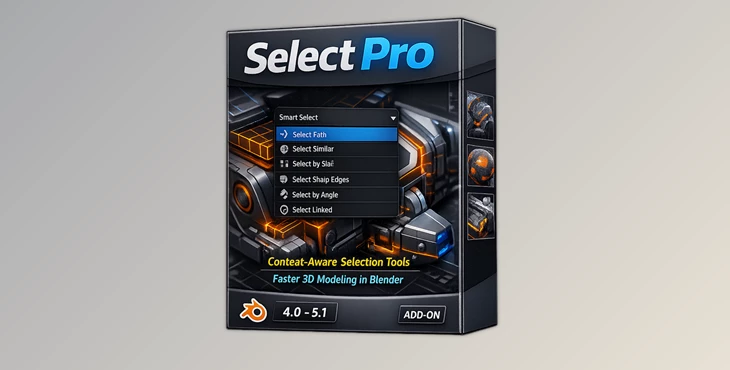
You can download the product Select Pro for free at the end of this page.
Smarter Selections, Faster Workflow
When working on complex 3D scenes within Blender, selecting the correct vertices, edges, faces, and objects can take up more time than modeling itself.
The addition of Select Pro will drastically improve the selection of objects within your Blender scene by predicting which selection tools will best suit your current scene. This tool will significantly reduce the time spent selecting the proper objects and improve the artist’s experience with the software.
From building hard-surface models to creating entire game environments, the selection tool will give you a smarter and more intuitive workflow with this new addon.
Why Smart Selection Matters
When working on 3D modeling projects, it is essential to have precision with the selection of objects.
Traditional methods of selecting specific objects take up several steps that the artists must complete manually. However, as projects have become more complicated, artists require tools that can automatically recognize the object’s geometry and its context within the scene.
Select Pro evaluates the following to automatically select the objects that artists require:
- Scene structure
- Mesh topology
- Connected geometry
- Object hierarchy
- Similarity between model components
The ability for this tool to automatically select the objects within a project that artists require will significantly reduce the amount of time spent on selection.
For example, this tool can significantly cut the time it takes to choose a series of connected edges. Furthermore, the tool can also detect all the meshes containing similar components and automatically select them. Finally, this tool can also identify objects with similar names and automatically select these objects as well.
Meet Select Pro
Select Pro is an all-in-one selection tool for Blender that aims to provide artists with the tools and methods to increase their efficiency in the software.
This tool will auto-highlight the correct selection tools for the situation in your current workflow. This will significantly reduce the time spent searching for the correct tool and will provide an improved experience for each artist using the software.
Features
One of the strongest features of Select Pro is its predictive selection system. The addon evaluates:
- Current mode
- Geometry type
- Mesh topology
- Scene structure
Then it recommends the most useful selection methods automatically. This creates a smoother workflow, especially in large or complicated projects.
Contiguous Edge Path
This tool allows you to select flowing edge paths through complex geometry using angle thresholds and predictive continuation. It is extremely useful for:
- Hard-surface modeling
- Retopology workflows
- Mechanical mesh cleanup
- Loop-based editing
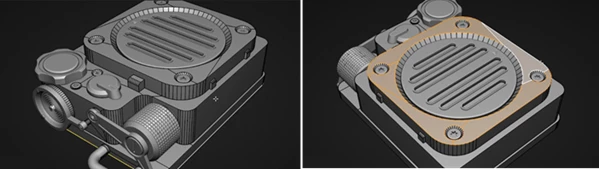
Instead of manually selecting every edge loop, artists can achieve clean edge flow selections in seconds.
Face Surface Selection
The Face Surface tool intelligently selects connected surfaces using predictive face similarity and boundary analysis. Perfect for:
- Surface isolation
- Material assignment
- Sculpt preparation
- Mesh segmentation
This feature helps maintain cleaner topology management during production.
Similar Islands Detection
Working with repeated geometry becomes significantly easier. This tool detects similar mesh islands using:
- Bounding volume comparison
- Structural similarity
- Shape complexity analysis
Useful for:
- Modular assets
- Environment art
- UV workflows
- Repeated mesh optimization
Similar Edges Selection
Select all connected edges sharing properties like:
- Sharp marks
- Seams
- Bevel weights
This makes mesh editing and cleanup dramatically faster for complex projects.
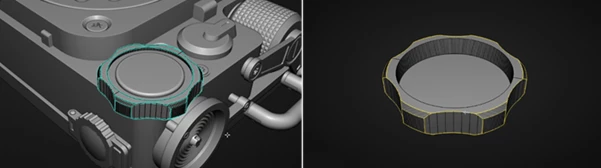
Boundary Edge Detection
Boundary edges can be selected based on:
- Convexity
- Concavity
- Naked edge detection
This is especially valuable for:
- Hard-surface detailing
- Open mesh repair
- Retopology refinement
Vertex Proximity Selection
This feature selects vertices based on distance from a chosen vertex. It supports:
- Connected vertices
- Unconnected vertices
- Distance threshold control
Ideal for precision editing and localized mesh operations.
Face Direction Selection
Artists can quickly select connected faces using face-normal direction thresholds. This becomes extremely useful when:
- Separating angled surfaces
- Cleaning shading issues
- Preparing game-ready assets
- Optimizing geometry
Object Hierarchy Selection
Large scenes become easier to manage with hierarchy-based selection tools. Users can select:
- Root objects
- Parent chains
- Ancestors
- Entire family trees
Perfect for animation rigs, scene organization, and environment assembly.
Similar Size Detection
This tool compares object dimensions and bounding volume to detect similarly sized objects. Helpful for:
- Asset organization
- Environment balancing
- Modular design systems
Similar Name Matching
Select Pro can intelligently identify similarly named objects using:
- Affix stripping
- Fuzzy string matching
This becomes incredibly useful inside large production scenes with hundreds of objects.
Professional Tips for Better Results
Use Predictive Selection Frequently
The more you rely on Select Pro’s prediction system, the faster your workflow becomes. Instead of manually searching for tools, let the addon guide the process.
Combine Multiple Selection Methods
For advanced workflows, combine:
- Similar edge selection
- Face surface tools
- Boundary edge detection
This creates highly accurate mesh isolation workflows.
Great for Large Production Scenes
The hierarchy and naming tools become especially powerful when managing large environments or animation scenes with many linked objects.
Improve Retopology Speed
Using contiguous edge paths together with face direction selection can dramatically accelerate retopology workflows.
Final Thoughts
Select Pro is an excellent tool that significantly improves the workflow of 3D artists in Blender.
This all-in-one tool for object selection within Blender will drastically improve your efficiency in the software.
Whether you are a Blender beginner or an experienced 3D artist, this tool will significantly improve your work process. With the selection of this addon, artists will have a smart, fast, and intuitive experience with their projects in Blender. Select Pro is definitely worth considering for any 3D artists looking to create smarter selections and improve their workflow.

Files Password : gfxplugin.com OR 123456