Downloadable Files
You can download Skinworks for free at the end of this page.
Beautiful Skin in Just a Few Clicks
When it comes to enhancing the retouching of beauty shots, one of the most important aspects is having natural-looking skin. The last thing any retoucher wants is to create harsh edits on the skin that ruin the project.
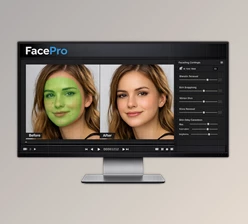
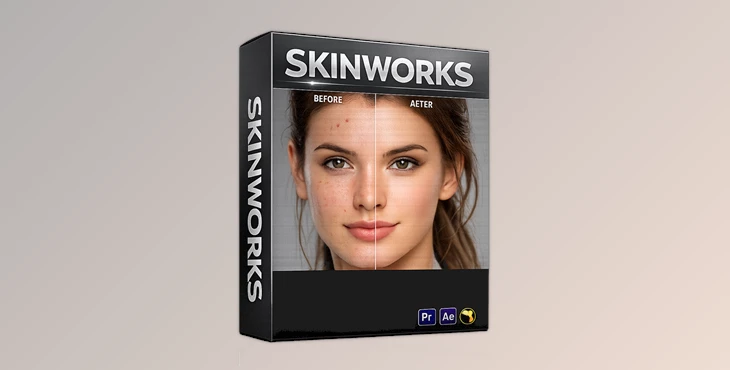
Skinworks was created for professional artists looking for a way to achieve professional-looking skin retouching with simple clicks and with realistic results. Skinworks can automatically remove acne, even out skin tones, and add glossy highlights to make the skin look as attractive as possible. The best part about Skinworks is that it will preserve the texture of an individual’s skin while enhancing their natural beauty.
What Is Skinworks and Why Is It Useful?
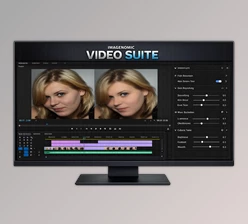
This tool is a professional skin retouch plug-in designed for video editing and compositing software. It offers advanced beauty-retouching tools that allow creators to improve skin quality without damaging important facial details. Instead of manually fixing every skin imperfection frame by frame, Skinworks automates the process intelligently using edge detection and skin-tone recognition technologies. This means:
- Acne and moles can be removed naturally
- Uneven skin tones become smooth and balanced
- Skin and lips gain attractive cinematic highlights
- Eyes, mouth, and facial contours remain untouched and sharp
These features significantly improve the final visual quality while saving a huge amount of editing time. For example:
- Beauty commercials can achieve clean Hollywood-style skin
- Wedding videos can look softer and more elegant
- Fashion projects gain premium cinematic polish
- Portrait videos become more professional and visually appealing
Meet Skinworks
This product is built specifically for creators who need fast, natural, and high-quality skin enhancement tools inside their favorite editing software. The plug-in currently includes three professional modules:
- Concealer
- Foundation
- Gloss
Each module focuses on a different aspect of beauty retouching.
Features
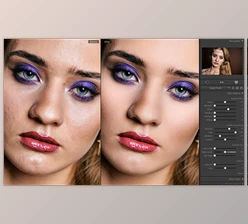
The Concealer tool removes acne, blemishes, and moles while preserving the original skin texture. Unlike aggressive smoothing tools, it keeps the skin realistic and detailed.
Key Highlights
- Natural blemish removal
- Preserves skin texture
- Edge detection protects facial contours
- Skin-tone detection applies effects only where needed
This makes close-up beauty shots look clean without appearing fake or over-processed.
Foundation – Smooth and Balanced Skin Tone
The Foundation module focuses on correcting uneven skin tones and discoloration while maintaining natural detail.
Key Highlights
- Removes uneven color and spots
- Creates smooth and balanced skin
- Maintains original texture
- Smart edge protection for facial features
This feature is especially useful for beauty videos, interviews, commercials, and cinematic portraits where smooth skin quality is essential.
Gloss – Cinematic Shine and Dimension
The Gloss module enhances highlights across both bright and dark areas of the skin to create a radiant and attractive look.
Key Highlights
- Adds glossy skin highlights
- Enhances lips naturally
- Restores three-dimensional skin appearance
- Can also enhance cars and night scenes
This feature is excellent for fashion videos, luxury product shots, and dramatic cinematic lighting setups.
Simple Controls, Fast Workflow
One of the biggest advantages of Skinworks is its user-friendly workflow. The retouching process usually takes only a few simple steps:
- Adjust the effect parameters
- Create masks for selected areas
- Apply the effect
That’s it. The clean and simple interface makes the plug-in accessible for both professionals and everyday users.
Compatible Software and Systems
Skinworks supports many professional editing and compositing applications, including:
- Adobe After Effects
- Adobe Premiere Pro CC
- The Foundry Nuke
- Autodesk Flame 2020+
- DaVinci Resolve
- Other OpenFX-supported software
Supported Operating Systems
- Windows 10
- macOS 10.13 / 10.14
- Linux (Rocky Linux 8 or later recommended)
This broad compatibility makes Skinworks suitable for many professional production pipelines.


Pro Tips for Better Skin Retouching
Keep It Natural
The best beauty retouching is often the one viewers cannot notice.
Useful Tips
- Avoid excessive smoothing
- Use Gloss carefully for realistic highlights
- Apply effects selectively with masks
- Preserve skin texture whenever possible
- Combine Foundation and Concealer for balanced results
Small adjustments usually create more cinematic and believable outcomes.
Final Thoughts
Skinworks will give your projects professional Hollywood retouching with ease and naturally retouched skin. With the best features for editing software, Skinworks is perfect for photographers, filmmakers, beauty pageants, and content creators who want to enhance the skin in their projects.
Whether you are editing fashion, portrait, wedding, or social media videos, Skinworks will assist you in creating professional projects. This tool is definitely worth trying to enhance the beauty of the individuals in your videos and give them a professional look that will impress your audience.

Files Password : gfxplugin.com OR 123456