Downloadable Files
You can download MeltFlow Blur for free at the end of this page.
Bring Motion and Energy Into Your Visuals
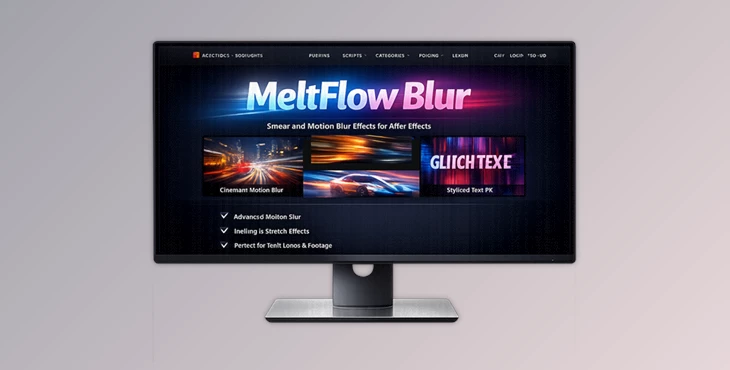
Sometimes you need more than just a simple blur. That’s when MeltFlow Blur becomes incredibly useful. MeltFlow Blur is a GPU-accelerated After Effects plugin that allows you to create dynamic melting effects in your compositions.
+MeltFlow Blur is ideal for projects such as music visuals, futuristic effects, abstract motion graphics, and VFX films. The unique flowing effects will draw the attention of your viewers. And all of this at the speed of your GPU!
What Makes MeltFlow Blur Different?
Traditional blur effects usually soften an image evenly. MeltFlow Blur works differently by creating directional motion and liquid-like distortion around a specific area of your composition. This means you can:
- Focus the effect around a subject
- Simulate melting motion
- Create energetic transitions
- Add surreal atmospheric movement
- Build stylized sci-fi visuals
Because the blur reacts to turbulence maps and directional controls, the final result feels much more cinematic and artistic compared to standard blur plugins.
Features
Position the Blur
MeltFlow Blur lets you position the blur exactly where you would like it in your composition. With MeltFlow Blur, you can adjust the:
- Position
- Size
- Aspect ratio
- Rotation angle
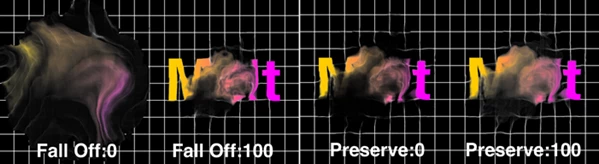
You can even use the Falloff feature to allow the blur to naturally fade towards the edges of your composition.
Natural-Looking Motion Flow
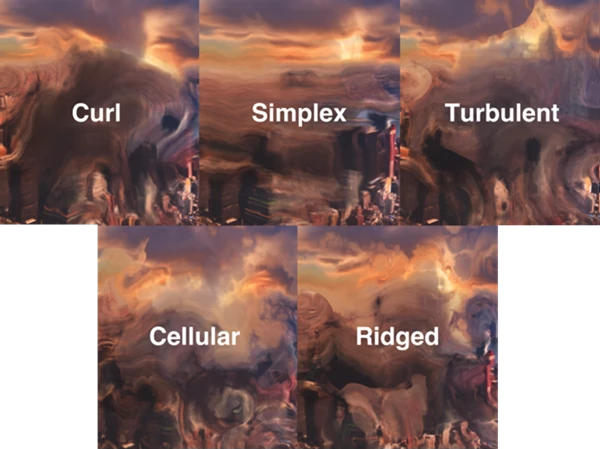
One of the strongest features of MeltFlow Blur is its flow simulation system. You can choose from five different turbulence maps to create unique movement styles. Each map changes how the blur spreads and flows across the image.
The animated turbulence system adds continuous motion, making still frames feel dynamic and alive. Seamless looping support is especially useful for motion graphics, looping backgrounds, and social media visuals.
Preserve Original Details
The Preserve control allows part of the original image color and detail to remain visible beneath the effect. This is important because it keeps compositions readable while still adding stylized distortion.
Instead of completely destroying image clarity, you can blend the melting effect smoothly into the original footage.
Reverse the Blur Direction
The Inward setting reverses the melting direction of the blur. This creates interesting visual variations:
- Pulling motion toward the center
- Energy collapse effects
- Reverse liquid simulations
- Stylized vortex animations
This small feature can dramatically change the overall mood of a scene.
Wind and Directional Control
The built-in wind controls let you guide the blur direction naturally across the frame. This is extremely useful for:
- Speed effects
- Atmospheric motion
- Action scenes
- Dynamic title animations
Instead of random distortion, the movement feels intentional and cinematic.
Grain and Diffusion Effects
MeltFlow Blur also includes:
- Grain noise
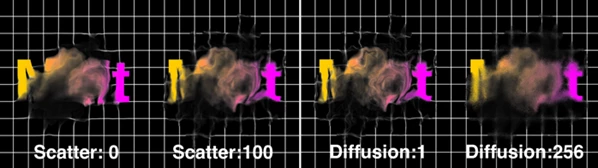
- Diffusion controls
- Scatter adjustments
These features help break up overly clean digital visuals and create a more textured result. The granular diffusion effect can make the blur appear more organic and film-like, especially when combined with turbulence animation.
Real Creative Uses
Music Videos and Motion Graphics
MeltFlow Blur works beautifully for:
- Beat-synced visuals
- Abstract backgrounds
- Liquid transitions
- Experimental edits
The animated turbulence creates energetic motion that pairs perfectly with modern music visuals.
Cinematic Visual Effects
For filmmakers and VFX artists, the plugin can simulate:
- Heat distortion
- Dream sequences
- Energy waves
- Surreal environmental effects
Because the blur can be controlled around specific points, it becomes easy to direct the viewer's attention while maintaining a cinematic atmosphere.
Logo and Typography Animation
Motion designers can use MeltFlow Blur to:
- Melt text dynamically
- Create glitch-like transitions
- Add motion flow to logos
- Produce futuristic title reveals
The combination of blur direction and turbulence creates very eye-catching typography effects.
Pro Tips for Better Results
Use MeltFlow Blur to focus on specific areas of your project instead of using it across your entire composition. Use the built-in wind controls only subtly in your projects instead of using extreme settings.
Try to use different turbulence maps at different points of your project to provide visual variety throughout your composition. Use the grain and diffusion features subtly to provide more natural visuals instead of overly digital edits.
Final Thoughts
MeltFlow Blur allows you to take your visual projects to the next level and creates professional, cinematic results. With the ability to add animated movement, directional control, grain, diffusion, and control the focus of the blur, MeltFlow Blur is a vital effect for visual effects artists and motion graphics designers.
If you work on abstract visuals, futuristic edits, cinematic effects, or time-lapse edits, MeltFlow Blur will be a very valuable plugin in your collection.

Files Password : gfxplugin.com OR 123456