Downloadable Files
You can download the Normal Scanner for free at the end of this page.
Turn Any Video Into Professional Normal Passes
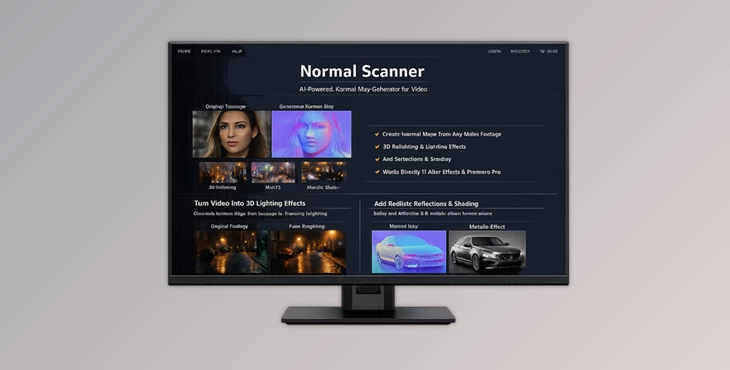
Creating realistic lighting and VFX interactions usually requires detailed 3D information from a scene. But what if you could generate high-quality normal passes directly from regular video footage? That’s exactly what Normal Scanner does.
This powerful plugin brings video-native normal estimation to Adobe After Effects and Premiere Pro, making it possible to generate stable and professional normal maps from footage without complicated 3D workflows. Whether you’re working on cinematic relighting, compositing, motion graphics, or advanced VFX setups, this tool opens up entirely new creative possibilities with surprisingly simple controls. Even better, everything renders locally on your machine, giving artists maximum privacy, speed, and stability.
What Is Video-Based Normal Estimation?
Normal estimation is the process of calculating surface directions from an image or video. In simple terms, it helps software understand which way different parts of a scene are facing in 3D space. This information is incredibly useful for:
- Dynamic relighting
- Adding realistic shadows
- Integrating CGI with footage
- Creating 3D-aware visual effects
- Enhancing depth and realism in compositing
Traditionally, generating normal passes required full 3D scenes or complex reconstruction pipelines. Normal Scanner simplifies this process by extracting temporally stable normals directly from video footage. That means you can take ordinary clips and transform them into lighting-ready VFX assets in minutes.
Why Normal Passes Matter in Modern VFX
Normal maps allow lights to react naturally to surfaces. Instead of flat-looking footage, your scenes gain directional lighting and depth-aware highlights. This dramatically improves realism in:
- Music videos
- Commercials
- Motion graphics
- CGI integration
- Sci-fi effects
- Digital makeup and stylized relighting
Better Integration Between 2D and 3D
With accurate normals, compositors can blend 3D elements into live-action footage much more convincingly. Reflections, shadows, and lighting interactions become far more believable.
Faster Creative Experimentation
Because the lighting becomes interactive, artists can test different moods and setups without re-rendering entire scenes from scratch.
Meet Normal Scanner
Normal Scanner is the first plugin specifically optimized for video-based normal estimation inside After Effects and Premiere Pro. Unlike experimental workflows that often produce flickering or unstable results, this plugin focuses heavily on temporal consistency and smooth frame-to-frame accuracy. The plugin is completely written in C++ for maximum performance, security, and reliability — without requiring Python environments or external dependencies. It also supports NVIDIA GPU acceleration for significantly faster processing speeds.
Features
The First Video-Based Normal Estimation Plugin
Normal Scanner is specifically designed for video processing instead of single-image estimation. This results in:
- Better temporal consistency
- Stable motion handling
- Reduced artifacts
- Cleaner frame transitions
For artists working with moving footage, this is a major advantage.
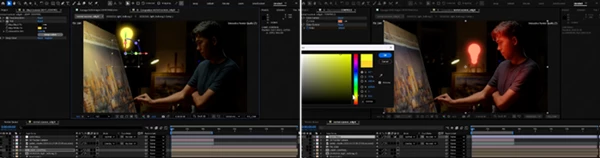
Interactive Relighting
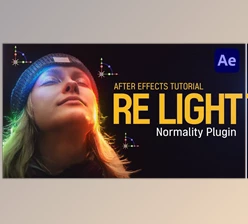
The plugin works perfectly with Normality, allowing you to build fully interactive relighting setups directly inside your compositions. Using generated normal maps — and optionally depth maps — you can:
- Add virtual lights
- Change light directions
- Create dynamic highlights
- Simulate realistic surface interaction
This gives editors and VFX artists much greater flexibility during post-production.
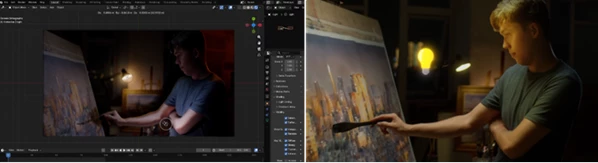
Interactive Relighting in 3D Software
The generated normal passes are not limited to After Effects. You can export them into:
- Blender
- Cinema 4D
- Unreal Engine
- Houdini
- Maya
- Nuke
This makes it easy to create geometry-aware lighting setups across professional 3D pipelines.
No Flickering
One of the biggest challenges with AI-generated passes is instability between frames. Normal Scanner solves this with temporally stable processing that keeps lighting smooth and consistent throughout the shot. The result feels much more production-ready and professional.
Export VFX Passes Easily
The plugin pairs perfectly with Depth Scanner, enabling artists to quickly generate:
- Depth maps
- Normal maps
- Relighting passes
- Advanced compositing layers
Instead of manually building complex 3D scenes, you can derive useful VFX data directly from footage.
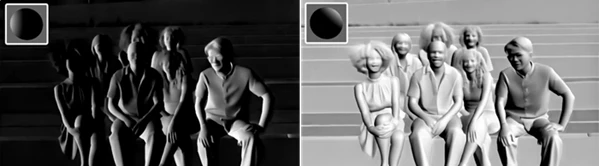
Visualize Normal Direction
The built-in visualization tools help artists instantly understand scene geometry and surface orientation. This makes:
- Troubleshooting easier
- Lighting adjustments faster
- Artistic control more intuitive
Especially useful during compositing and look development stages.
Easy Setup Workflow
Getting started is surprisingly simple. Recommended workflow:
- Add the plugin to your footage
- Disable:
Composition → Preview → Cache Frames When Idle - Let the clip process in chunks
- Increase the Window Size parameter based on your GPU capability
Higher window sizes improve temporal stability and overall result quality. Although some frames may initially process more slowly, subsequent playback becomes significantly faster.
Professional Tips for Better Results
Use High-Quality Footage
- To obtain the best results, ensure that the video footage you are using for your project is of high quality.
- Using low-quality video clips will produce normal maps with less temporal stability.
- To reduce the risk of obtaining poor results, ensure that you use higher bitrate video clips, reduce noise in your footage, and avoid excessive video compression.
Increase The Window Size
- As discussed above, the larger the window size, the higher the quality of the normal maps that are extracted from your video clips.
- However, using a large window size will require more GPU memory to complete your project.
- Finding the best window size for your GPU will significantly improve the outcome of your project.
Combine With Depth Passes
- Using the Normal Scanner alongside the Depth Scanner allows editors and VFX artists to access richer relighting possibilities.
- Using both tools will allow you to add depth and normal maps that react to your virtual lights. This will significantly enhance the realism of any CGI elements created in your project.
Test The Different Lighting Angles
- Another benefit of using the Normal Scanner is the interactive relighting capabilities.
- Experiment with the different virtual lights that can be added to your project in After Effects to enhance your visuals.
- Try changing the direction, intensity, color, and even adding rim lights to your project.
Final Thoughts
The Normal Scanner plugin dramatically expands the capabilities of After Effects and Premiere Pro for editors, motion graphics designers, and visual effects artists.
Normal maps allow you to take your VFX and editing projects to the next level by creating more realistic lighting for your compositions. The fact that the Normal Scanner runs locally on your machine, features NVIDIA GPU acceleration, offers no flickering between video clips, allows for interactive relighting, and supports a variety of 3D software applications makes this tool not just helpful but incredibly valuable.
Whether you are working on music videos, motion graphics, cinematic VFX, and more, this plugin will significantly expand your creative possibilities.

Files Password : gfxplugin.com OR 123456