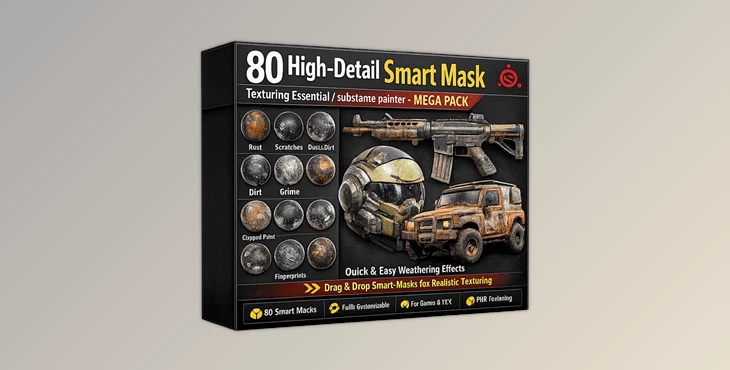
Downloadable Files
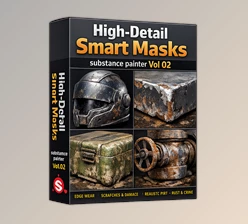
You can download the 80 High-Detail Smart Mask for free at the end of this page.
Bring More Realism to Your Textures
Adding realistic textures to 3D models is one of the most important parts of any texturing process. Any imperfections, such as rust, dirt, scratches, fingerprints, and moisture stains, can change the feel of the 3D model.
The 80 High-Detail Smart Mask will help you quickly and accurately add these imperfections to your models for a more realistic result. This 3D smart mask collection is ideal for working on game assets, environments, props, and hard-surface models.
What Are Smart Masks and Why Are They Important?
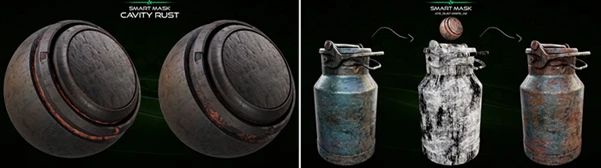
Smart Masks in Substance Painter automatically generate realistic wear and tear effects on your models based on the mesh information of your model. No need to manually paint the imperfections on your 3D models. The procedural smart masks offer realistic results for your textures.
Some of these effects include:
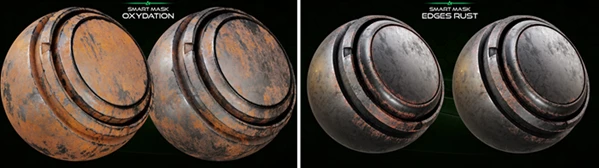
- Rust forms on the damaged edges of metals
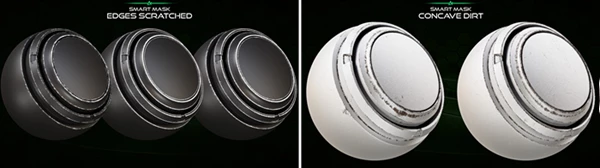
- Dirt collects on the concave parts of your models
- Fingerprints can be added to glossy materials
- Moisture stains on your model materials
- Scratches on the edges of your models
These effects can significantly improve the realism of your 3D models. Using these high-quality smart masks will significantly reduce the amount of time it takes to complete your projects.
A Professional Smart Mask Collection for Substance Painter
The 80 High-Detail Smart Mask package is a complete texturing essential designed for artists who want faster workflows and more realistic results inside Substance Painter.
This MEGA PACK includes 80 customizable smart masks created using high-quality imperfection maps. Every mask is carefully designed to produce natural-looking surface details with excellent realism and flexibility. The masks are fully compatible with the latest versions of Adobe Substance 3D Painter and provide high-quality previews for easier workflow management.
Features
Massive Variety of Realistic Effects This pack includes a massive variety of realistic effects, including:
- Rust
- Concave Dirt
- Concrete Edges
- Dirt
- Edge Rust
- Edge Scratches
- Fingerprints
- Leaks
- Moisture
- Moisture Stains
- Occlusion
- Oxidation
- Rust Drips
- Surface Worn
- Wipe Dusty
- Wipe Effects
These effects will allow you to quickly create believable materials for your 3D models.
Fully Customizable Workflow
One of the biggest advantages of this package is its customization capability. Artists can easily:
- Adjust intensity levels
- Modify grunge distribution
- Change wear balance
- Combine multiple masks together
- Adapt effects for different materials
This flexibility makes the pack suitable for both stylized and photorealistic projects.
High-Quality Imperfection Maps
The smart masks are built using premium-quality imperfection maps that improve realism dramatically. These maps help create:
- Natural dirt accumulation
- Realistic aging
- Organic surface variation
- Better material storytelling
The result is textures that feel more authentic and visually detailed.
Faster Production for Professional Projects
Instead of creating every mask manually, artists can instantly apply procedural effects and focus more on creativity and final presentation. This becomes extremely useful for:
- Game development
- Environment design
- Product visualization
- Film assets
- Hard-surface modeling
- Sci-fi props
- Industrial materials
Professional Tips for Better Results
Combine Multiple Masks
For more realistic surfaces, avoid relying on a single smart mask. Mixing rust, dirt, and edge wear together creates richer materials with more believable storytelling.
Use Subtle Intensity
Professional texturing often looks better when imperfections are slightly reduced instead of exaggerated. Small details usually create the most realistic final result.
Match the Environment
Always think about where the object exists. For example:
- Humid environments need more moisture and rust
- Industrial areas require oil leaks and dirt
- Outdoor assets benefit from oxidation and dusty wipes
This environmental logic makes textures feel naturally grounded.
Customize for Each Asset
Even though the masks are procedural, small adjustments help avoid repetitive patterns and give every model its own unique identity.
Installation Notes
This Smart Mask package only works with the latest version of Substance Painter. Created with:
- Adobe Substance 3D Painter 7.4.3
Installation:
- Copy the .spmsk smart mask files into your Adobe Substance 3D Painter assets/smart-masks folder
For the latest versions:
- Copy the files into your Substance Painter Shelf folder
Final Thoughts
The 80 High-Detail Smart Mask collection is an excellent toolkit for artists who want realistic texturing results with faster and more efficient workflows.
Its combination of high-quality imperfection maps, fully customizable masks, and a wide variety of effects makes it useful for both beginners and professional texture artists. If you want to add more realism, surface storytelling, and production speed to your Substance Painter projects, this MEGA PACK can become a very valuable part of your workflow.

Files Password : gfxplugin.com OR 123456