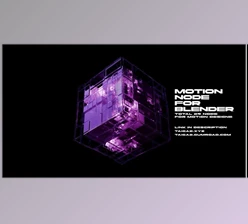
Downloadable Files
You can download the product Blender Mograph Toolbox for free at the end of this page.
Bring Your Motion Graphics to Life in Blender
Working within Blender to create professional motion graphics can be slow and overly technical at times. Creating arrays, adding animations, falloffs, and more can become a chore for motion graphics designers within Blender.
That’s where Blender Mograph Toolbox comes in. This tool helps motion graphics designers to create motion graphics in a faster and more creative manner. Whether you are working on animating a logo, creating product visuals, abstract animations, or even user interfaces, Blender Mograph Toolbox will help you focus on your creative efforts. Another benefit of using this Blender addon is that both beginners and those with professional experience can use it comfortably to achieve fast results.
What Is Blender Mograph Toolbox?
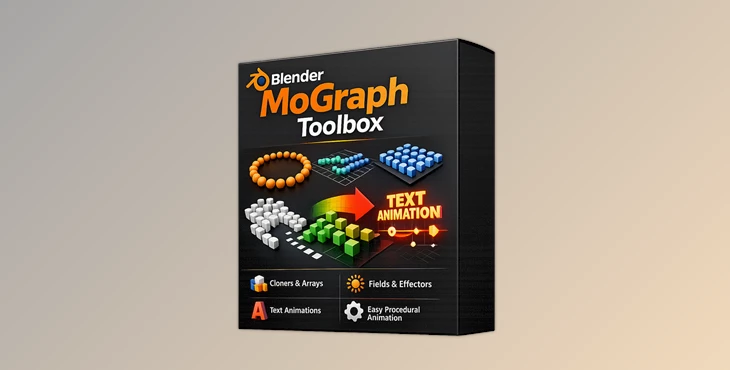
Blender Mograph Toolbox is a professional motion graphics system designed specifically for Blender users. It combines procedural arrays, animation tools, field systems, falloffs, shader controls, and utility nodes into one streamlined workflow. Instead of spending hours building node networks manually, artists can create advanced motion graphics setups in just a few clicks.
This makes the workflow dramatically faster for projects like:
- Logo animations
- Product advertisements
- Social media motion design
- Abstract visual loops
- Text animations
- UI and interface motion
- Stylized reveal effects
The toolbox simplifies complex animation systems while still giving users deep procedural control when needed.
Features
MoGraph Array System
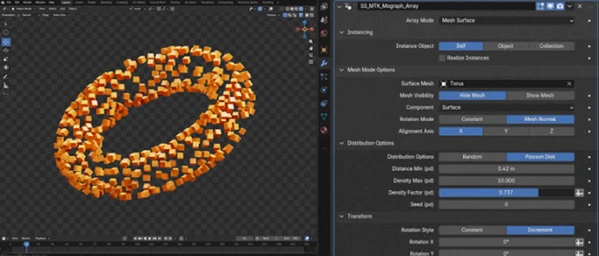
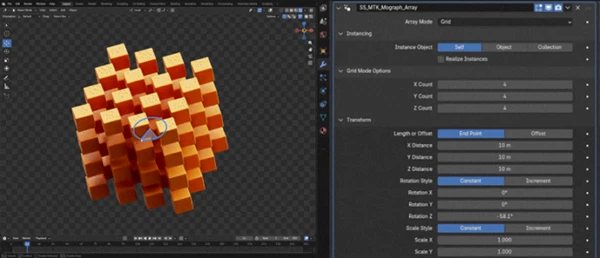
One of the most powerful parts of Blender Mograph Toolbox is the procedural array system. Users can instantly distribute objects into:
- Linear patterns
- Radial layouts
- Grid formations
- Curve-based arrangements
- Object-driven distributions
Simple gizmo controls allow quick editing directly inside the viewport, while advanced settings provide precise procedural customization for professional workflows. This feature is especially useful for creating dynamic product showcases, futuristic UI layouts, and looping abstract scenes.
MoGraph Animator
Animating repetitive motion manually can take a huge amount of time. The MoGraph Animator solves this problem by instantly applying:
- Loop animations
- Ping-pong effects
- One-shot animations
No complicated keyframe setups are required. Artists can quickly add life to arrays and motion graphics elements while keeping everything procedural and editable. This makes motion design faster and far more flexible during revisions.
MoGraph Curve Tool
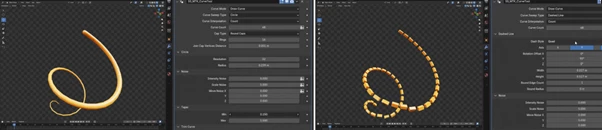
The curve system allows artists to create highly stylized animated curves with:
- Round caps
- Tapering
- Curve trimming
- Dash effects
- Noise animation
These tools are perfect for:
- Motion trails
- Path reveals
- Neon outlines
- Dynamic line animations
- Stylized interface graphics
The procedural controls make the animation process smooth and efficient while producing highly polished results.
Shader Mix System
The Shader Mix feature gives users the ability to blend materials and shaders using:
- Fields
- Falloffs
- Textures
- Animation data
This makes it easy to create animated reveals, smooth transitions, stylized material changes, and dynamic effects driven entirely by procedural systems. For example, designers can animate glowing materials spreading across objects or create seamless product reveal animations with almost no manual setup.
MoGraph Wiggler
Adding subtle imperfections and natural motion is essential for realistic animation. The MoGraph Wiggler introduces:
- Procedural noise movement
- Organic jitter
- Smooth sine-wave motion
These effects help scenes feel more alive and dynamic without requiring hand animation. Even simple animations become more cinematic and visually interesting with small procedural motion variations.
Powerful Field System
The toolbox includes a full suite of field systems for controlling animations and effects across scenes. Available field tools include:
- Transform
- Pusher
- Randomize
- Image Texture
- Incremental
- Target
These systems allow artists to create highly controlled animations while maintaining procedural flexibility. For example:
- Randomization can create natural variation across clones.
- Incremental fields are perfect for wave or cascade animations.
- Target fields help objects face or follow animated elements dynamically.
This level of control dramatically improves workflow speed and animation quality.
Flexible Falloff Controls
Falloffs make it possible to control how effects spread across objects and animations. Included options:
- Linear falloffs
- Spherical falloffs
- Additive systems
- Subtractive systems
- Index-based setups
These tools are ideal for creating:
- Ripple effects
- Explosions
- Smooth transitions
- Layered motion graphics
The drag-and-drop workflow keeps the process simple while still offering advanced procedural behavior.
Utility Nodes for Faster Workflow
The toolbox also includes utility nodes that simplify common Blender tasks. Examples include:
- Grease Pencil to Curve
- Text on Curve
- Mesh to Curve
- Curve to Mesh
- Object to Instance
These utilities speed up scene building and improve modifier stack workflows significantly. Instead of manually converting geometry and setting up systems, artists can work faster and stay focused on design.
Ready-Made Presets
Another major advantage of Blender Mograph Toolbox is the included preset library. Users get:
- Text animation presets
- Motion graphics setups
- Example scenes
- Ready-made procedural systems
These presets save huge amounts of time and also help beginners learn professional workflows more easily. Instead of starting from scratch, artists can customize existing setups and quickly build polished animations.
Professional Tips for Better Results
- Combining fields for specific animations can result in more visually interesting projects. For instance, using fields such as randomize and incremental in combination can result in more organic-looking motion within a project.
- Using subtle movements within an animation often looks more professional than exaggerated movements. Using the MoGraph Wiggler to add a slight movement to an object, for instance, will look more professional than a movement of the same amount created through other means.
- Using the presets in the program will help users to get started with their projects and learn the program. Using one of the included text animations will get users started with the animation tools in Blender Mograph Toolbox.
- Additionally, users can learn how to control the animations within the program by playing with its various settings.
- Combining spherical and linear falloffs in a specific way will result in additional control over the movement of animations. For instance, this can be used to create reveal animations for brands and companies’ logos.
Final Thoughts
Overall, Blender Mograph Toolbox will significantly increase the efficiency of designers looking to create motion graphics within Blender. It does away with the technicalities of creating various nodes and instead allows users to produce professional motion graphics as quickly as possible.
From creating arrays and fields for objects to being able to control the shaders of those objects and even having text animation presets to use, Blender Mograph Toolbox includes just about everything to speed up an individual’s production within Blender.
Depending on your experience level with Blender, this add-on will make a significant difference to your projects. Even for beginners, this Blender tool will make a marked improvement to your projects’ completion times.
If you are looking to produce motion graphics within Blender, this tool is definitely worth exploring for your own projects.

Files Password : gfxplugin.com OR 123456