Downloadable Files
You can download the product Rebelle for free at the end of this page.
Bring Traditional Painting to Life
Digital painting has evolved dramatically over the years. However, few painting programs offer the same organic beauty as real-world painting techniques. Where most painting applications try to simulate what it is like to use a computer screen and digital tablets, Rebelle allows artists of all skill levels to finally experience what it is like to use traditional painting mediums.
What Is Rebelle and Why Artists Love It
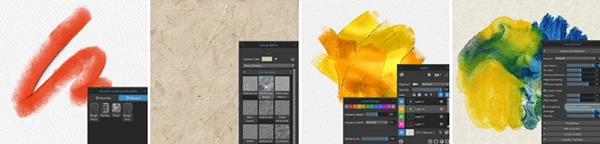
Rebelle allows artists to use various mediums to create digital art that simulates the experience of using traditional painting mediums. With the software, digital artists can enjoy using the same natural media as they use with their paint brushes, including watercolor, acrylic, ink, and oil paintings.
Artists of all genres can enjoy using this paint application. Whether you are a digital illustrator, a concept artist, a traditional painter looking to explore the digital world, a comic and storyboard creator, or even a creative hobbyist, Rebelle has something that will entertain and inspire you.
Watercolor artists can create their paintings to simulate the fluid nature of watercolor paints. Oil painters can create digital art with the thick textures that are characteristic of oil painting mediums. This product was also created to encourage artists to experiment and explore with their paint programs to discover what best fits their painting needs.
Features
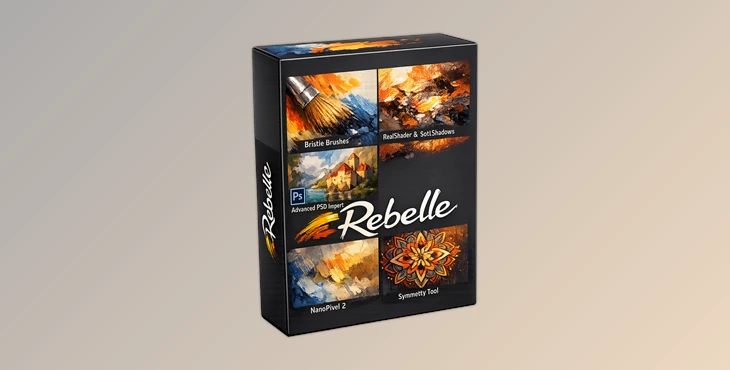
Bristle Brushes PRO
The new particle-based brush engine simulates individual brush strands for incredibly rich and expressive strokes. This creates more natural brush movement and helps artists achieve realistic texture variation in every stroke.
RealShader PRO
This tool introduces advanced lighting simulation using environment maps. Oil paintings react to light realistically, giving artworks a true three-dimensional appearance.
NanoPixel 2 PRO
Artists can now export artwork with up to 2000% NanoPixel detail. This creates sharper textures, more depth, and extremely high-quality results for large-scale projects or print work.
SoftShadows PRO
Brushstrokes now cast soft, realistic shadows while reflecting light according to paint thickness and color. This feature adds incredible realism during the painting process itself.
Smooth Scaling PRO
Brush strokes remain smooth and clean regardless of zoom level. Whether working on tiny details or viewing the full canvas, artists enjoy crisp and natural visuals.
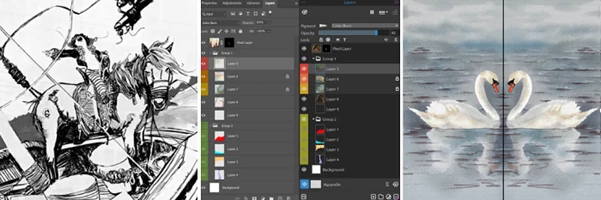
Advanced PSD Import & Export PRO
The upgraded PSD system improves compatibility with Photoshop workflows by preserving:
- Layers
- Masks
- Groups
- Filters
This makes collaboration between software much easier and more professional.
Symmetry Tool
Create perfectly mirrored artwork for concept art, character design, patterns, and decorative illustrations using the new Symmetry Tool.
Larger Brushes
Rebelle 8 supports brush sizes up to 3000 pixels, giving artists much greater freedom for expressive, large-scale painting.
Recent Brushes
The new Recent tab keeps frequently used brushes instantly accessible, helping artists work faster and more efficiently.
Instant Paper Preview
Quickly preview papers, canvases, and surfaces before purchasing or applying them to your artwork.
Layer Settings
Gain deeper control over individual layers with settings for:
- Layer color
- Metallic reflectivity
- Blending modes
- Impasto depth
Custom Reflectivity and Granulation Textures
Artists can upload custom textures for metallic paint reflections and watercolor granulation, allowing highly personalized artistic styles.
More Creative Improvements in Rebelle 8
Editing & Selection
Rebelle 8 introduces smarter editing tools, including:
- Improved freehand selection
- Dedicated Selection menu
- Enhanced transformation tools
- Better canvas resizing
- Pixel-perfect guides and grids
These upgrades improve precision and workflow speed significantly.
Color & Filters
New color management tools help artists experiment more creatively:
- RYB color wheel
- Color harmonies
- Gradient slider
- Filter layers
- Curves adjustments
These tools simplify color exploration while improving overall artwork quality.
Interface & Workflow
The updated interface focuses on a smoother creative experience with:
- Faster REB file loading
- Custom user folders
- New Assets panel
- Better cursor settings
- Line smoothing indicators
Everything feels more responsive and organized for daily artistic work.
Tools & Export
Additional upgrades include:
- WebSocket Control Input PRO
- Print-size preview
- Improved ruler tools
- New NanoPixel export dialog
- Native compatibility with Apple Silicon M chips
These features improve both performance and production efficiency.
Professional Tips for Better Results in Rebelle
- Use RealShader and SoftShadows for more realistic oil paintings.
- Use the different papers to change the texture of the paint in your project.
- Use the Symmetry Tool to speed up your painting project for specific design work.
- Use the Recent Brushes tab for easier access to your favorite brushes.
- Export your painting with NanoPixel technology to improve print and viewing quality.
Final Thoughts on Rebelle
Rebelle 8 continues to expand on what the previous versions of the application offered artists. With the addition of new features and improvements, this program allows artists of all levels to work in an interface that feels natural and simulates the experience of traditional painting as closely as possible to inspire them to create their masterpieces.
Whether you are a digital illustrator, a concept artist, or someone who loves to create digital art for personal enjoyment, the Rebelle application will give you the space to inspire and create stunning digital artwork that reflects who you are as an artist. Rebelle 8 is undoubtedly one of the best digital painting applications available to artists who seek a realistic experience with the most advanced technologies available.
This product is definitely worth exploring if you are passionate about digital painting. Get your copy of Rebelle 8 today to experience the next generation of digital painting technologies for yourself!

Files Password : gfxplugin.com OR 123456
![Gumroad - Download ergoINDEX - Brushset Bundle! [Complete Procreate Edition]](https://dls5.gfxplugin.ir/Download_Files/33054/SearchSmall/banner.jpg)