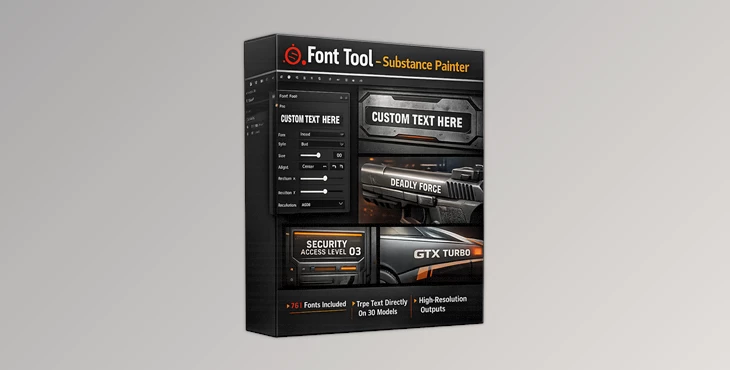
Downloadable Files
You can download the product Font Tool for free at the end of this page.
Say Goodbye to Photoshop Text Stencils
If you’ve ever felt frustrated by the limited font selection inside Substance Painter, you’re definitely not alone. Many artists waste valuable time creating text stencils in Photoshop just to achieve the exact typography they need for decals, labels, sci-fi panels, logos, or stylized assets.
That’s exactly where Font Tool becomes incredibly useful.
Instead of jumping between different software, this tool lets you use a huge collection of fonts directly inside Substance Painter with clean 4096×4096 quality. It makes the entire text creation process faster, smoother, and far more creative.
Whether you’re designing futuristic interfaces, game props, industrial assets, or stylized environments, having access to dozens of high-quality fonts can completely change your workflow.
What Is Font Tool and Why Is It Useful?
Font tool is a font collection and text editing tool made specifically for users of Substance Painter. It allows you to use 75 different fonts within the software without the need to create text stencils outside of the painting program.
With the Font Tool, you can create the following within your projects:
- Labels
- Warning signs
- UI elements
- Vehicle decals
- Sci-fi text
- Military text
- Industrial text
- Game asset text
Why It Improves Your Workflow
One of the biggest advantages of Font Tool is speed and flexibility. Instead of:
- Opening Photoshop
- Creating a text stencil
- Exporting textures
- Reimporting files into Substance Painter
You can simply edit your typography directly inside your painting workflow. This helps artists:
- Save production time
- Experiment faster
- Keep visual consistency
- Improve text sharpness
- Create more professional surface details
The included 4096×4096 resolution also ensures your text remains crisp even on close-up renders.
Features
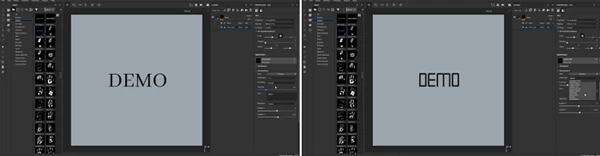
Huge Font Collection
The tool includes 75 fonts covering multiple visual styles:
Clean & Professional Fonts
- Arial
- Calibri
- Cambria
- Verdana
- Times New Roman
- Segoe Script
- Georgia
Sci-Fi & Futuristic Fonts
- Neuropol
- Nasalization
- Quantum
- Space Age
- Tesla
- Transformers
- Conthrax
Gaming & Stylized Fonts
- Super Mario 256
- Minecrafter
- Sega
- Battlefield
- NFS Font
Industrial & Technical Fonts
- Led Counter 7
- Digital Display
- Squarefont
- Consolas
- Courier New
This variety makes the tool suitable for almost every type of project.
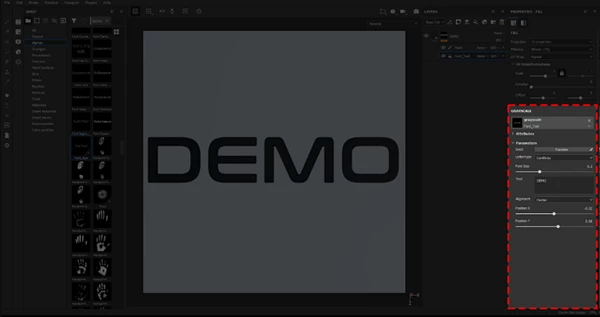
Full Text Customization
The tool allows you to adjust:
- Font
- Font Type
- Text Size
- Alignment
- Manual Positioning
- Custom Text Input
These controls give artists much more freedom when designing decals and typography elements.
High Resolution Output
All fonts are provided at:
- 4096 × 4096 resolution
This ensures:
- Sharper details
- Cleaner edges
- Better readability
- More professional final renders
Especially for cinematic renders and close-up shots, this quality difference becomes very noticeable.
Perfect for Multiple Project Types
Font Tool works especially well for:
- Game asset creation
- Hard surface texturing
- Sci-fi environments
- Vehicle decals
- Product visualization
- Military assets
- Motion graphics textures
- Stylized 3D scenes
For example, a sci-fi corridor instantly feels more believable when panels, warnings, and interface labels use strong typography. Small text details often create the realism that makes assets feel finished.
Pro Tips for Better Results
Combine Fonts for More Realism
Avoid using the same font everywhere. Mix:
- Technical fonts for warnings
- Futuristic fonts for interfaces
- Clean fonts for branding
This creates richer and more believable designs.
Use Subtle Surface Imperfections
Perfect text can sometimes feel artificial. Try adding:
- Roughness variation
- Slight paint wear
- Dirt overlays
- Edge fading
This helps typography blend naturally into the material.
Match Fonts to Project Style
Choosing the right typography matters a lot. For example:
- Neuropol works great for sci-fi UI
- Battlefield fits military assets
- Minecrafter suits stylized voxel scenes
- Led Counter 7 is excellent for digital displays
The correct font instantly improves visual storytelling.
Final Thoughts
Font Tool is one of those workflow tools that can save a surprising amount of time while also improving visual quality. Instead of fighting with limited font choices or constantly switching to Photoshop, artists can stay fully focused inside Substance Painter and experiment freely with typography.
The large font library, high-resolution output, and customization controls make it extremely useful for both beginners and professional artists. If typography and decals are an important part of your texturing workflow, Font Tool can make your projects faster, cleaner, and much more visually interesting.

Files Password : gfxplugin.com OR 123456