Downloadable Files
You can download the Simple Renaming product for free at the end of this page.
Make Blender Organization Fast and Stress-Free
If you have ever worked on a large project in Blender, then you are probably used to seeing a variety of differently named objects in your project files. Over time, files become incredibly cluttered with objects named “Cube.001,” Camera. 003,” and various other duplicated objects that are incredibly difficult to manage when you have dozens or even hundreds of these objects in your project files. This is where Simple Renaming comes into play. Simple Renaming is one of the most useful tools for Blender artists looking to rename multiple objects within their project files quickly and easily. Whether you work with animation or product visualizations, this Simple Renaming addon will help make your life easier. It is also one of the most beginner-friendly Blender tools out there.
Why Proper Naming Matters in Blender
If you are producing a professional-grade project in Blender, proper object naming is one of the biggest distinctions between a messy, poorly-produced Blender project and a stunning production pipeline with well-organized teams. Proper object naming offers artists an incredible amount of benefits when working with Blender objects. With proper object naming within your Blender project, you can easily:
- Find your objects within your scene rapidly
- Improve your team’s collaboration within your projects
- Avoid any potential problems with animation or rendering your project
- Ensure your exported game assets have proper organization
- Speed up the editing process on your Blender project files
Consider working on a massive scene of buildings and structures, for example. If you cannot quickly find any one building within your scene, this could take up considerable amounts of time from your production team. Simple Renaming will save this team time and improve their production pipeline.
Simple Renaming Explained
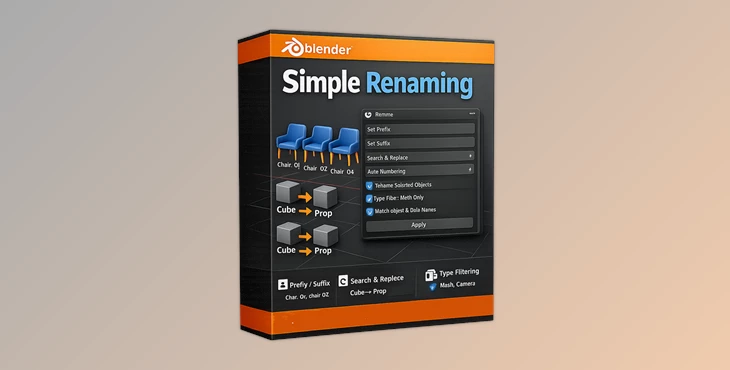
Simple Renaming is a Blender addon focused on batch renaming objects and data efficiently. It allows users to rename multiple elements at once using smart automation tools. The addon supports renaming for:
- Objects
- Materials
- Collections
- Meshes
- Cameras
- And many other Blender data types
It also provides advanced searching, numbering, trimming, and regex-based renaming systems that make even large-scale organization tasks extremely easy. Because of this flexibility, the addon works perfectly for both small personal projects and professional production environments.
Features
Batch Rename Objects Instantly
One of the strongest features of Simple Renaming is its ability to rename multiple objects simultaneously. Instead of editing names individually, you can apply naming rules across entire scenes. This is especially useful for:
- Environment assets
- Product models
- Animation rigs
- Scene collections
- Imported CAD or FBX files
The result is a cleaner and more professional Blender project structure.
Replace Names with Automatic Numbering
The ability to quickly replace all objects in your project with a new name while also automatically assigning each object a unique number will make it easier for you to manage your project. For instance, instead of having all the trees in your forest scene named the same, you can instead have them all automatically numbered.
Add Prefixes and Suffixes
This is particularly useful for projects involving game engines, as you can quickly apply prefixes like “GEO” to all your game objects or “LIGHT” to all of your lighting objects. This will make your scenes easier to manage.
Search and Replace System
The built-in search and replace feature is extremely useful for editing large groups of names instantly. You can:
- Replace unwanted text
- Standardize naming conventions
- Fix imported asset names
- Rename duplicated objects quickly
This saves enormous amounts of manual work during scene cleanup.
Search and Select Objects by Name
This is one of the most helpful features for those working with massive scenes. You can quickly search and select all the objects with similar names or with the same name, which will help you navigate your project files at a rapid rate.
Regex Support
This feature allows advanced users to create their own expressions or “regex” to be used within the add-on for specific projects. For instance, you could use this to automatically remove any text from the beginning of the object names.
Rename Objects Based on Order or Position
The addon can organize naming based on:
- Selection order
- Object position
- Workflow sequence
This is especially useful when preparing assets for animation, simulations, or exports to game engines.
Real Workflow Benefits
Cleaner Production Pipelines
Consistent naming improves communication between artists, animators, and technical teams. Everyone can instantly understand scene structures without confusion.
Faster Scene Management
Large Blender scenes become easier to navigate and edit. Artists spend less time searching and more time creating.
Better Asset Exporting
When exporting assets to Unreal Engine, Unity, or other software, organized naming prevents errors and improves compatibility.
Professional Tips for Better Results
Use Prefix Systems
Create naming categories like:
- GEO_
- CAM_
- FX_
- LIGHT_
This makes scenes far easier to scan visually.
Combine Search and Numbering
Using search-and-replace together with automatic numbering creates highly organized object structures in seconds.
Keep Naming Consistent
Choose a naming convention early in your project and stay consistent throughout production. This prevents confusion later.
Use Regex Carefully
Regex is powerful, but beginners should test small renaming operations first before applying them to entire scenes.
Final Thoughts
Simple Renaming for Blender is one of the best tools to save your project files massive amounts of time. While it seems like a small tool, it will drastically reduce the time you spend renaming and searching for objects in your scenes. From batch renaming to regex support, this tool is one of the best for both beginners and professionals in the Blender industry.
If you have ever struggled with large scenes with dozens or hundreds of objects, this will help make your projects easier to manage and further improve your production pipelines.

Files Password : gfxplugin.com OR 123456