Downloadable Files
You can download the product ColorVSN for free at the end of this page.
Turn Ordinary Footage Into Stunning Visual Art
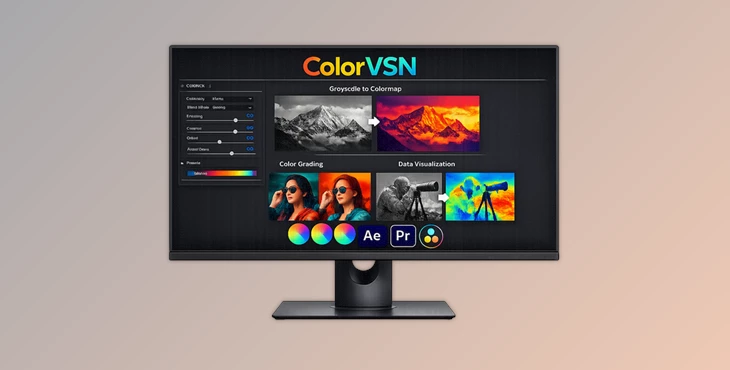
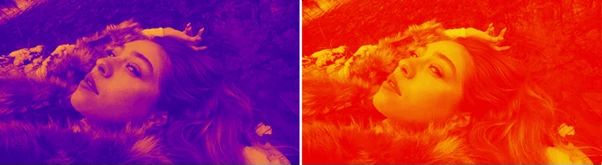
Sometimes a simple color adjustment is not enough to give footage a unique identity. This is where ColorVSN becomes incredibly useful. With creative colormap technology, this plugin transforms grayscale and flat-looking visuals into rich, cinematic, and visually striking imagery in just a few clicks.
Whether you are working on motion graphics, cinematic edits, data visualization, experimental visuals, or creative color grading, ColorVSN gives you an easy and inspiring way to create eye-catching looks without complicated workflows. The best part is that you can use it both as a visualization tool and as a professional creative color grading effect, making it useful for many different kinds of projects.
What Makes ColorVSN Special?
ColorVSN is a professional plugin designed to apply unique colormap styles directly onto footage. Instead of relying only on traditional LUTs or standard grading methods, it maps grayscale and luminance information into vibrant artistic color schemes.
This creates dramatic visual transformations that instantly add personality and atmosphere to videos. For example:
- Turning black-and-white textures into colorful abstract visuals
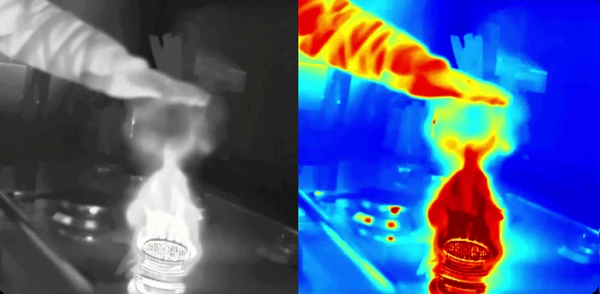
- Creating futuristic heatmap-style effects
- Enhancing scientific or grayscale data visualization
- Adding stylized cinematic moods to footage
- Producing modern music video aesthetics
These effects help projects feel more dynamic, professional, and visually memorable.
Features
22 Unique Colormaps
One of the strongest parts of ColorVSN is its collection of 22 different colormaps. Each colormap delivers a completely different visual mood and artistic direction.
You can quickly experiment with multiple styles to discover the perfect look for your project, whether you want something subtle and cinematic or bold and experimental. This flexibility speeds up creative workflows and encourages visual exploration.
Better Grayscale Visualization
ColorVSN is especially powerful when working with grayscale imagery or data-driven visuals. The plugin enhances grayscale information and converts it into visually understandable color-based imagery. This makes details easier to read while also making the footage far more engaging for viewers. This can be extremely useful for:
- Scientific visualizations
- Motion graphics
- Abstract animations
- Texture enhancement
- Artistic monochrome footage
The result is cleaner visual communication with a more professional presentation.
Advanced Blend Modes
To help users achieve the exact look they want, ColorVSN supports 5 different blend modes. These blend modes allow the colormap effect to interact naturally with the original footage, making it easier to create subtle enhancements or dramatic transformations. Instead of forcing a fully stylized effect, you can fine-tune the intensity and integration of the colors for more polished and cinematic results.
Professional Software Support
ColorVSN works on multiple major editing platforms, making it accessible for many creative workflows.
Supported Platforms
- Windows & macOS
(Adobe After Effects & Premiere Pro) - Windows
(DaVinci Resolve)
This compatibility allows editors, motion designers, and colorists to integrate the plugin directly into their existing pipelines.
Professional Tips for Better Results
Ensure your footage has high contrast
ColorVSN works best with footage that has high contrast between the darkest and lightest areas of the video. Higher contrast footage will allow for the best results when using ColorVSN.
Experiment with blend modes
ColorVSN’s blend modes can dramatically change the look of your project. Often, using a lower opacity for the blend modes will lead to more cinematic-looking results.
Use ColorVSN for setting the mood of your project
ColorVSN can be used to create a variety of different moods in your project. For instance, some colormaps will give your project a futuristic look while others may provide a mysterious aesthetic to your project.
Try using multiple effects within ColorVSN
For even more visually interesting results, combine ColorVSN with other effects in your editing software. For instance, applying a glow effect or a chromatic aberration effect to your footage will create visually interesting and premium cinematic visuals for your project.
Final Thoughts
ColorVSN is a powerful plugin that can help users transform their ordinary footage into visually interesting and artistic projects. With 22 unique colormaps, the ability to better visualize any grayscale footage, and 5 different blend modes to fine-tune the visual effects, ColorVSN is a professional-quality tool for both editors and motion designers alike.
Whether you are creating cinematic color grading projects, experimental visuals projects, or even enhancing your data visualizations with ColorVSN, this tool will improve the visual aspect of your projects. If you are interested in creating visually interesting projects with ColorVSN, this product is definitely worth exploring for your editing projects.

Files Password : gfxplugin.com OR 123456