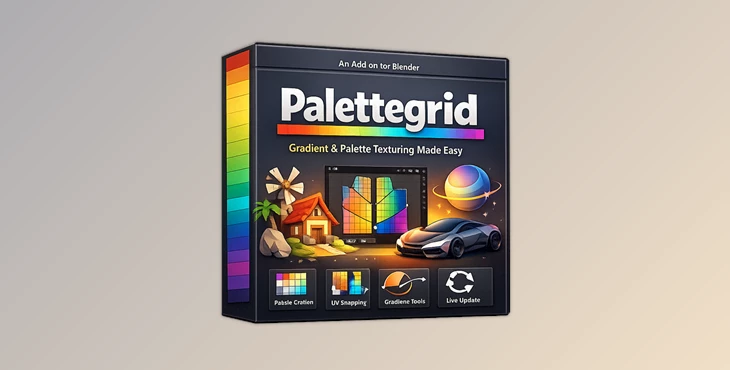
Downloadable Files
You can download the product Palettegrid for free at the end of this page.
A Faster Way to Create Stylized Textures
Creating stylized textures using gradients and palette strips has always looked amazing. However, the process of creating these textures usually comes with a slow and frustrating process.
That is exactly where Palettegrid changes the game. No more creating palette textures outside of Blender, exporting them, and having to deal with the frustrations of positioning each UV island manually. With Palettegrid, you can speed up each process and ultimately create amazing stylized textures for your 3D projects. Whether you are working on environment art, game art, props, or even simple 2D projects, Palettegrid will make creating gradient textures a breeze.
What Is Palette-Based Texturing?
Palette-based texturing is a stylized workflow where artists use tiny texture strips filled with flat colors or gradients instead of large traditional textures. Different parts of a model are mapped to different color strips using UV coordinates. This technique is popular because it offers several huge advantages:
- Smaller texture sizes
- Fewer draw calls
- Faster performance in games
- Easy color variations
- Consistent stylized visuals
For example, instead of creating multiple large textures for rocks, weapons, props, and environments, you can use a single compact palette texture that controls all colors and gradients across the entire scene.
The problem was never the visual result.
The problem was always the workflow.
Manual UV placement, constant exporting, and gradient alignment could easily slow down production. Palettegrid removes those bottlenecks and makes the entire process feel natural inside Blender.
Features
Create Palette Textures Inside Blender
Usually, artists have to create their palette textures in an external editing software and then import them into Blender. This product allows artists to skip this step entirely. With Palettegrid, users can:
- Create flat color texture strips
- Create gradient texture strips
- Choose the resolution of the created textures
- Design the texture strips directly within Blender
All these features allow artists to save time and effort in the texturing process.
Real-Time Gradient Editing
One of the most powerful parts of Palettegrid is its live editing system. As you drag gradient stops or modify colors, the texture updates instantly on the model itself. There is no export process and no refresh cycle. This makes experimentation much easier because artists can rapidly test different visual styles without rebuilding UVs or recreating textures. Real-world benefit:
- Faster stylized look development
- Instant color variations
- Better visual consistency across assets
One-Click UV Snapping
- Traditional gradient workflows often require manual UV placement strip by strip.
- Palettegrid simplifies this into a single action.
- Select faces, choose a strip, and snap.
The addon automatically creates and positions UVs for you, even if the object has no UV map yet. This is especially useful when working with large environments or complex stylized meshes where manual UV editing would normally consume a huge amount of time.
Viewport Projection Workflow
Directional gradients usually require tedious UV rotation and alignment.
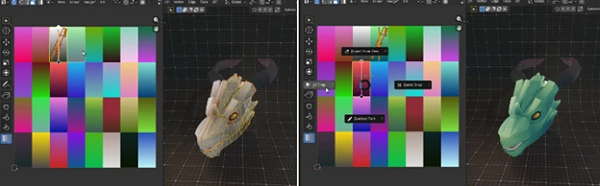
Palettegrid introduces viewport-based projection, allowing you to frame the object from any angle and instantly project the gradient onto visible surfaces.
This creates beautiful directional lighting effects, stylized shading, and painterly gradients without the usual technical setup. Perfect for:
- Stylized cliffs
- Weapons
- Architectural assets
- Organic surfaces
- Environmental storytelling
Distance-Based Gradient Effects
This tool also supports radial and distance-based gradients using the 3D cursor. This is extremely useful for effects like:
- Energy shields
- Magical objects
- Stylized lighting falloff
- Sci-fi surfaces
- Glowing spheres
Normally, curved surfaces make these effects difficult to texture cleanly. Palettegrid automates the placement process and makes it achievable in seconds.
Path-Based Gradient Mapping
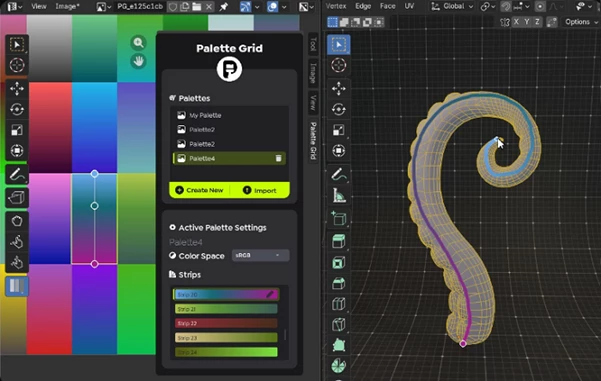
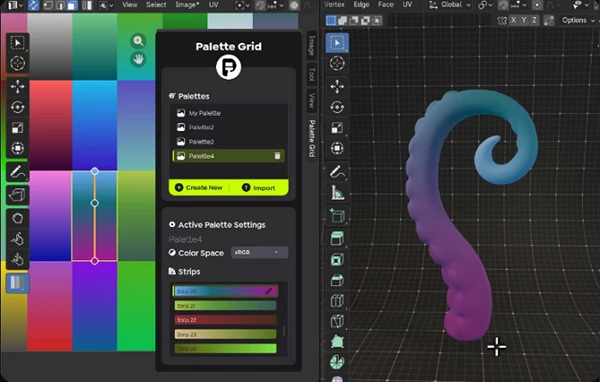
Another standout feature is path-based gradient placement. Artists can draw curves or spirals directly onto the model and automatically map gradients along those paths. This allows for complex flowing designs that would otherwise require extremely careful manual UV work. Ideal use cases include:
- Organic patterns
- Decorative trims
- Spirals
- Flowing magical effects
- Stylized surface details
Smart Shape Detection
This product can detect rough geometric sketches and convert them into clean, editable shapes. You can roughly draw:
- Lines
- Circles
- Rectangles
The addon intelligently snaps them into clean forms that can then be scaled, rotated, and projected precisely onto the model. This creates a much more intuitive and artist-friendly workflow compared to traditional UV editing.
Professional Tips for Better Results
Keep Palette Textures Small
The advantage of using gradient textures is that they are usually very small in size. In most instances, smaller textures work best. Do not use gradient textures if they are too large for your 3D models.
Use Gradients for Depth
While flat colors work well for 3D models, gradients are better suited for adding depth to your project. Use them to create dimensional, stylized 3D models.
Combine Projection Methods
There are several projection methods in Palettegrid. Use them in combination to achieve even more detailed yet stylized 3D models.
Experiment With Color Variations
Since all gradients in the program update in real time, artists can experiment with various color variations until they find the perfect gradient for their project's 3D models.
Final Thoughts
Palettegrid has transformed the gradient texturing process into a fast and enjoyable experience for artists within Blender.
With this amazing addon, artists do not have to deal with the frustrations of manually positioning the UV coordinates, exporting and importing texture strips, or aligning the gradients of their 3D models. For anyone who loves creating stylized 3D models with gradients, Palettegrid is the ideal tool to add to your Blender installation.

Files Password : gfxplugin.com OR 123456