Downloadable Files
You can download The Particle Library for free at the end of this page.
Bring Your Blender Scenes to Life with Cinematic Particle Effects
Creating believable particles within Blender can be a very involved process. Whether it’s for effects like sparks, fire, explosions, rain, snow, boids, magic, or any other type of particle-based visual you may be creating for your scenes, it takes time and effort to create these effects from the ground up.
The Particle Library was created to save you and others in the Blender community from having to create these different effects from scratch. The library contains over 57 different types of particle animations that can be instantly imported into Blender with one click. From VFX projects to cinematic animations of any kind, The Particle Library will allow you to create visually appealing Blender projects with minimal effort on your part.
What Exactly is The Particle Library?
At its core, The Particle Library is an advanced Blender asset collection filled with pre-built particle systems, dynamic simulations, and animated effects. It includes more than 57 particle animations spread across multiple categories, along with animated 3D models that work directly with the effects.
Everything is designed to be editable, customizable, and easy to integrate into your own projects. Instead of building every particle setup manually, users can simply browse the library, select an animation, and import it directly into Blender using the included custom add-on interface. This makes it especially useful for:
- Cinematic renders
- Action sequences
- Fantasy scenes
- Environmental storytelling
- Motion graphics
- Realistic simulations
- Sci-fi projects
- Atmospheric animations
The biggest advantage is speed. Artists can focus more on creativity and composition instead of technical setup.
Features
Massive Collection of Particle Animations
The library includes over 57 professionally designed animations across 9 categories:
- Abstract
- Boids
- Explosions
- Fire + Sparks
- Magic
- Paper + Bags
- Paths
- Weather
- Zero-G
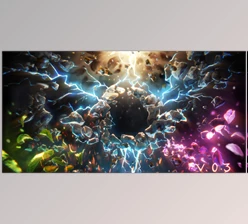
Each category offers multiple variations that can easily be modified for different visual styles and project requirements. For example, instead of using the same explosion repeatedly, users can adjust particle settings, seeds, forces, or object types to generate completely new results every time.
Realistic Boid Simulations
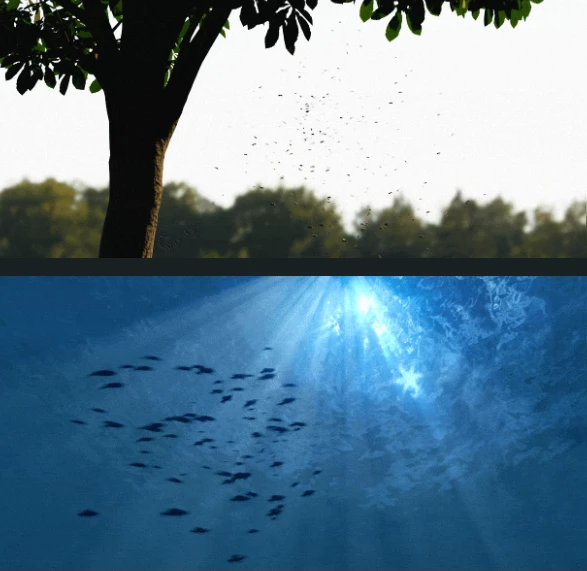
One of the most impressive parts of The Particle Library is the intelligent boid behavior system. These animations simulate realistic swarm and flock movement in real-time, making scenes feel alive and natural. Included examples:
- Bird flocks
- Fish schools
- Mosquito swarms
- Fireflies
- Falling leaves
The library also includes fully textured animated models, such as:
- Mosquito
- Fly
- Bee
- Butterfly
These assets instantly improve environmental realism and help artists create dynamic outdoor scenes without complicated simulation work.
Cinematic Fire, Sparks, and Explosions
Action scenes become dramatically more believable when realistic particles are added correctly. The Particle Library includes:
- Sparks
- Embers
- Fire simulations
- Directional fire assets
- Dust particles
- Large and small explosions
These effects are especially useful for:
- Action cinematics
- Destruction scenes
- Sci-fi effects
- Industrial environments
- Fantasy battles
Because the systems are already optimized and animated, users can simply place them into the scene and continue working immediately.
Weather Effects for Atmospheric Scenes
Environmental effects often make the biggest visual difference in a render. The weather section includes:
- Heavy rain
- Light rain
- Snow
- Snow storms
- Wind rain
- Water flow
Adding rain or snow instantly increases depth, mood, and realism in outdoor scenes. These effects also help lighting and reflections feel more cinematic and immersive.
Magic and Fantasy Effects
Fantasy artists and cinematic creators will especially enjoy the magic category. Included effects:
- Portals
- Magical paths
- Fantasy particle systems
These assets can be customized heavily to fit stylized projects, dark fantasy scenes, magical environments, or sci-fi worlds.
Trash and Soft Body Simulations
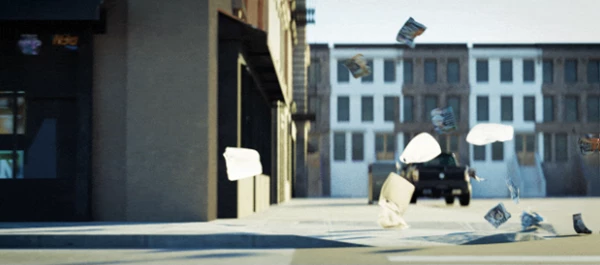
One surprisingly useful section is the paper and bag simulation category. Included assets:
- Plastic bags
- Newspapers
- Sticky notes
- Small paper particles
These soft-body simulations add subtle realism to urban scenes, abandoned environments, windy streets, or post-apocalyptic settings. Small environmental details like these often make renders feel far more believable.
Why These Features Improve Your Final Render
Particle systems are not only visual decorations. They help scenes feel dynamic, immersive, and alive. For example:
- Sparks create energy and motion
- Rain adds atmosphere and mood
- Swarms create environmental realism
- Floating particles improve depth perception
- Embers enhance cinematic lighting
- Paper simulations add natural movement
Without these subtle effects, many scenes can appear static or artificial. The Particle Library helps artists achieve professional-looking results much faster while maintaining full creative control.
Professional Tips for Better Results
Combine Multiple Effects Together
One of the best techniques is layering several particle systems. For example:
- Add embers with smoke
- Combine rain with wind particles
- Use sparks alongside explosions
- Mix Boid simulations with atmospheric fog
Layering effects creates much richer and more believable scenes.
Use Different Particle Seeds
The seed option inside Blender’s particle settings allows users to generate infinite variations from the same setup. This prevents animations from looking repetitive and helps create more natural randomness.
Adjust Lighting Around Particle Effects
Particles often look dramatically better when paired with proper lighting. For example:
- Warm lighting enhances embers and fire
- Blue lighting improves magical effects
- Strong rim lighting highlights rain and snow
Small lighting adjustments can completely transform the mood of a scene.
Customize the Particle Objects
The library allows users to replace particle objects with their own custom models. This means you can turn simple particles into:
- Leaves
- Mechanical debris
- Energy fragments
- Stylized shapes
- Custom VFX assets
This flexibility makes the library suitable for both realistic and stylized workflows.
Final Thoughts
The Particle Library for Blender is not just another pack of particle effects to quickly enhance your visual projects. No, it is a library that was created to help Blender artists significantly speed up their production processes for a variety of visual effects.
With over 57 customizable animations, realistic boids, weather effects, explosions, magic simulations, and environmental effects, this library provides Blender creators and visual effects artists with an immense amount of creative flexibility. From creating VFX projects to adding realistic elements to animations, whether it’s cinematic or realistic Blender animations, this library can enhance your projects in a variety of ways. If you want to give your Blender scenes more life and visual interest, this library is definitely worth checking out.

Files Password : gfxplugin.com OR 123456