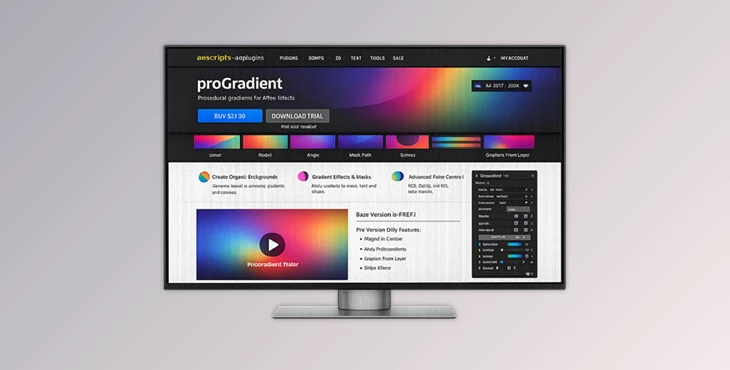
Downloadable Files
You can download proGradient for free at the end of this page.
Bring Motion to Every Gradient
Creating gradients in After Effects used to be simple — but often limiting. Most artists eventually hit the same wall: flat transitions, repetitive looks, and static color blending that feels lifeless in motion graphics.
That's where proGradient completely changes the workflow.
Instead of acting like a basic gradient generator, this product turns gradients into animated textures, dynamic motion systems, and organic visual effects. Whether you're building futuristic UI animations, abstract motion backgrounds, cinematic transitions, or experimental typography, this tool gives you far more control over how gradients behave and evolve over time.
The best part? Everything feels visual, interactive, and creatively inspiring from the first minute.
What Makes Gradient Animation So Powerful?
Gradients are one of the most popular visual elements used in design projects. From photography to film and motion graphics, gradients are an essential part of the visual language designers use to communicate with viewers.
Gradient animations take this visual language to the next level. By adding motion to gradients, After Effects designers can create visually stimulating design elements that are perfect for a variety of design projects.
Some of the most popular types of projects that benefit from gradient animations include:
- Motion design intros
- Music visualizers
- UI and HUD animations
- Abstract backgrounds
- Branding animations
- Social media visuals
- Experimental typography
- VJ loops and generative visuals
Meet proGradient
This tool is a powerful animated gradient generator for After Effects.
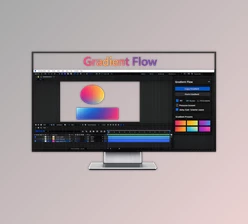
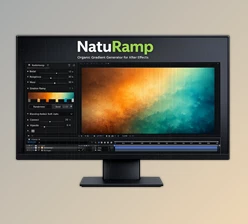
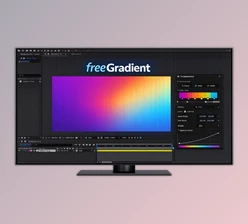
Originally known as freeGradient, proGradient has undergone a complete redesign to include new procedural animation modes and color interpolation methods.
proGradient allows After Effects designers to generate linear, radial, angular, contour, magnetic, and path-following gradients.
proGradient is a unique tool because of how easily it can be used for a variety of design projects and how much creative control it provides to the designers using it.
Features
Animated Linear, Radial, and Angular Gradients
This product includes three gradient modes that can be animated by the designer:
- Linear
- Radial
- Angular
Each of these gradient types can be animated to create visually stunning results. They are also perfect for creating dynamic gradients for projects such as motion graphics intros, music visualizers, user interfaces, and abstract visuals.
Gradient Offset Animation
One of the most satisfying features is gradient shifting.
The plugin can continuously move the gradient across the surface, creating endlessly flowing motion.
Combined with:
- Loop mode
- Mirror mode
- Invert mode
- Scale repetition
You can create hypnotic animations that feel procedural and organic rather than repetitive.
This saves enormous animation time while producing smoother results.
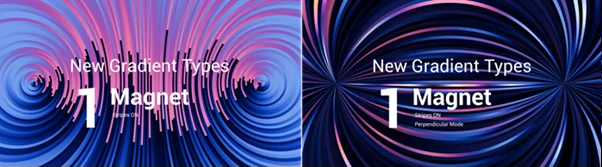
Magnet Mode
Magnet Mode simulates magnetic field line behavior.
You can choose:
- Along direction
- Cross direction
This creates unique flowing structures that resemble:
- Energy fields
- Sci-fi visuals
- Electric currents
- Particle simulations
It's especially useful for futuristic motion graphics and abstract compositions.
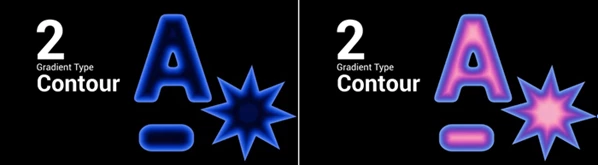
Contour Mode
Contour Mode fills closed shapes using gradients that flow relative to the shape boundary.
It works with:
- Alpha channels
- Closed masks
- Text layers
Instead of simple flat fills, shapes gain depth and motion that naturally follow their form.
This creates more dimensional and visually intelligent graphics.
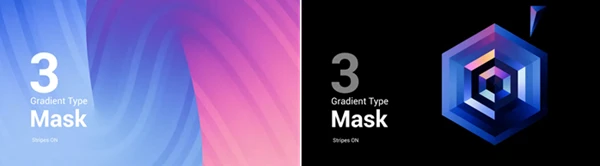
Mask Path Gradients
With Mask Path mode, gradients follow custom bezier paths.
Artists can create gradients that:
- travel along curves
- wrap-around shapes
- move through custom motion paths
Both Along and Cross directions are supported.
This opens up creative possibilities for:
- animated typography
- flowing ribbons
- kinetic UI elements
- procedural motion trails
Gradient From Any Layer
One of the most creative features in tool is sampling gradients directly from any layer.
The plugin can use:
- photos
- videos
- precomps
and extract color information from them.
By default, it samples a horizontal line from the center, but you can shift the sample position vertically for different color palettes.
Even more impressive:
Random Stripes mode can sample multiple random lines from different heights to generate endlessly evolving textures.
This feature is perfect for:
- cinematic color extraction
- texture-based gradients
- organic visual systems
- generative motion graphics
Stripes Mode
Stripes Mode slices gradients into separate bands.
Each stripe can receive randomized offsets, creating:
- chase effects
- analog-style distortion
- procedural textures
- unpredictable rhythm patterns
This instantly makes gradients feel more alive and less digitally perfect.
Advanced Color Interpolation
Color interpolation is where proGradient becomes truly modern.
RGB Mode
Classic direct color blending.
OKLAB Mode
Perceptually uniform interpolation with smoother brightness transitions and cleaner gradients.
The result:
- fewer muddy transitions
- more natural light balance
- softer cinematic blending
HCL Mode
Hue-based interpolation for vibrant rainbow-style transitions.
You can control:
- Short path
- Long path
- Clockwise rotation
- Counter-clockwise rotation
This allows artists to precisely shape how colors evolve during transitions.
The visual difference compared to standard gradients is immediately noticeable.
Randomize Gradient Colors
Need inspiration fast?
The Randomize feature instantly generates new color combinations while preserving the original gradient structure.
This is incredibly useful during:
- concept exploration
- client revisions
- style experimentation
- rapid iteration workflows
Sometimes the best creative direction appears unexpectedly through randomization.
Professional Tips for Better Results
Use OKLAB for Cinematic Motion
If your gradients feel too harsh or artificial, switch from RGB to OKLAB mode.
The smoother luminance behavior creates more filmic transitions and avoids ugly brightness dips.
Combine Stripes with Slow Motion
Small stripe offsets combined with subtle animated movement can create incredibly premium motion textures.
Perfect for:
- title sequences
- luxury branding
- ambient backgrounds
Sample Colors From Footage
Try extracting gradients from movie stills, nature footage, or textured imagery.
This creates naturally balanced palettes that feel far more organic than manually selected colors.
Use Mirror Mode for Seamless Loops
Mirror mode helps create perfectly repeating animations without visible jumps.
Extremely useful for:
- looping backgrounds
- social media animations
- VJ visuals
- LED wall content
Why proGradient Feels Different
Many gradient tools will allow After Effects designers to create gradients.
This tool allows them to create gradients that have motion and procedural animation behaviors.
This is a unique feature, and one that allows designers to create visually stunning motion graphics that have a unique visual language and identity.
proGradient also encourages motion graphics designers to experiment with the various features of its interface. Most of the features can produce different visual outcomes if adjusted correctly.
proGradient allows designers to save time and effort and produce unique visuals for motion design projects. It encourages more creative freedom in the design process.
Final Thoughts
proGradient is much more than a standard gradient plugin for After Effects.
It combines animated procedural textures, advanced interpolation science, path-based motion systems, and organic randomization into a single creative tool that feels both technical and artistic.
Whether you're designing futuristic interfaces, cinematic backgrounds, abstract visuals, or motion branding systems, the plugin gives you a huge range of possibilities without slowing down your workflow.
The combination of:
- animated offsets
- contour systems
- mask-following gradients
- magnetic behaviors
- stripe generation
- OKLAB and HCL interpolation
make proGradient one of the most creative gradient tools available for After Effects users today.
If you enjoy experimenting with color, motion, and procedural design, this is the kind of tool that can completely reshape your creative process.