Downloadable Files
You can download the product OverAct for free at the end of this page.
OverAct — Add Life and Energy to Your Animations
Every great animation has one thing in common. It features believable motion for its animated characters or elements. While motion graphics software can move objects from point A to point B using static keyframes, it often lacks the features to provide believable and life-like movement for those animated objects. This is where OverAct becomes incredibly useful.
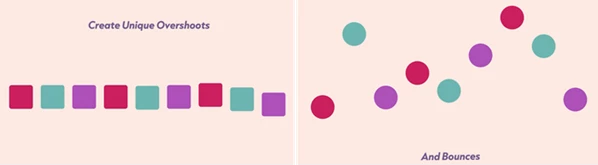
OverAct allows your animations to feature smooth overshoots and bounces that will give your projects an instant sense of natural movement. The software will allow you to quickly and easily adjust the movement of your elements without having to spend hours adjusting the keyframes to achieve the effect you desire for your project.
Whether you are animating user interfaces (UI), motion graphics, text, logos or characters, OverAct will allow your motion to feel more polished and cinematic to your audience with minimal effort.
Why Motion Details Matter
Often, the smallest details for motion graphics will have the biggest impact on the final product. For example, if an element of your project features subtle overshoots and bounces, the element can feel as if it is heavier (or lighter), moves faster (or slower), or features elastic movements.
Elements such as logos, user interfaces (UI) and text often require these subtle movements to appear more premium, modern and satisfying to the audience.
Overshoot and bounce movements can make a big difference in the quality of your motion graphics project. They provide visual interest and allow your projects to feel dynamic and engaging.
Meet OverAct
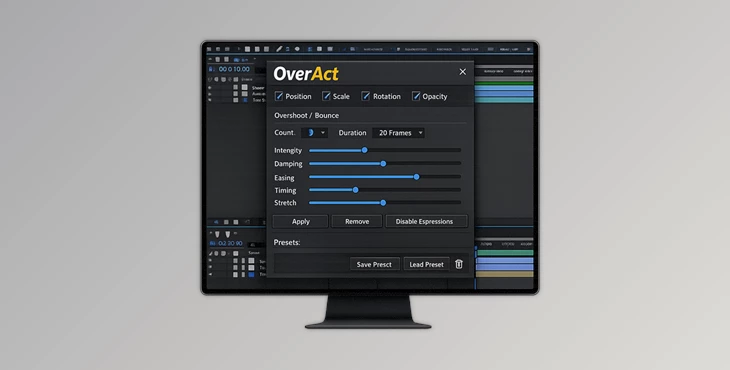
OverAct is a professional animation tool that helps you to control the overshoots, bounces, easing and timing of your projects.
OverAct can save you time when creating your motion graphics projects because you no longer have to manually add the features that make your animations feel natural and lifelike.
OverAct can be of use to those who create the following types of projects:
- Motion designers
- After Effects users
- UI animators
- Content creators
- Logos animators
- Social media editors
Features
Overshoot & Bounce Control
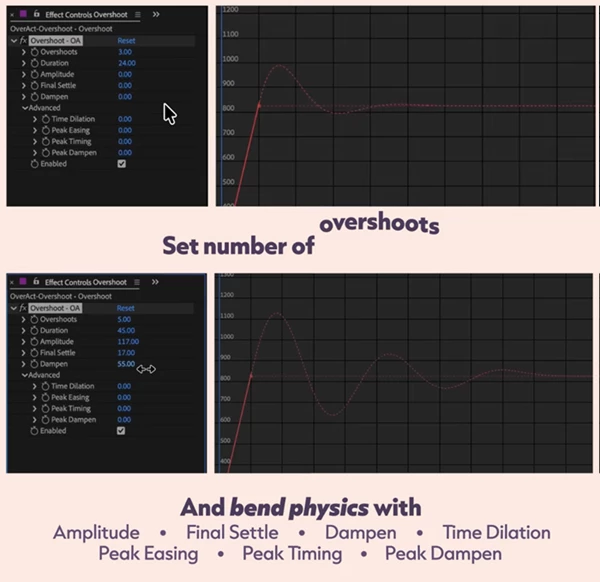
OverAct allows you to control the number of overshoots or bounces inside an animation cycle.
You can create:
- Soft cinematic settles
- Energetic elastic motion
- Heavy object rebounds
- Stylized cartoon-like movement
This flexibility helps match animation style to the mood of the project.
Duration Control
The Duration setting defines how many frames the animation takes.
This makes it easy to:
- Create snappy UI transitions
- Build smooth cinematic motion
- Match motion timing to music or editing rhythm
Precise duration control is essential for professional-looking animation pacing.
Amplitude Adjustment
Amplitude changes the overall strength of the movement.
Higher amplitude creates:
- Bigger overshoots
- Stronger bounces
- More exaggerated animation
Lower amplitude creates:
- Cleaner motion
- Subtle realism
- Softer transitions
This makes it easy to adapt motion for different project styles.
Advanced Dampen System
The Dampen control manages how trailing overshoots and bounces lose energy over time.
Instead of every bounce feeling equally strong, the motion gradually settles more naturally.
This creates:
- More believable physics
- Cleaner final motion
- Less chaotic animation
Especially useful for professional UI and logo animation work.
Final Settle & Final Bounce
This feature helps smooth out the ending of animations.
You can:
- Extend the final settle for softer endings
- Reduce final bounce height
- Prevent harsh stopping points
This is extremely useful when working with high-amplitude motion that still needs a polished finish.
Time Dilation
Time Dilation changes the duration of later overshoots and bounces.
This allows:
- Longer first impacts
- Faster trailing rebounds
- More natural motion decay
The result feels significantly more organic compared to evenly timed motion cycles.
Peak Easing Controls
Peak Easing increases easing at extreme points of the motion.
For bounce animations, you can separately control:
- Ease into peaks
- Ease out of peaks
This creates smoother and more refined movement behavior that feels less mechanical.
Peak Timing Adjustments
Peak Timing shifts the extreme positions earlier or later in the animation cycle.
This helps artists:
- Create anticipation
- Add stylization
- Improve rhythm and flow
Small timing shifts can dramatically improve the feel of an animation.
Peak Dampen
Peak Dampen gradually reduces Peak Easing and Peak Timing effects in later bounces.
This prevents animations from feeling overly exaggerated during long motion sequences and helps maintain visual balance.
Enable / Disable Flexibility
The Enable feature allows you to choose exactly which keyframes receive overshoots or bounces.
This is especially useful for:
- Combining multiple animation styles
- Keeping some motion clean and direct
- Applying effects selectively
It gives artists more control without complicating workflows.
Real Creative Uses
Bring Logos to Life
Animating a logo can be a static process that creates a sense of boredom within the viewer. By adding realistic overshoot and settling features to your logo animations, you can make your brand and logo more memorable.
- OverAct will allow your animations to feel more dynamic and cinematic.
Improve UI Animations
Modern interfaces rely heavily on motion feedback.
Using controlled bounces and easing makes:
- Buttons feel responsive
- Menus feel smoother
- Interactions feel more satisfying
Enhance Text Animation
Typography animations become more expressive when letters react with layered overshoots and bounce timing.
Perfect for:
- Social media content
- YouTube intros
- Commercial edits
- Motion graphics packages
Pro Tips for Better Results
Don’t Overuse Amplitude
Large overshoots can look exciting, but subtle movement often feels more professional.
Start small and increase gradually until the motion feels natural.
Use Dampen for Cleaner Motion
If animations feel too chaotic, increase Dampen values to help movement settle more smoothly.
This keeps motion energetic without becoming distracting.
Combine Time Dilation with Peak Timing
Using both controls together can create highly realistic motion behavior that feels handcrafted instead of procedural.
Even small adjustments can dramatically improve animation quality.
Match Motion Style to Project Mood
- Fast, sharp motion works well for tech and UI projects.
- Softer bounces fit cinematic and luxury branding.
- Exaggerated overshoots work well for playful content.
Always let the animation support the visual identity of the project.
Final Thoughts
OverAct is more than just a tool for adding life-like bounces and overshoots to your animations. It gives you deeper control over the details of your projects to allow for more professional results.
OverAct will allow you to easily create smooth, polished, and professional motion graphics projects.
Regardless of the type of motion project that you create, OverAct will allow you to dramatically improve the quality and realism of your projects.
If you care about the quality of the motion graphics in your projects, OverAct is definitely worth exploring as a new tool for your animation software.

Files Password : gfxplugin.com OR 123456