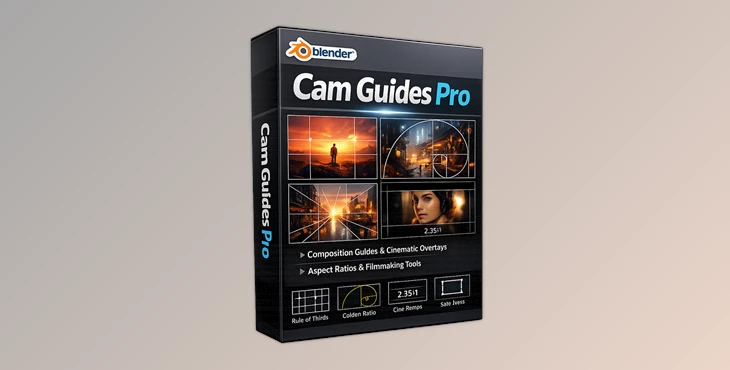
Downloadable Files
You can download Cam Guides Pro for free at the end of this page.
Make Every Shot Feel Cinematic
Whether you are creating cinematic animation, product renders, architectural visualizations, or social media content, good composition is essential to creating visually engaging content.
That is where Cam Guides Pro becomes incredibly useful.
Instead of having to struggle with where subjects should go within your scene or shot, Cam Guides Pro will provide you with professional composition guides and overlays that will help you get the most out of your editing or visualization software.
If you have ever looked at a movie shot or a professional photograph and wondered how they got that composition just right, the answer is through the use of composition principles.
Why Composition Matters So Much
Composition is the visual structure of an image. It controls where viewers look first, how their eyes move through the frame, and how emotional or cinematic the final result feels.
Professional artists and cinematographers use composition techniques like:
- Rule of Thirds
- Golden Ratio
- Fibonacci Spirals
- Leading Lines
- Triangle Composition
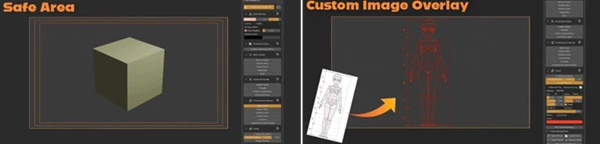
- Safe Areas
- S-Curves
These tools help create natural visual balance and improve storytelling without the audience even noticing it consciously.
For example:
- A product render becomes more premium when focal points are aligned correctly.
- A cinematic shot feels more dramatic with leading lines and a triangle composition.
- Character framing becomes more emotional when subjects are positioned using golden ratio guides.
- Architectural visualization feels cleaner and more realistic when perspective lines are controlled properly.
Good composition does not just make images prettier — it makes them easier to understand and more emotionally engaging.
Meet Cam Guides Pro
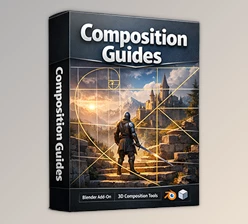
This tool is a tool that was created for professionals in the film, photography, 3D, and animation industries to give them more control over the composition within their scenes.
With Cam Guides Pro, you will have access to professional composition guides, aspect ratios, and more.
With over:
- 15+ composition guides
- 50+ professional aspect ratios
- 35+ ready-to-use presets
The tool covers everything from Hollywood-style cinematic framing to social media content creation.
Features
Professional Composition Guides
Cam Guides Pro includes professional composition guides for the most commonly used composition systems within the visual industry, such as:
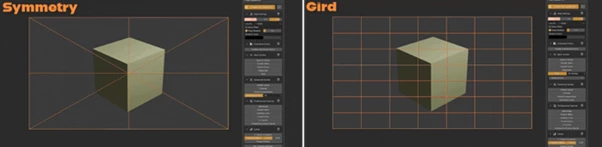
- Rule of Thirds
- Golden Ratio
- Fibonacci Spiral
- Center Cross
- Diagonal Guides
- S-Curves
- Circle Systems
These guides will help visual creators to develop natural visual balance within their scenes.
The interactive power points and golden ratio tools can be of great use when shooting close-ups or storytelling content.
Interactive Leading Lines
One of the most powerful features is the interactive leading line system.
Users can click to place vanishing points and dynamically create directional flow throughout a scene. This is extremely useful for:
- Architectural visualization
- Interior design renders
- Sci-fi environments
- Cinematic hallway shots
- Urban photography compositions
Leading lines naturally direct the viewer’s eyes through the image and create a stronger sense of depth and realism.
Fibonacci Spirals & S-Curves
The Fibonacci Spiral system gives artists advanced control over natural eye movement.
With rotation and scaling controls, creators can adapt spirals to any composition style and improve subject placement in a more organic way.
S-Curves are also excellent for:
- Character posing
- Fashion compositions
- Environmental storytelling
- Dynamic cinematic movement
These tools help scenes feel smoother and visually more immersive.
8 Triangle Composition Types
Triangle composition is one of the oldest and most effective cinematic framing techniques.
Cam Guides Pro includes:
- Classic pyramids
- Inverted triangles
- Golden triangles
- Nested triangle systems
These guides are especially effective for:
- Dramatic portraits
- Action scenes
- Hero shots
- Product showcases
- Film-style compositions
Triangle structures create stability, tension, or motion depending on how they are used.
Per-Camera Settings
For multi-camera productions or complex scenes, Cam Guides Pro allows individual guide settings for each camera.
This is incredibly useful when:
- Different shots require different aspect ratios
- One camera uses cinematic framing, while another uses social media framing
- Artists need separate composition presets for close-ups and wide shots
It saves time and keeps workflows organized.
50+ Professional Aspect Ratios
The tool supports professional delivery formats for nearly every platform, including:
Cinema & Film
Hollywood and indie film standards for cinematic production.
Broadcast & TV
Professional television and streaming formats.
Social Media
Precise framing for Instagram, TikTok, YouTube Shorts, and other platforms.
Mobile & Devices
Modern mobile screens and device-specific aspect ratios.
This makes it easier to prepare content for multiple platforms without constantly adjusting framing manually.
Custom Image Overlays
Users can load custom overlays, references, logos, or templates directly into the viewport.
This feature is especially useful for:
- Matching client references
- Recreating cinematic framing styles
- Brand placement previews
- Visual alignment
- Composition studies
Advanced transform controls and masking options provide precise positioning control.
Real Creative Uses
This product is useful for a wide variety of creators, including:
- 3D photographers
- Cinematographers
- 2D artists
- Animators
- Educators
- Architectural visualization artists
- Product designers
- Game developers
For example:
A game developer can use Fibonacci spirals for cutscene framing.
An archviz artist can improve interior perspective using leading lines.
A product designer can create cleaner commercial renders with a triangle composition.
An animator can improve character focus using the rule-of-thirds placement.
The tool adapts naturally to different creative workflows.
Professional Tips for Better Results
Use Fewer Guides at Once
Avoid using too many composition guides at once. It is best to use one composition guide at a time for your projects.
Combine Leading Lines with Depth
Create leading lines with your depth of field and focus points for more professional-looking results.
Match Aspect Ratio to Your Content First
Ensure that you have chosen your aspect ratio for your content before you begin to compose your scene.
Use Fibonacci for Organic Scenes
Fibonacci Spirals are best used for scenes that are meant to be more organic and natural, such as nature scenes, character portraits, fashion content, or content that is meant to evoke certain emotions from the viewer.
Save Your Presets
Use the presets within Cam Guides Pro to create your own custom composition guides so that you can quickly compose your scenes for your projects.
For example, you may want to create a cinematic close-up preset for your films, a social media framing guide for social media content, a product showcase preset for your brand products, and an architectural interior preset for your architectural visualization projects.
Final Thoughts
Cam Guides Pro offers visual creators a complete product system that will allow them to improve the visual storytelling within their projects.
From golden ratios and Fibonacci sequences to leading lines and triangle compositions, Cam Guides Pro allows creators to have a tool that enhances their projects visually and improves their quality.
Whether you are creating films, animations, visualizations, illustrations, or game content, this tool will ensure that your visual projects have a great deal of visual and graphical quality.

Files Password : gfxplugin.com OR 123456