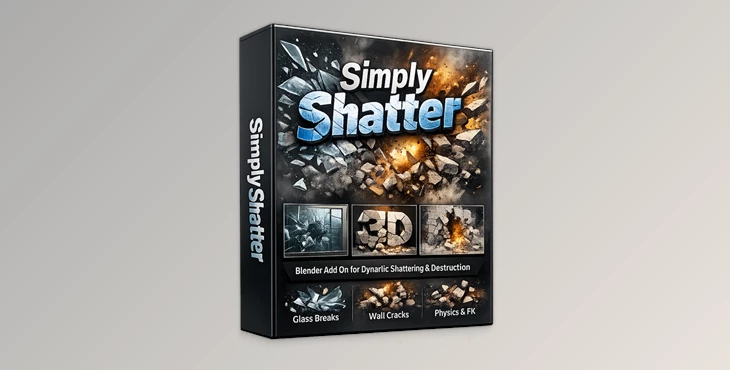
Downloadable Files
You can download Simply Shatter for free at the end of this page.
Break Objects Like a Pro in Blender
Adding realistic destruction effects to Blender projects can be complicated. From shattered glass to exploding props, it takes a lot of effort to create these effects.
Simply Shatter comes in very handy in these situations.
Simply Shatter is a powerful Blender add-on that makes it easy to add shattering effects to your projects. Whether you are working on motion graphics, VFX, architectural visualizations, or game assets, this tool will make it easier for you to create realistic destruction effects without slowing your project’s production process.
The best part about Simply Shatter is its easy and intuitive interface. It allows users to quickly experiment with different shattering effects on the objects in their Blender projects.
What is Simply Shatter?
Simply Shatter is a professional Blender add-on designed to create realistic destruction and shattering effects for objects such as glass, walls, props, and other materials.
Instead of manually breaking meshes or building complex simulations from scratch, the add-on automates the entire process while giving you creative flexibility.
With built-in fracture systems, physics controls, and custom materials, artists can create highly detailed destruction scenes much faster and with more realistic behavior.
Why Does It Matter?
Realistic destruction instantly adds more energy and cinematic quality to a project. Small details like natural crack patterns, debris movement, and imperfect glass surfaces make animations feel far more believable.
For example:
- A shattered glass logo reveal becomes more dynamic and professional.
- Architectural visualization scenes feel more realistic when windows break naturally.
- Game assets gain cinematic impact with destructible props.
- VFX shots become more immersive with physics-based debris movement.
This tool simplifies all these processes into an artist-friendly workflow.
Features
Smart Fracture System
Simply Shatter includes multiple fracture methods, such as:
- Low Poly Shatter
- High Poly Shatter
You can adjust:
- Resolution
- Threshold
- Randomness
- Transform variations
This allows you to create anything from clean, stylized breaks to highly chaotic cinematic destruction.
The included presets also speed up production dramatically because you can mix and customize them to fit your project style.
Realistic Physics Simulation
One of the strongest parts of Simply Shatter is its integrated physics system.
You can preview simulations in real time and later bake final animations for smoother playback and rendering.
Physics Options Include:
- Static collisions
- Dynamic collisions
- Sticky surfaces
- Slippery interactions
- Breakable boundaries
- Pin-to-frame constraints
- Animated boundaries
These settings help objects behave naturally instead of looking artificially animated.
The randomized break and stuck effects also add subtle imperfections that make simulations feel more organic and believable.
Faster Animation Workflow
The add-on includes several workflow-focused tools that save time during production:
- Auto keyframing
- Keyframe export
- Retiming support
- Custom simulation frame ranges
This makes it easier to integrate destruction effects into larger animation projects without manually adjusting every movement.
Artists can quickly test ideas, refine timing, and create polished results faster.
Custom Glass Materials & Dirt Maps
This product comes with 6 ready-to-use custom glass materials designed for different visual styles and lighting conditions.
The built-in dirt map system adds another layer of realism by generating subtle imperfections based on the fracture patterns themselves.
This is especially useful because perfectly clean, shattered glass often looks artificial in renders.
You can fully customize:
- Dirt intensity
- Texture visibility
- Surface detail
- Material appearance
These small details help final renders feel more cinematic and realistic.
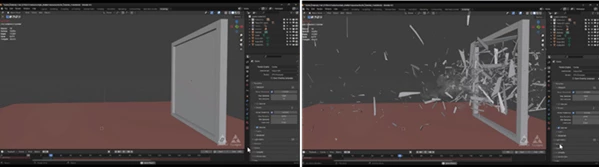
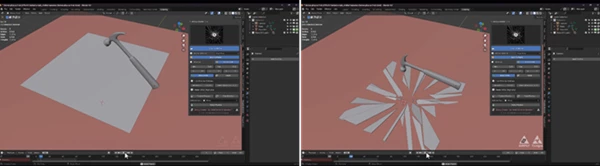
Professional Tips for Better Results
Mix Presets for Unique Fractures
Instead of using a single preset, try combining multiple fracture styles together. This creates less repetitive break patterns and more natural destruction.
Add Slight Randomness
Real-world destruction is never perfectly symmetrical. Adding small transform variations and randomized break settings helps simulations look much more believable.
Use Dirt Maps Carefully
Subtle dirt and imperfections usually look more realistic than extreme settings. Small surface details often create the biggest visual improvement.
Combine Slow Motion with Physics
Shattering effects become much more cinematic when paired with slow-motion animation. Simply Shatter’s retiming tools make this process easier and smoother.
Bake Final Simulations
For heavy scenes, always bake the final physics simulation before rendering. This improves stability and prevents unexpected changes during animation playback.
Final Thoughts
Simply Shatter is an excellent add-on for Blender for those who would like to add realistic destruction simulations to their projects without having to use the technical process of creating all of these simulations manually within Blender.
Simply Shatter includes realistic fracture simulations, realistic physics simulations for your objects, customizable materials for the objects in your project, and a user-friendly interface for all of these features to be controlled.
This tool will be of great use to those who work in the fields of motion graphics, visual effects, architectural visualizations, or game assets.

Files Password : gfxplugin.com OR 123456