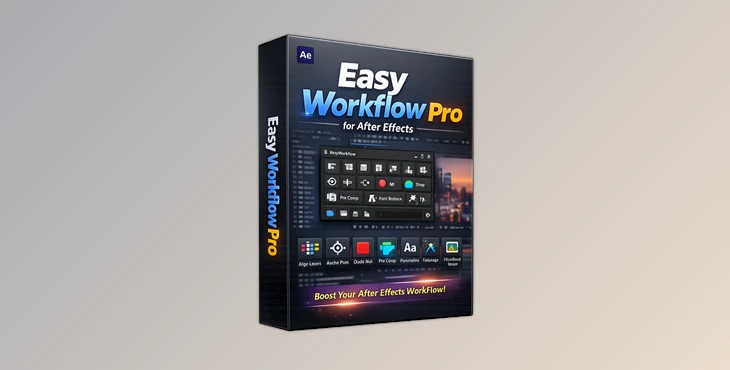
Downloadable Files
You can download Easy Workflow Pro for free at the end of this page.
Speed Up Your After Effects Workflow Like Never Before
If you spend hours inside After Effects, you already know how repetitive small tasks can become. Aligning layers, fixing anchor points, managing precomps, replacing fonts, controlling shape layers, or disabling heavy effects can easily eat up valuable production time.
That’s exactly where Easy Workflow Pro changes the game.
Instead of jumping through endless menus and manual steps, this powerful extension puts everything into one clean, professional panel. Whether you're a motion designer, video editor, animator, or content creator, Easy Workflow Pro helps you work faster, cleaner, and with much more control.
The best part? It feels natural from the first minute you use it.
What Is Easy Workflow Pro?
Easy Workflow Pro is an advanced all-in-one extension for Adobe After Effects that combines multiple professional workflow tools into a single unified panel.
Rather than installing many separate scripts and plugins, you get a complete productivity system designed specifically for editors and motion designers.
It simplifies complicated tasks such as:
- Layer alignment
- Anchor point positioning
- Precomp management
- Font replacement
- Shape layer editing
- FX control
- Composition organization
- Graph animation easing
- Workflow analytics
And it does all of this directly inside After Effects.
Why Editors Love Tools Like Easy Workflow Pro
Modern motion graphics projects are getting more complex every year. Deadlines are shorter, clients expect faster revisions, and projects contain hundreds of layers and effects.
Small workflow optimizations can save massive amounts of time.
For example:
- Instead of manually repositioning anchor points layer by layer, you can do it instantly with one click.
- Instead of searching through dozens of compositions to replace fonts, the tool scans and swaps them automatically.
- Instead of disabling effects one by one to improve preview speed, you can batch-disable them across the project.
These improvements may sound simple, but together they dramatically improve editing speed and project organization.
Features
Unified Workflow Panel
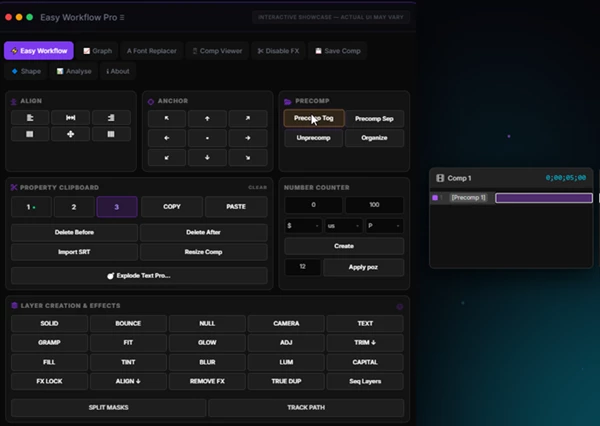
Easy Workflow Pro combines 7 premium tools into one organized interface.
You no longer need multiple scattered scripts or floating windows. Everything stays inside one professional control center.
Included Tools
- Workflow Panel
- Graph Editor
- Analytics Dashboard
- Font Replacer
- Shape Tools
- FX Manager
- Comp Saver
This creates a much smoother editing experience for both beginners and advanced users.
Layer Alignment Tools
Precise alignment is essential for clean motion graphics.
Easy Workflow Pro includes:
- 9-point alignment grid
- Distribution controls
- Pixel-perfect positioning
- Instant layer arrangement
This helps designers create balanced compositions much faster without manually dragging layers around.
Anchor Point Control
Manually moving anchor points can be frustrating in After Effects.
With Easy Workflow Pro, you get:
- 9-point anchor positioning
- Instant corner/center placement
- Faster animation preparation
- Better transform control
This becomes especially useful when animating UI elements, titles, logos, or motion graphics systems.
Advanced Precomp Manager
Precomps are powerful, but managing them manually can slow projects down.
Easy Workflow Pro simplifies the process with:
- Precomp together
- Precomp separately
- Unprecomp tools
- Auto organization
This keeps projects cleaner and easier to manage during large productions.
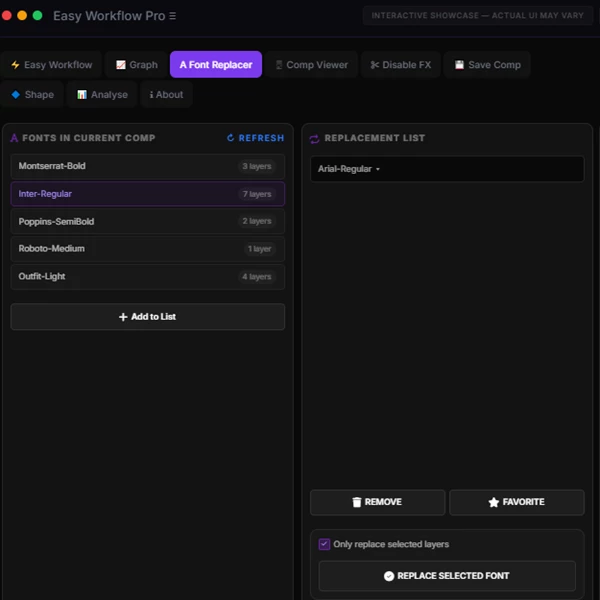
Font Replacer
One of the most useful features for client revisions.
The Font Replacer can:
- Scan all fonts inside a composition
- Replace fonts instantly
- Apply replacements to selected layers only
- Save favorite fonts
This is extremely valuable when branding changes happen late in production.
Shape Layer Tools
Shape animation becomes significantly faster thanks to the dedicated Shape panel.
You can control:
- Stroke
- Fill
- Trim Paths
- Taper
- Dashes
- Opacity
- Offset values
All through live sliders and organized controls.
Instead of opening dozens of timeline properties, everything stays accessible in one place.
FX Manager
Heavy effects often make previews slow and difficult to work with.
The FX Manager allows you to:
- Scan all project effects
- Disable selected effects
- Re-enable effects instantly
- Search and filter effects
This is a huge performance boost for complex compositions.
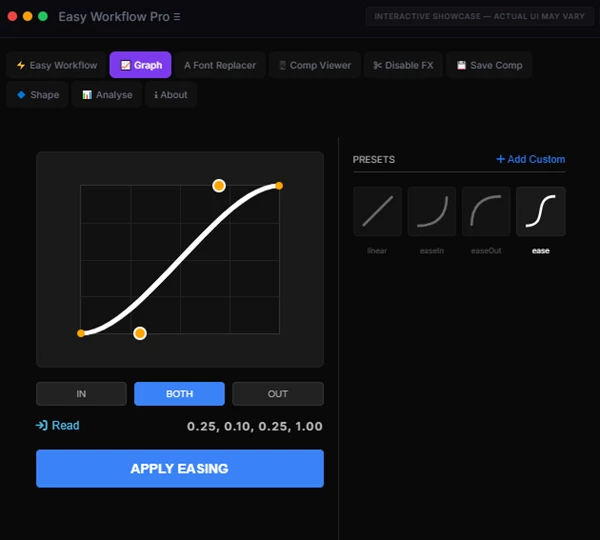
Graph Editor Presets
Professional motion design depends heavily on smooth easing curves.
Easy Workflow Pro includes:
- 18+ easing presets
- Bounce curves
- Elastic curves
- Sine and Expo easing
- Visual bezier handles
- Numerical precision controls
This helps animations feel more cinematic and polished with far less effort.
Comp Saver System
Managing reusable compositions becomes much easier.
Features include:
- Thumbnail previews
- Client folders
- Instant search
- Favorite system
- Adjustable grids
This essentially creates a mini asset library directly inside After Effects.
Analytics Dashboard
A unique feature rarely seen in AE extensions.
The dashboard tracks:
- Active editing time
- Daily focus sessions
- Weekly productivity
- Historical work charts
This helps freelancers and studios better understand workflow habits and production efficiency.
Professional Tips For Better Results
Always organize your project before you begin animating it. Easy Workflow Pro’s alignment and anchoring tools will help you to position your project’s layers prior to animation.
Always disable effects while animating your project. Using Easy Workflow Pro’s FX Manager will allow you to disable the effects on your project, making it much easier to animate.
Always save your components in the Comp Saver system. Use this system to make your own library of After Effects compositions that you can save and reuse.
Use the Graph Editor presets wisely when animating your project. Combining the different Graph Editor presets will allow you to create natural motion graphics. Only use Elastic, Bounce, and other extreme presets when animating elements that require such motion graphics.
Always replace fonts at the beginning of your projects when you receive client requests. Using the Font Replacer will allow you to quickly scan and change the fonts in your project.
Final Thoughts
Easy Workflow Pro is much more than an After Effects extension.
It is a complete system for After Effects editors that will drastically cut the amount of time you spend on repetitive tasks.
From alignment and graph editor presets to font replacement and FX management, Easy Workflow Pro has a feature that will save you time and improve the quality of your editing process.
If you are an After Effects editor, this could be the extension that transforms the way you edit and create projects.

Files Password : gfxplugin.com OR 123456