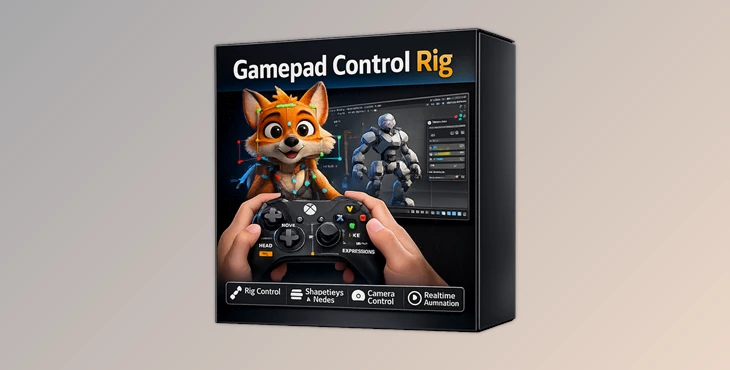
Downloadable Files
You can download Gamepad Control Rig for free at the end of this page.
Animate with Your Hands, Not Just Your Mouse
The Gamepad Control Rig allows you to animate within Blender in a completely different way.
Instead of using your mouse to control various animation parameters, you can use the controller’s buttons and sticks to manipulate the actions of objects or characters within your project.
With Gamepad Control Rig, animation within Blender becomes faster, smoother, and more natural.
If you’ve ever fantasized about animating with your controller instead of your mouse, this tool will give you a completely new experience using Blender.
What Is Gamepad Control Rig?
This tool can turn almost any modern gamepad into a professional animation controller for Blender.
Instead of using your keyboard and mouse to control animation parameters in Blender, you can use your gamepad to control these parameters directly.
You can control over a dozen different types of animation properties with your controller, including the following:
- Object transforms
- Rig controls
- Shape keys
- Materials
- Constraints
- Geometry Nodes
- Lighting
- Physics settings
- Custom properties
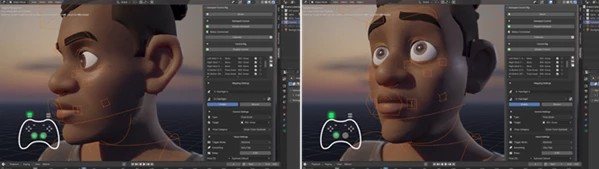
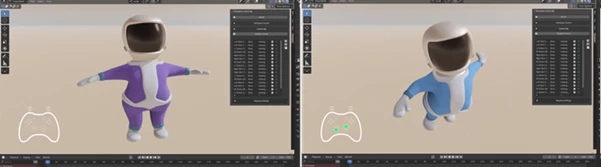
For example, you can use the analog stick on your gamepad to rotate your characters. Additionally, you can use the buttons to trigger facial expressions, controlling the character’s head movement with triggers, and much more.
The instant responsiveness of the gamepad means that animators can create more organic movements with better speed and focus.
Why Real-Time Control Changes Animation
Traditional animation workflows can sometimes interrupt creative flow. Constantly moving between menus and properties slows experimentation.
With Gamepad Control Rig, control becomes immediate.
Instead of:
- selecting values,
- opening panels,
- typing numbers,
You simply move, press, or hold.
This improves animation because:
- motions become more organic,
- timing feels more human,
- Experimentation becomes faster, and
- performance-based animation becomes easier.
The result is animation that often feels more alive and expressive.
Meet the Tool
A New Way to Animate in Blender
Gamepad Control Rig is designed for Blender artists who want faster, more intuitive control over animation and scene interaction.
The addon supports professional workflows while remaining flexible enough for experimentation and live performance animation.
Whether you're building complex character rigs or simply controlling shader values, the system adapts to your setup.
Features
Universal Property Control
The addon can control almost every important property inside Blender.
Transform Control
Adjust:
- Location
- Rotation
- Scale
using analog sticks or triggers for smooth real-time movement.
Pose Asset Blending
Transition between pose assets naturally during playback or recording.
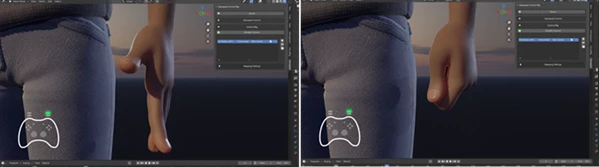
Bone & Rig Control
Manipulate armatures, constraints, and rig properties directly from the controller.
Shape Key Animation
Perfect for:
- facial animation,
- creature deformation,
- stylized morphing,
- lip-sync workflows.
Material & Shader Control
Animate shader parameters in real time for dynamic visual effects.
Geometry Nodes Support
Control node inputs interactively to create evolving procedural effects.
Lighting & Physics
Adjust:
- light intensity,
- physics strength,
- particle behavior,
- simulation properties
without interrupting playback.
Custom Data Paths
Map nearly any Blender property using custom data paths.
Smart Control Modes
Multiple Ways to Interact
Every mapping works independently, allowing highly customized setups.
Absolute Mode
Direct value mapping:
- half press = half value,
- full press = full value.
Excellent for analog precision.
Toggle Mode
Switch between predefined states with each press.
Perfect for:
- enabling effects,
- changing expressions,
- activating constraints.
Cycle Mode
Step through multiple values sequentially.
Useful for:
- pose switching,
- camera modes,
- lighting presets.
Continue Mode
Accumulate changes while holding a button.
Great for progressive animation changes.
Wave Generator
Generate automatic animation using mathematical or organic wave patterns.
Create:
- wind motion,
- breathing effects,
- ocean movement,
- pendulum motion
without touching the controller.
Instant Setup Feels Amazing
Automatic Binding System
One of the most impressive parts of Gamepad Control Rig is how quickly it connects controls.
Trigger Binding
Press a controller button and instantly assign it.
Control Binding
Touch any Blender property and connect it immediately.
This removes unnecessary setup friction and keeps the workflow fast and creative.
Record Live Animation Performances
Gamepad Control Rig allows artists to record their animation performances live within Blender.
Recordings can be made for individual mappings or entire collections of mappings. Your movements will be recorded into keyframes for each of these selected parameters.
This feature makes the tool very useful for character animation and performance, camera work, and creating previs animations.
Fine Control for Professional Results
Smoothing
Gamepad Control Rig includes smoothing functionality that makes analog stick movements look less jittery and more fluid.
This feature is very useful for character animation and game control parameters.
Delay
Add millisecond-based timing offsets for layered or sequential actions.
Useful for:
- mechanical rigs,
- chain reactions,
- secondary animation.
Supported Controllers
Works with Almost Everything
The addon supports a wide range of controllers, including:
- PS5 DualSense
- PS4 DualShock
- PS3 DualShock
- Xbox Series X/S
- Xbox One
- Xbox 360
- Nintendo Switch Pro
- Joy-Con pairs
- Nvidia Shield
- Google Stadia
- Amazon Luna
- Standard Gamepad API devices
Both:
- Bluetooth
- USB
Connections are supported with automatic detection and calibration.
Dead-zone adjustments are also available for worn analog sticks.
Professional Tips for Better Results
Use the following tips to ensure the best experience with the Gamepad Control Rig add-on.
Build Your Control Systems Layer by Layer
Start with essential properties such as object transforms, facial controls, and camera movement.
As your skills and knowledge of the software increase, you can begin to include more complex properties.
Use Smoothing for More Natural Animation
Smoothing will provide you with more natural movements of your gamepad-controlled elements.
For instance, it will work better with animating the movements of cameras and creatures.
Combine Wave Generators with Manual Control
In some instances, you may want to use the automatic animations provided by the wave generator.
For instance, use the breathing wave animation to automatically breathe in and out of a character while manually turning their heads to look at other characters in the scene.
Record Multiple Mappings at Once
Recordings made for individual mappings are more natural than recordings for each parameter separately.
For instance, control a character’s body movements and facial animations at the same time, then record their performance.
This way, you can perform movements together that may take more time to control separately.
Final Thoughts
Gamepad Control Rig allows Blender animators to control their software using a gamepad rather than a keyboard and mouse.
The ability to map the gamepad controls to the software features allows users to have more control over the animation process.
Additionally, features like an automatic binding system, live recording of animations, the ability to create procedural wave animations, and the ability to control almost every important property make this a fantastic tool to have at your disposal as an animator.
Whether you are a professional or just starting out in the animation industry, Gamepad Control Rig is a tool that will provide you with a more enjoyable and creative animation experience in Blender.

Files Password : gfxplugin.com OR 123456