Downloadable Files
You can download Texture VFX Control for free at the end of this page.
Bring Motion Graphics Directly Into Blender
Creating motion graphics within Blender usually involves switching between several different programs to edit your videos. Texture VFX Control allows you to turn your videos, images, and image sequences into textures you can control directly within Blender’s 3D program.
Whether you are producing motion graphics, reels, cinematic graphics, or VFX shots within your projects, Texture VFX Control will significantly improve the way you work within Blender. Your entire workflow will become faster, smoother, and much more creative.
What Is Texture VFX Control?
Texture VFX Control is a plugin that allows you to work with media textures like videos, images, and image sequences within Blender. It gives you greater control over the playback of media files and the application of visual effects.
By staying within Blender, users can create motion graphics and apply visual effects to their project. This is significantly more flexible than working within Blender and external video editing software. Some of the features of Texture VFX Control include the following:
- Add animated video textures to 3D objects
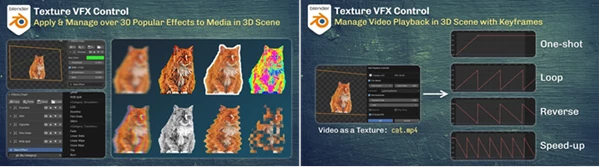
- Control the playback speed of video textures using keyframes
- Reverse or crop video clips within your project
- Add multiple visual effects to your textures
- Create motion graphics within the 3D editing environment of Blender
- Speed up your production of visually intensive reels and VFX elements for projects
A Smarter Workflow for Video Textures
Traditional editing workflows often require moving between video editing software and 3D applications. With Texture VFX Control, media editing becomes part of the Blender scene itself.
This integration offers several advantages:
- Faster iteration and previewing
- Better synchronization between animation and media playback
- More creative freedom in compositing
- Easier experimentation with effects and transitions
- Cleaner non-destructive editing workflow
For motion designers and VFX artists, this can dramatically speed up production while keeping everything centralized in one project.
Features
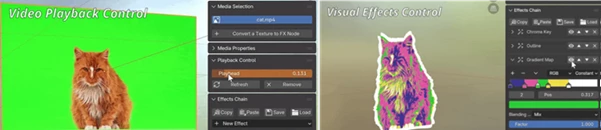
Media Playback Control One of the key features of Texture VFX Control is the flexibility with which it allows users to play back their media files.
The feature allows users to:
- Adjust the playback speed of media files
- Reverse the playback of media files
- Crop media files to specific sections
- Animate various playback features using keyframes
- Add multiple media files to the project to edit
With this media playback control feature, users can create features like time-lapse edits or focus on specific elements within their media files to give to their 3D designs.
Effects Chain Control
The add-on also includes a powerful effects workflow designed for non-destructive editing.
Key capabilities include:
- Access to over 40 popular video effects
- Quick effect application
- Layering multiple effects as a chain
- Saving custom effect presets
- Transferring presets between objects
This means users can experiment freely without permanently changing original media files. For example, you could create:
- Glitch effects for cyberpunk scenes
- Retro VHS visuals
- Stylized color grading
- Distortion effects for sci-fi interfaces
- Dynamic animated overlays
Because the workflow is non-destructive, artists can always adjust or refine effects later in the project.
Easy Integration Inside Blender
The add-on integrates directly into Blender’s 3D viewport sidebar through the [TexFX] tab. The setup process is simple:
- Import media using:
Add > Image > Mesh Plane - Open the TexFX tab
- Click:
Convert a Texture to FX Node - Select your media texture
- Start applying playback controls and effects
Once activated, additional panels appear for advanced editing and effect management. This user-friendly workflow makes the tool approachable even for Blender users who are newer to motion graphics or compositing.
Professional Tips for Better Results
One of the best techniques for creating cinematic results within your Blender projects is to animate the playback speed of the media files and your project’s camera movements.
Use the effect chains carefully to avoid making your 3D projects look cluttered with too many visual effects.
Save your most used visual effect presets to significantly speed up your projects in the future.
Experiment with using image sequences to create your visual media within Blender instead of compressed video files.
Why Texture VFX Control Stands Out
Compared with other Blender programs, this software stands out due to its seamless integration between media editing and 3D design in Blender.
You can edit your media files, apply visual effects, and create motion graphics- all within Blender.
This program offers benefits for those interested in learning how to incorporate motion graphics, reels for social media, music videos, cinematic graphics, VFX shots, and even art projects into their Blender programs.
Final Thoughts
Texture VFX Control is an excellent add-on for any artist interested in gaining further control over the textures and visual effects within their Blender projects.
This software significantly improves the creativity and speed at which artists can produce their projects.
Whether you are working on motion graphics, cinematic visuals, VFX projects, or even experimental 3D art projects in Blender, this program is worth exploring to see how it can enhance your projects.
If you are interested in incorporating visual media into your Blender projects, Texture VFX Control is definitely one of the tools to explore.

Files Password : gfxplugin.com OR 123456