Downloadable Files
You can download QuickImporter for free at the end of this page.
Make Importing Footage Feel Effortless
If you work with large libraries of media editing software like Adobe Premiere Pro, After Effects, or Audition, then you know how frustrating it can be to search for one specific file out of hundreds or even thousands of media files.
QuickImporter changes all that by offering an ultra-fast search system that makes browsing for media files faster, smoother, and more organized than ever before. Whether you are a video editor, motion designer, sound editor, or content creator, QuickImporter will help you focus more on your project and less on browsing for your media files.
What Is QuickImporter and Why Is It Useful?
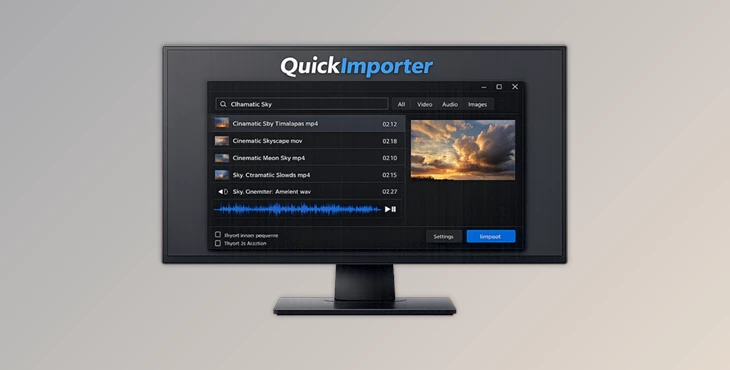
QuickImporter was built for use within Adobe Premiere Pro, After Effects, and Audition. The goal behind building QuickImporter was to make it easier for editors to find and import their media files. Using a super-fast fuzzy search engine, QuickImporter finds media files even when the keywords or the spelling of the files are mistyped. For example:
- Searching for a sound effect inside a massive SFX library becomes almost instant.
- Finding the correct footage version among hundreds of similar clips is dramatically easier.
- Browsing image sequences no longer requires opening folders filled with thousands of individual frames.
These features improve workflow speed, reduce editing frustration, and help creators stay focused during production.
A Smarter Import Experience for Creative Projects
QuickImporter has been built to provide an improved file import experience to users working on video and audio projects within the Adobe creative suite applications.
Features
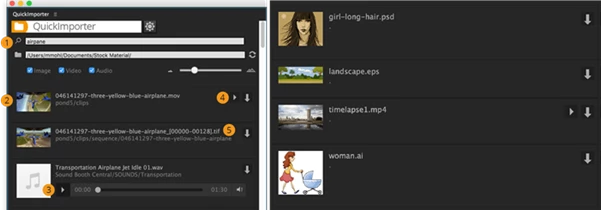
Super-Fast Fuzzy Search
One of the strongest features of QuickImporter is its intelligent search engine. It instantly scans thousands of files and finds results even when:
- your spelling is incorrect,
- keywords are incomplete,
- or filenames are difficult to remember.
This is incredibly useful for editors working with huge footage archives or sound libraries.
Built-In Audio Player
Preview audio files simply by hovering over the file icon. This small feature saves a surprising amount of time because you no longer need to import files just to hear them first. It’s especially useful for:
- sound designers,
- podcast editors,
- trailer creators,
- and music-heavy projects.
Media Preview Support
QuickImporter also includes a media player that allows video previews before importing. Instead of guessing which clip you need, you can quickly check footage directly inside the importer window. This improves accuracy and speeds up project organization.
Image Sequence Support
Working with image sequences can become messy very quickly. QuickImporter solves this by displaying image sequences as a single item instead of hundreds of separate files. This creates a much cleaner browsing experience for:
- VFX artists,
- animation workflows,
- and CGI rendering pipelines.
Thumbnail Support on macOS
On Mac systems, QuickImporter uses the macOS QuickLook system to display thumbnails for many file types including:
- PSD
- AI
- EPS
- video formats
- images
If Finder can preview it, QuickImporter usually can too. This visual browsing system helps editors recognize files faster and reduces importing mistakes.
Seamless Adobe Workflow
One license works across:
- Premiere Pro
- After Effects
- Audition
This unified workflow is extremely useful for creators who move between multiple Adobe applications during production. In Audition, QuickImporter even supports multitrack sessions by inserting files directly into the active track.
Professional Tips for Better Workflow
- Use Favorites to Navigate to Your Projects Faster: Save your projects to your favorites so that you can navigate to them faster.
- Combine Your Keywords: Instead of using the full name of your media files, use keywords to find the files that you need. QuickImporter’s fuzzy search engine works extremely well with these keywords.
- Preview Your Files Before Importing: Use the media and audio preview tools built into QuickImporter to avoid importing your files into your projects without first reviewing the contents of those media files.
- Organize Your Image Sequences into Folders: Place your image sequences into their own dedicated folders so that QuickImporter can find them faster.
Final Thoughts
QuickImporter is one of those applications that makes every editing session better. It gets rid of the repetitive and slow steps editors must take when adding media files to their projects. From its fuzzy search engine to its built-in media players, QuickImporter is a time-saving tool that will help editors remain focused on their projects.
Whether you work in video editing, motion graphics, audio editing, or content creation, QuickImporter will make your editing experience smoother and more professional.

Files Password : gfxplugin.com OR 123456