Downloadable Files
You can download the product Fluid for free from the bottom of this page.
🌊 A New Way to Bring Motion to Life
Have you ever wanted to give your designs a life? Fluid is a tool that allows you to do just that! This plugin produces smooth, dynamic fluid motion that is addictive to play with.
💡 What Is Fluid and Why It Matters
At its core, this tool is a 2D fluid simulation plugin powered by real physics (Navier-Stokes equations). But don’t let the technical part scare you—what it really means is that your animations behave like actual liquid.
Why is that important?
The natural-looking motion of Fluid will make your designs look more professional.
Fluid motion can be used for applications like:
- Introducing a brand’s logo with liquid motion
- Creating dissolve effects from text
- Creating fluid motion for cinematic effects
- Simulating water and other liquids in your designs
Instead of static effects, this system introduces motion that mirrors the way that objects move in life.
🚀 Meet Fluid – A Professional Creative Tool
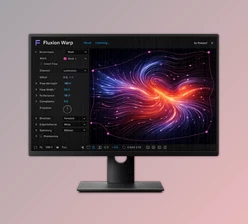
This tool allows designers to create realistic fluid motion within After Effects.
✨ Features
- 🔹 Real-Time GPU Simulation: This tool simulates in real time and directly within the After Effects timeline using your GPU
- 🔹 Any Layer as a Fluid Source: Simply apply Fluid to any layer in your composition, such as text or logos, to make liquid motion from your brands
- 🔹 Dual Emitters: Add two separate sources of liquid to your composition to create interaction between the two flows of your choosing
- 🔹 Collider Support: Any layer can act as a “collider” or obstacle for the liquid to interact with. Control the bounce and friction against these layers
- 🔹 Advanced Physics Controls: Control the physics of the liquid using settings like Gravity, Wind, Buoyancy, Viscosity, Vorticity, and more
- 🔹 Procedural Turbulence: Add natural movement to your liquid using procedural turbulence
- 🔹 Cinematic Post Effects: This product includes built-in post effects to enhance the motion, such as bloom and shading
- 🔹 Quality Levels: Fluid includes settings to control the quality of the motion. Options include Standard, High, Ultra, and Extreme settings
🎬 Real Example
Imagine a logo that melts into liquid, flows around invisible objects, and then reforms into text—all in real time. That’s the kind of workflow this plugin enables without leaving After Effects.



🎯 Pro Tips for Better Results
- Use the lower quality settings in Fluid to create your designs. Then, use the quality controls within the simulation to increase the quality settings once you are happy with your composition
- Use invisible colliders to alter the path of the liquid without visually representing the obstacle to the motion
- Animate the movement of the sources of the effect to control the movement of the liquid trails
- Use the vorticity and turbulence features within Fluid to add dynamic movement to the motion
- Use the color mode settings to create more cinematic-looking liquid motion (use gradient or dual color modes)
- These small features will have a big impact on the realism of your liquid animations
🔥 Final Thoughts
Fluid is a tool that allows anyone to add realistic fluid motion to their compositions in After Effects. The learning curve is low, and the results can easily be shared amongst teammates or published online. For anyone looking to add realism to their designs and enhance the visual aspects of their projects, this tool is worth investigating. It is unlikely that anyone will ever return to static After Effects effects once they have used them!

Files Password : gfxplugin.com OR 123456