Downloadable Files
You can download Pluck for free at the end of this page.
✨ Grab Only What You Need
If you’ve spent any time in After Effects, you’ve imported entire projects from your computer - only to use one composition from that project.
That’s exactly what Pluck was made for.
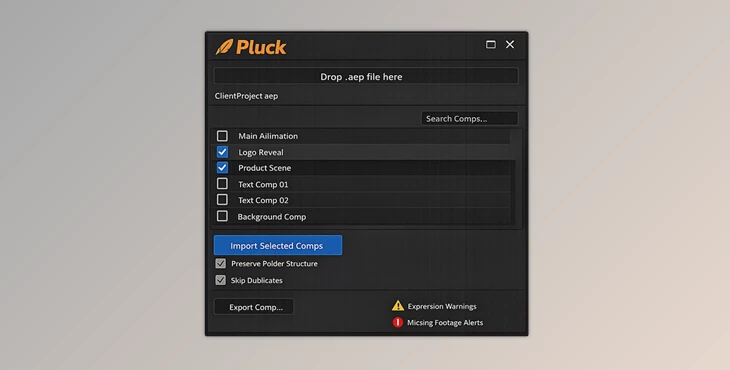
Just drag and drop the AE projects that you’d like to import into Pluck. Select the compositions that you want to import, and they’ll automatically be imported into After Effects - without having to open those projects!
🎯 What is Pluck and Why It Matters
Pluck helps designers extract compositions from After Effects projects. Pluck allows you to:
- Import only the compositions you need from another .aep file
- Automatically download all the dependencies of the compositions
- Export your files and compositions as a new .aep project
💡 Why This Improves Your Workflow
Think about how much time you spend organizing imported projects:
- Removing unused comps
- Fixing missing files
- Cleaning up messy folders
This product eliminates all of that. You get:
- Faster workflow with fewer steps
- Cleaner projects with no unnecessary assets
- Reliable imports with all dependencies handled automatically
🚀 Meet Pluck – A Tool Built for Motion Designers
This import tool was built by motion designers for designers! Whether you use After Effects as a freelancer, part of a design team, or even to deliver project files to your clients, Pluck will make your experience easier and more efficient.
🧩 Features
📥 Smart Import
- Drag and drop your .aep files into the panel
- View all compositions inside those projects
- Search and filter by composition name
- Select one or more compositions to import
🔗 Dependency Management
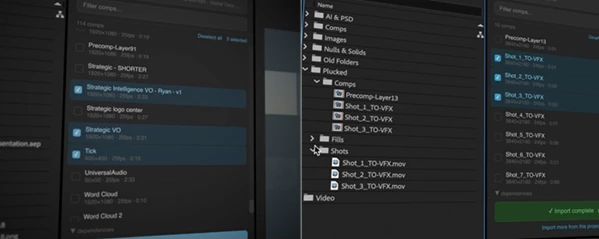
- Automatically imports precomps and footage
- Prevents duplication with smart relinking
- Detects and warns about broken expressions
- Ensures everything works immediately after import
📁 Flexible Organization
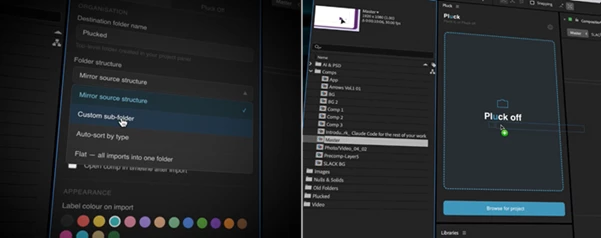
- Mirror original folder structure
- Auto-sort items by type
- Flat import into a single folder
- Custom sub-folder naming
- Apply label colors to imported items
📤 Export (Pluck Off)
- Export comps as standalone .aep files
- Create fully packaged .zip files for sharing
- Use custom naming with tokens (comp name, date, project name)
- Batch export multiple compositions
🎬 Real Use Cases
- Reusing animations from previous client projects
- Sharing specific scenes with teammates
- Creating clean project files for delivery
- Building a reusable motion design library
Instead of importing entire projects, you work with only what you need—saving time and reducing clutter.
🧠 Pro Tips for Better Results
- Use the search bar to find a composition within a large project
- Use the mirror folder structure to share projects with team members
- Click on the expressions warning to inspect any expressions before importing
- Use the export as ZIP function to deliver your projects to your clients
- Use label colors to organize your project in After Effects
These tips will help you to get the most out of Pluck and greatly improve your current After Effects projects.
🏁 Final Thoughts
This tool is much more than just a plugin for After Effects. It will remove steps from your project, keep your projects looking clean, and allow you to focus on your design work. Whether you work alone or as part of a large design team, Pluck will become an essential tool in your creative flow.
 Pluck - Move and reuse comps in Ae by Aescripts (v1.2.5).rar (Size: 891.7 KB - Date: 6/6/2026 11:13:09 AM)
- Pluck - Move and reuse comps in Ae by Aescripts (v1.2.3).rar (Size: 891.1 KB - Date: 5/30/2026 12:57:25 PM)
- Pluck - Move and reuse comps in Ae by Aescripts (v1.1).rar (Size: 878.4 KB - Date: 5/9/2026 12:37:21 PM)
- Aescripts - Pluck v1.0.rar (Size: 904.6 KB - Date: 5/2/2026 2:06:41 PM)
Files Password : gfxplugin.com OR 123456
![Download Essential Sounds for Vital - Ghosthack [Synth Presets]](https://dls3.gfxplugin.ir/Download_Files/14453/SearchSmall/banner.jpg)