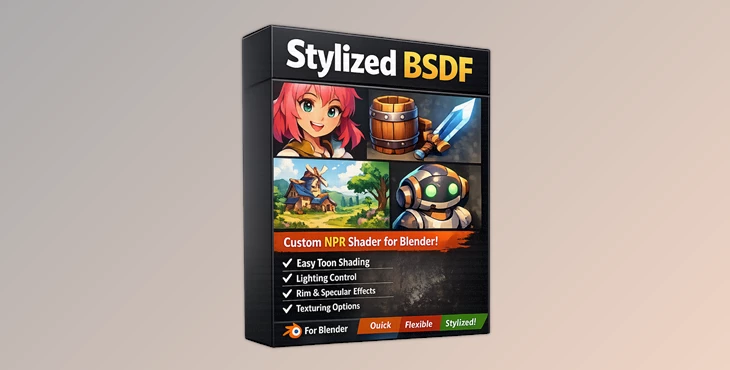
Downloadable Files
You can download Stylized BSDF for free at the end of this page.
🎨 A Fresh Way to Create Stylized Materials
If you’ve ever struggled with complicated node setups just to achieve a clean, stylized look in Blender, Stylized BSDF is exactly what you’ve been waiting for. This shader takes the complexity out of non-photorealistic rendering (NPR) and replaces it with a smooth, artist-friendly workflow.
Instead of fighting with technical limitations, you get direct control over how your materials look—whether you’re aiming for anime, illustration, or bold graphic styles. It’s simple, powerful, and surprisingly fun to use.
🧩 What Is Stylized BSDF & Why It Matters?
At its core, Stylized BSDF is a complete NPR shader designed specifically for artists who want creative control rather than physical accuracy. Unlike traditional shaders that try to mimic real-world lighting, this tool lets you break the rules on purpose. And that’s exactly why it works so well.
Why it improves your results:
- Artist-first controls: You decide how reflections, shadows, and highlights behave.
- Faster workflow: No need for complex node networks.
- Consistent style: Perfect for animation, games, and stylized projects.
Real-world uses:
- Creating anime-style characters with sharp shadows
- Designing illustrated environments with textured shading
- Producing motion graphics with bold, graphic lighting
- Building concept art that stands out instantly
These features help you achieve cleaner, more intentional visuals—without spending hours tweaking nodes.
🚀 Meet Stylized BSDF (Professional Tool Overview)
Stylized BSDF is a single node group that replaces complex shader setups with a streamlined, all-in-one solution. Everything you need for stylized rendering is built right in.
✨ Features
🎭 Pattern System
Add artistic patterns like Crosshatch, Halftone, Dash, or Paint directly into your materials.
You can control:
- Scale and intensity
- Aspect ratio (screen-space friendly)
- Separate patterns for diffuse and highlights
👉 Result: Your renders gain texture and personality without extra compositing.
💡 Stylized Specular & Metallic
Forget physically accurate reflections—this system gives you full creative control:
- Roughness → sharpness of highlights
- Reflection Smoothness → shape of reflections
- Reflection Detail → pattern scale
- Metallic toggle for stylized reflective surfaces
👉 Result: Clean, graphic reflections that match your art style perfectly.
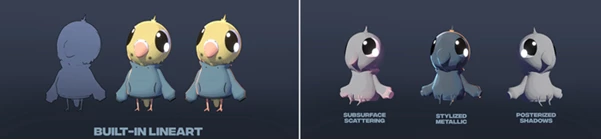
✏️ Lineart System
Generate outlines directly inside the shader:
- Thickness, threshold, opacity, and color controls
- Multiply Self option for adaptive line behavior
👉 Result: Dynamic lineart that reacts to lighting and surface details.
🌈 Subsurface Scattering (SSS)
Simulate soft light passing through surfaces:
- Distance, weight, and tint controls
- Great for skin, wax, or leaves
👉 Result: More depth and realism—even in stylized scenes.
🌑 Shadow Mask Control
Use custom masks (textures or vertex colors) to control shadows:
- Override scene lighting completely
- Focus shadows exactly where you want them
👉 Result: Cleaner, more intentional shading for stylized visuals.
🎬 Full AOV Support
Export every major component separately:
- Base Color
- Patterns & Highlights
- Specular & Metallic
- Lineart & Shadows
👉 Result: Maximum flexibility in compositing and post-production.
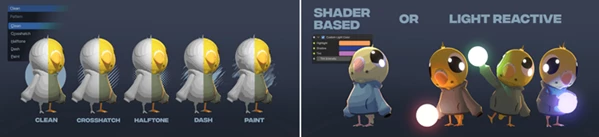
🎯 Pro Tips for Better Results
Use these tips to get the best out of the shader and create the type of projects you want:
- Use halftone and paint patterns together to create interesting textures
- Use shadow masks to manually place shadows in your projects
- Use the reflection settings to either create soft or graphic reflections
- Use lineart only if you want to create artistic projects with lines
- Use subsurface scattering tint to adjust the color of subsurface scattering lights (great for skin projects)
These small tweaks will help you get from good work to professional work in a jiffy.
🌟 Final Thoughts
If you’ve ever wanted more control over your Blender materials without having to jump into the node editor and potentially waste hours struggling with complicated nodes and settings, then Stylized BSDF may just be the tool you’ve been looking for.
Whether you’re an animator, a game developer, or even a concept artist, this product will allow you to create the type of visual projects you envision - without the hassle.
For anyone interested in working with stylized shaders in Blender, this is definitely something you’ll want to try out for yourself.

Files Password : gfxplugin.com OR 123456