Downloadable Files
You can download the product Fluxion Warp for free at the end of this page.
✨ Introduction — Let Your Images Flow Naturally
Have you ever wanted your visuals to move, not just animate—but flow organically like liquid or wind? That’s exactly where Fluxion Warp shines. This powerful After Effects plugin transforms static images into dynamic, fluid compositions by warping pixels along custom paths. With just a simple mask, you can guide motion in a way that feels natural, artistic, and surprisingly intuitive.
🎯 What Is It & Why It Matters
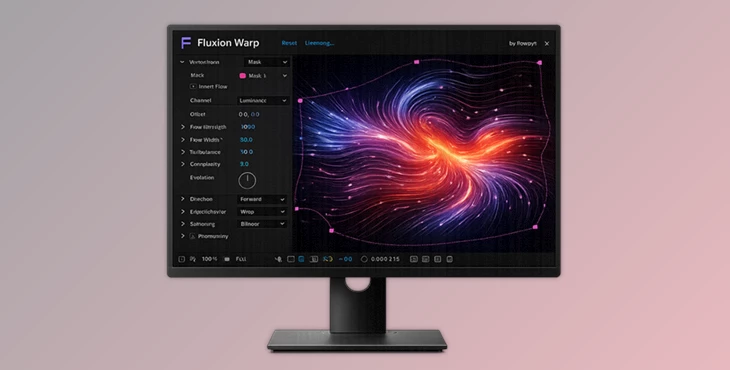
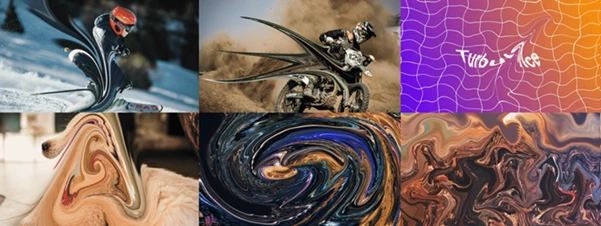
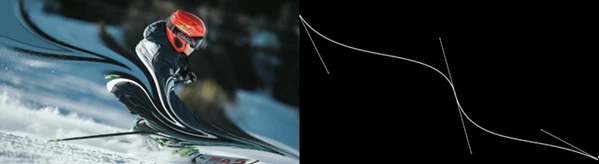
At its core, Fluxion Warp generates a vector field from a mask, which means it creates directional forces that push pixels along a defined path. Think of it like drawing a river, and then watching your image flow through it.
Why this is powerful:
- Instead of random distortions, you get controlled, directional warping
- Movements feel intentional and realistic
- You can design motion based on shapes and paths you already use
Real-world uses:
- Creating flowing fabric or smoke effects
- Warping faces or objects in a stylized way
- Simulating wind, water, or energy trails
- Adding motion to still images for motion graphics
These features dramatically improve visual quality because they replace artificial-looking effects with organic motion driven by your design.
🚀 Meet Fluxion Warp — Your Creative Flow Tool
Fluxion Warp is designed to make complex warping effects simple, fast, and visually stunning. It gives you full control over how pixels move—without overwhelming you with complicated setups.
🔧 Features
- Vector Field from Mask: Easily generate directional flow based on any mask you draw.
- Pixel Advection (Flow Simulation): Pixels move smoothly along the generated vector field, creating fluid motion.
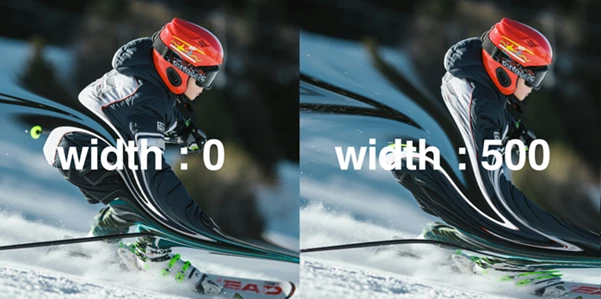
- Width Control: Adjust how wide the influence of the flow spreads across your image.
- Edge Handling Modes: Choose from four different behaviors for how edges are treated during warping.
- Flow Direction Control: Reverse the flow instantly or tweak how the mask endpoints behave.
- Falloff Adjustment: Control how the effect fades from the center outward for more natural blending.
Turbulence System
Add organic randomness for realism:
- Three turbulence types
- Adjustable noise scale
- Control over speed and animation
- Animate noise phase for evolving motion
🎬 Example Use Cases
- A logo dissolving into flowing particles
- A portrait subtly melting along curved paths
- Energy effects that follow drawn lines
- Dynamic transitions between scenes
🎨 Pro Tips for Better Results
Want your results to look truly professional? Try these:
- Use smooth masks: Clean, flowing paths create more natural motion.
- Combine with turbulence carefully: A little noise adds realism—but too much can break the effect.
- Animate the mask path: This creates evolving motion instead of static flow.
- Play with falloff settings: Soft transitions help avoid harsh distortions.
- Layer multiple effects: Subtle stacking creates rich, complex motion.
💡 Final Thoughts — A New Way to Warp Reality
Fluxion Warp allows you to warp your images in a way that is much smarter and more artistic for your design processes. The ability to create a vector field from a mask and add natural movements to the pixels within your compositions is a huge benefit to After Effects users of any skill level. If you are looking for a way to add fluid movement to your projects and compositions, Fluxion Warp is definitely worth exploring!

Files Password : gfxplugin.com OR 123456