Downloadable Files
You can download Voice2Captions for free at the end of this page.
🎬 Turn Audio into Captions in Seconds
Imagine finishing your video subtitles in a few seconds instead of spending hours on it. This is exactly what Voice2Captions does. The eVoice2Captions has made one of the most tedious aspects of video editing into a quick and enjoyable task. This is a tool that you should consider using if you work with video or audio files
Give it a try and see just how effortless adding captions can be for your projects. xtension, you can create accurate captions from your videos in seconds that will save you hours of typing. Whether you are working on YouTube videos, podcasts, or any other kind of project for your clients, this will drastically cut the amount of time you spend on captioning.
💡 What is Voice2Captions & Why It Matters
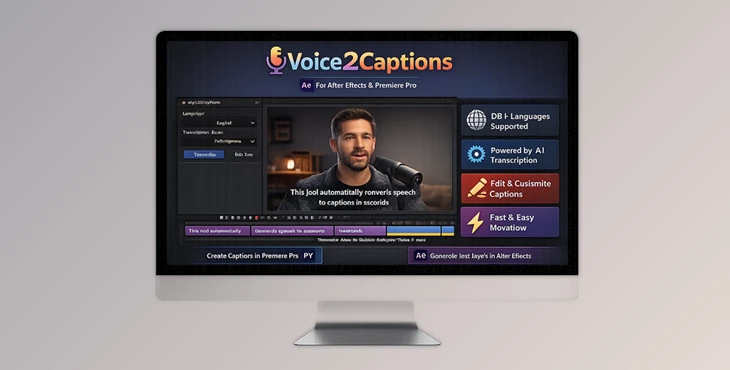
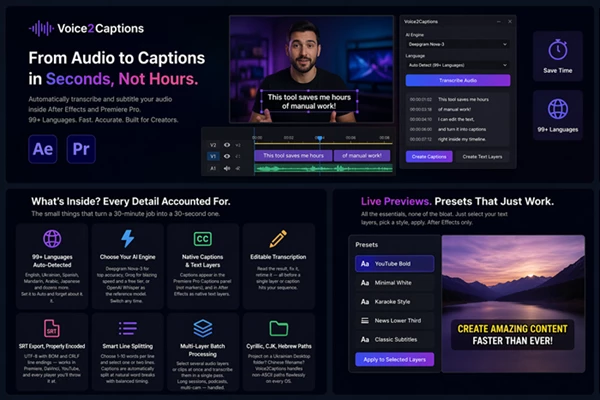
Voice2Captions is an AI-powered extension that automatically converts speech into accurate captions in over 99 languages — all without leaving your editing timeline.
Why is this important?
Adding captions manually is one of the most time-consuming tasks in the editing process. Using this tool, editors can:
- Eliminate hours of manual typing
- Get accurate captions
- Edit the captions before export
Real-world use cases:
- 🎥 YouTubers adding subtitles for global audiences
- 🎙 Podcasters converting audio into readable content
- 🎬 Editors working on multilingual projects
- 📱 Social media creators producing accessible content
These features significantly improve workflow efficiency, reduce human error, and help deliver more professional results faster.
🚀 Meet the Tool: A Smarter Way to Subtitle
Voice2Captions is designed to simplify the entire captioning process—from transcription to final export—inside your favorite editing software.
⚙️ Features
🌍 99+ Languages with Auto Detection
Supports a wide range of global languages and automatically detects them, so you don't have to set anything manually.
🤖 Multiple AI Engines
Choose between:
- Deepgram Nova-3 (best accuracy)
- Groq Whisper Large v3 (fastest speed + free tier)
- OpenAI Whisper-1 (trusted reference model)
Switch anytime based on your needs.
📝 Editable Transcriptions
Edit text, timing, and segments directly inside the panel before creating captions.
🎞 Native Captions & Text Layers
- Premiere Pro: Captions appear in the native captions panel
- After Effects: Generated as text layers ready for animation
📤 Clean SRT Export
Exports properly encoded subtitle files compatible with Premiere, DaVinci Resolve, YouTube, and more.
✂️ Smart Line Splitting
Control:
- Words per line (1–10)
- Single or double line captions
- Automatically balanced for readability.
🎧 Multi-Layer Batch Processing
Transcribe multiple clips or audio layers at once—perfect for long projects, interviews, and podcasts.
🌐 Full Unicode Support
Handles non-English file paths (Cyrillic, Chinese, Hebrew, etc.) without errors.
⚡ Built-in FFmpeg
No setup needed. Everything works out of the box on Windows and macOS.
👁 Live Preview Presets (After Effects)
Apply ready-made text styles instantly to your captions.
🎯 Real Impact in Projects
- A 30-minute subtitling task becomes a 30-second workflow
- Multi-language content becomes effortless
- Editors can focus on storytelling instead of technical work
🧠 Pro Tips for Better Results
- Select the Right AI Engine: Use Deepgram if you are looking for the most accurate captions. Use Groq for the fastest results.
- Always Edit the Transcription: Editing the transcription within the panel ensures that the captions will be perfectly timed.
- Use Shorter Lines: Setting the line length to 4 to 7 words ensures the readability of the captions, especially when sharing on social media.
- Use Batch Processing: Batch processing saves you time when dealing with multiple audio clips.
- Ensure That Your Audio is Clean: Using higher-quality audio leads to more accurate captions.
✨ Final Thoughts
Voice2Captions has made one of the most tedious aspects of video editing into a quick and enjoyable task. This is a tool that you should consider using if you work with video or audio files.
Give it a try and see just how effortless adding captions can be for your projects.

Files Password : gfxplugin.com OR 123456