Downloadable Files
You can download Ring Path Selection for free at the end of this page.
✨A Smarter Way to Select Edge Rings
If you’ve ever had trouble selecting edges along a path in Blender, you know how tedious it can be. But what if there was an easier way to define and expand edge rings in your models? That’s exactly what Ring Path Selection does - greatly simplifying the process. This tool is one that, once used, you’ll likely find yourself missing in your Blender projects.
🔍 What Is Ring Path Selection & Why It Matters
Ring Path Selection is another tool that aims to make it easier for you to select the edge paths on your models. It works similarly to Pick Shortest Path but optimizes the process for those looking to work with edge rings specifically.
💡 Why is this useful?
Imagine you're working on:
- Hard surface models (like sci-fi panels or mechanical parts)
- Clean topology for subdivision modeling
- Loop-based edits for animation-ready meshes
Instead of manually selecting edges one by one—or fixing messy selections—you can:
- Click an edge to define a path
- Automatically generate clean, consistent ring selections
- Expand selections intelligently from existing geometry
This leads to:
- Faster workflow
- Cleaner topology
- More precise edits
And ultimately, better results with less effort.
🧰 Meet the Tool: Ring Path Selection
Developed by Nodes Interactive, this addon is built for Blender 5.1+ and integrates seamlessly into your modeling workflow.
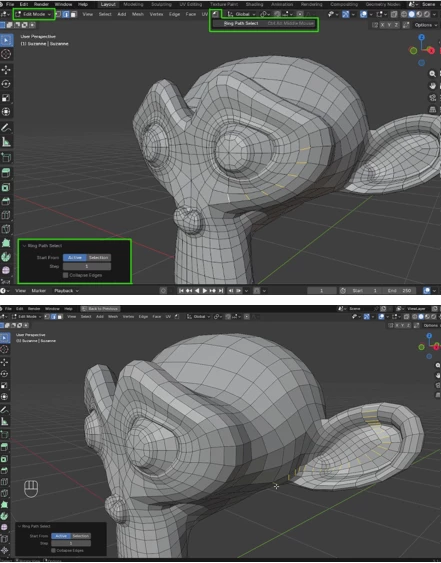
Once installed as an Asset Library, it becomes available in Edit Mode under the tools menu—ready for custom shortcut assignment.
⚙️ Features
Here’s what makes this tool stand out:
🔹 Smart Path Selection
- Works similarly to Blender’s shortest path selection
- Simply click an edge to define the endpoint
- Automatically calculates the best ring path
🔹 Start From Active
- Begin selection from the currently active edge
- Great for controlled, intentional topology edits
🔹 Start From Selection
- Expand an existing selection into a full ring path
- Perfect for refining or extending partial selections
🔹 Interactive Controls Panel
- A small panel appears after use (bottom-left corner)
- Gives you extra control over selection behavior
🎯 Real-World Example
Let’s say you're modeling a car body:
- You need to select a clean edge loop around the wheel arch
- Instead of manually fixing the loop, just click the start and end edges
- The tool instantly creates a smooth, consistent ring path
Or when retopologizing:
- Quickly define edge flow across complex surfaces
- Maintain a clean quad structure without breaking the flow
🚀 Pro Tips for Better Results
Want to get the most out of this tool? Try these:
- Use a shortcut (Ctrl + Alt + Middle Mouse recommended): Speeds up your workflow dramatically.
- Combine with loop cuts and bevels: Use ring paths to define where details should go.
- Start simple, then expand: Use “Start From Selection” to build complexity gradually.
- Keep topology clean: The tool works best when your mesh is well-structured.
- Experiment on different mesh types: It shines in both organic and hard surface modeling.
🎉 Final Thoughts
Ring Path Selection is one of those tools that quietly upgrades your entire modeling workflow. It removes friction from a common task and replaces it with speed, accuracy, and control.
Whether you're a beginner trying to understand edge flow—or a pro looking to optimize your workflow—this addon is absolutely worth trying.
Give it a shot, explore its features, and see how much smoother your Blender experience can become.