Downloadable Files
You can download the Drop and Slide product for free at the end of this page.
🎬 A Smarter Way to Control Your Animations
If you've ever spent time trying to create dropdown menus or expressions in After Effects, you know how frustrating and time-consuming it can be. Drop and Slide will completely change the way that you interact with animation controls.
This tool allows you to quickly and easily control layers, animations, and text within your projects. Just drop and slide to achieve your desired results. This plugin will save you time and effort in your projects.
🧩 What Is Drop and Slide & Why It Matters
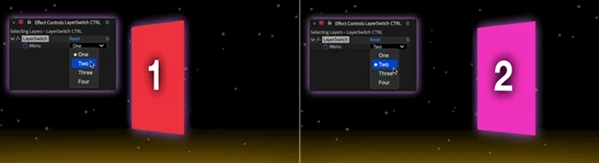
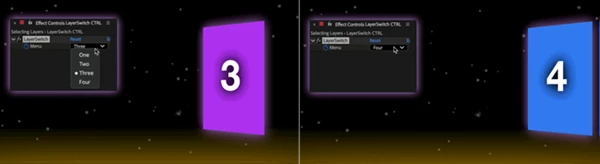
Drop and Slide automatically creates dropdown menus for After Effects to connect to different elements within your composition.
Why is this powerful?
Because it transforms complex animation setups into something visual, editable, and easy to manage.
Real-world examples:
- Switching between multiple scenes or product shots
- Creating dynamic text variations in templates
- Animating frame-by-frame sequences smoothly
These features improve your workflow by:
- Saving time on setup
- Reducing manual errors
- Making projects easier to update and reuse
🚀 Introducing Drop and Slide (Professional Tool)
This Product is designed to simplify advanced animation controls while expanding your creative possibilities. It’s especially useful for:
- Motion designers
- Template creators (MOGRTs)
- Editors working with multiple variations
✨ Features
🔹 Drop Select Layers
- Automatically creates dropdown menus from selected layers
- Controls Opacity, Position, Scale, Rotation (individually or all together)
Advanced options include:
- Dropdown Offset slider
- Selection spread, curve, and bias
- Looping controls
👉 Result: Smooth transitions and dynamic control over multiple layers.
🔹 Drop Select Time Remap
- Create dropdown menus for frame selection
- Use sliders to dynamically navigate frames
- Optional opacity fade between changes
👉 Result: Ideal for frame-based animation and stylized transitions.
🔹 Drop Select Source Text
- Generate text from selected layers or custom lists
- Control displayed text via a dropdown menu
- Animate using offset sliders and looping
- Includes opacity fading and text direction control (AE 2026+)
👉 Result: Flexible and dynamic text systems for templates and animations.
🎯 Pro Tips & Techniques
💡 Animate the Offset Slider
Use the offset slider creatively to:
- Build smooth transitions
- Create carousel-style animations
- Loop through layers or frames seamlessly
💡 Combine Controls
Link layer selection with text selection to:
- Sync visuals with captions
- Design interactive templates
- Build UI-style animations
💡 Keep Animations Natural
- Use the controls to animate in a way that feels natural to your project.
- For example, use fade between elements instead of abrupt changes.
🎉 Final Thoughts
Drop and Slide is a powerful tool that changes the way you create controls for your After Effects projects. This tool removes the complexity that comes with creating dropdown menus and expressions. Whether you are designing templates or complex animations, this tool will help to speed up your process.

Files Password : gfxplugin.com OR 123456