Downloadable Files
You can download Beziyay for free at the bottom of this page.
✨ A Fresh Way to See Your Bezier Curves
If you’ve ever worked with paths in After Effects, you know how tricky Bezier handles can be. They’re powerful—but not always easy to visualize or present. That’s where Beziyay comes in.
It transforms invisible math into beautiful, visual elements—helping you see, style, and present your bezier curves like never before. Whether you’re building motion graphics or showcasing your process, this tool adds clarity and creativity at the same time.
🎯 What Is Beziyay & Why It Matters
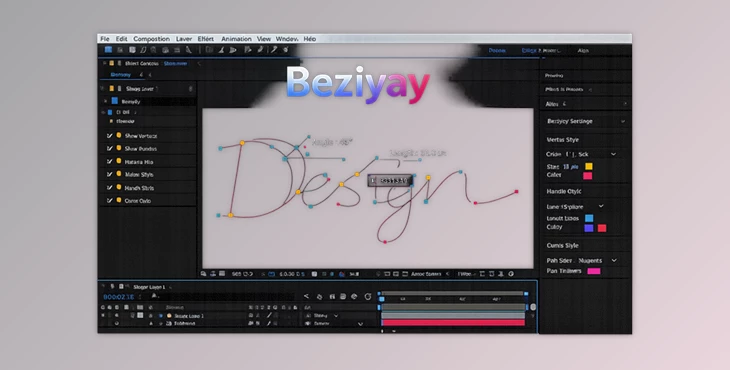
At its core, Beziyay is a tool that generates shape layers to visualize Beziyay handles directly inside After Effects.
Instead of guessing angles or lengths, you can actually see:
- Vertex positions
- Tangent directions
- Handle lengths
💡 Why This Improves Your Work
When you can visualize these elements:
- Your animations become more precise
- Your curves look smoother and more intentional
- Your workflow becomes faster and more controlled
Imagine designing a logo animation or typography motion—now you can clearly show how the curves behave, not just the final result.
This is especially useful for:
- Case studies
- Tutorials
- Motion guidelines
🚀 Meet Beziyay – Your Professional Bezier Companion
Beziyay makes working with Bezier paths easier, faster, and far more visually appealing. It automatically creates customizable shape layers based on your path animations—so you can focus on creativity instead of manual setup.
🔧 Features
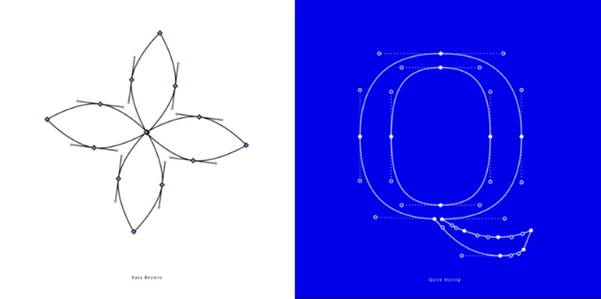
🎯 Easy Beziyay
Animate your paths as usual—Beziyay handles the rest.
It generates fully customizable shape layers that follow your animation, saving you hours of manual work.
🎨 Quick Styling Control
With the Beziyay Controller, you can instantly style:
- Vertices
- Tangents
- Connecting lines
This gives you endless visual flexibility without complicated setups.
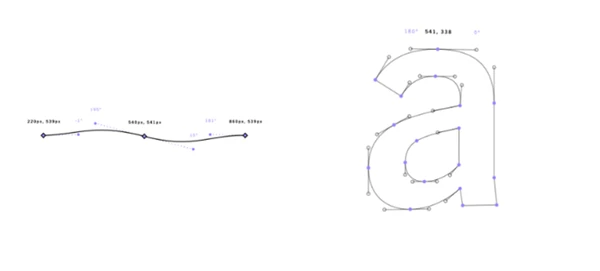
📊 Display Detailed Information
Beziyay can show real-time data for each handle:
- Position
- Angle
- Length
Perfect for technical breakdowns, tutorials, or showcasing precision in your work.
🧱 Fully 3D Ready
All generated shape layers are 3D-compatible.
You can bring cameras into your scene and create dynamic, technical animations with depth and perspective.
🔗 Advanced Parenting & Control
Each vertex and tangent can be parented individually.
This unlocks advanced animation possibilities and gives you more control with minimal effort.
📚 Built for Case Studies & Motion Guidelines
Beziyay is perfect for:
- Typography breakdowns
- Logo animations
- Data visualizations
- Icon design showcases
You can even duplicate the controller layer to maintain consistent styling across multiple assets.
💡 Pro Tips for Better Results
- Keep your designs clean: Use subtle styling for handles to avoid visual clutter.
- Leverage text data wisely: Show only the necessary values (like angle or length) depending on your project.
- Use 3D cameras creatively: Add depth to your presentations for more engaging visuals.
- Duplicate controllers for consistency: This ensures uniform styling across multiple scenes or assets.
- Animate the controller: Small opacity or scale animations can make your breakdowns feel more dynamic and professional.
🧾 Final Thoughts
Beziyay is more than just a tool. It’s a creative enhancer that will help you:
- Work faster
- Design smarter
- Present your designs more clearly.
Beziyay is ideal for motion graphics and creative projects that require beauty and precision in their storytelling elements. If you care about presentation, then Beziyay is definitely worth trying!

Files Password : gfxplugin.com OR 123456