Downloadable Files
You can download the Rocket Rooster product for free at the end of this page.
✨ Make Your Edits Feel Alive
Ever finish editing a video and feel like something’s missing? Not wrong—just… not exciting enough? That’s a common feeling, and usually it comes down to the tools you’re using.
Rocket Rooster was made with this exact problem in mind. It gives your videos that extra layer of style and motion while remaining incredibly easy to use, no matter what type of editing project you are working on.
🎬 What Is Rocket Rooster?
Simply put, Rocket Rooster is a bundle of ready-to-use plugins and visual effects for Final Cut Pro. Instead of spending hours creating effects manually, you can just drag, drop, and tweak.
Why does it make a difference?
Because it saves time and improves quality at the same time.
- You can add clean, modern titles in seconds
- Use transitions that feel smooth and professional
- Apply color looks that instantly change the mood
- Drop in glitch effects when you want something bold and different
🚀 Rocket Rooster Mega Bundle Overview
The Rocket Rooster Mega Bundle brings together a full set of tools that make editing faster, easier, and way more creative.
You don’t need to be an expert to use it—but the results can definitely look like you are.
🔧 Features
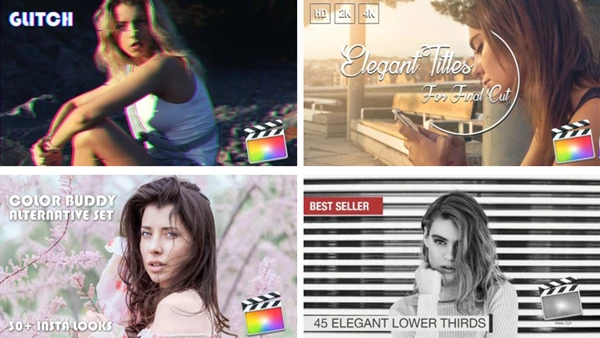
- 45+ Elegant Lower Thirds
Great for names, titles, and clean on-screen info. - 30+ Elegant Titles
Simple, stylish, and perfect for any kind of content. - Glitch & Twitch Effects
Adds energy—especially useful for tech, music, or fast-paced edits. - Avant-Garde Split Screen Transitions
Makes your scenes more dynamic and visually interesting. - 30 Color Buddy Looks
One-click color grading to match different moods and styles. - Transitionizer Plugin
Helps you create smoother transitions without extra effort. - Help Files & Guides
Easy instructions so you don’t get stuck.
🎥 Where it really helps
- Making YouTube videos look more professional
- Speeding up editing for client projects
- Giving your videos a consistent visual style
- Adding creativity without overcomplicating things
🎯 Simple Tips to Get Better Results
You don’t need to use everything at once. In fact, less is usually better.
- Keep it balanced
Too many effects can feel messy—use them where they matter. - Choose the right color look
Let the mood of your video guide your choice. - Use titles with purpose
Clean and minimal usually looks more professional. - Mix effects carefully
A good combo is better than using everything at once. - Always preview your edits
Small tweaks can make a big difference in timing and feel.
💡 Final Thoughts
At the end of the day, Rocket Rooster is all about making your editing process smoother while helping your videos look better.
It’s not about adding random effects—it’s about giving your content a more polished, intentional feel. And the best part? You don’t have to spend hours figuring things out.
If you want your videos to feel more alive and professional without extra hassle, this bundle is definitely worth checking out.

Files Password : gfxplugin.com OR 123456